硬件配置如下:
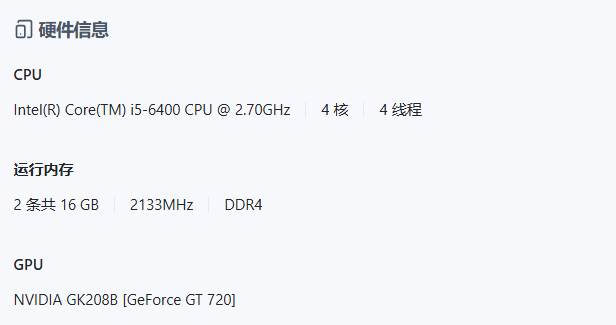
在ssh下用apt search nvidia-driver搜索可用驱动包,输出如下:
root@RoomNAS:~# apt search nvidia-driver
Sorting... Done
Full Text Search... Done
glx-alternative-nvidia/oldstable,oldstable,now 1.2.2 amd64 [installed,automatic]
allows the selection of NVIDIA as GLX provider
libegl-nvidia0/oldstable,oldstable 535.247.01-1~deb12u1 amd64
NVIDIA binary EGL library
libgl1-nvidia-glvnd-glx/oldstable,oldstable 535.247.01-1~deb12u1 amd64
NVIDIA binary OpenGL/GLX library (GLVND variant)
libgles-nvidia1/oldstable,oldstable 535.247.01-1~deb12u1 amd64
NVIDIA binary OpenGL|ES 1.x library
libgles-nvidia2/oldstable,oldstable 535.247.01-1~deb12u1 amd64
NVIDIA binary OpenGL|ES 2.x library
libglx-nvidia0/oldstable,oldstable 535.247.01-1~deb12u1 amd64
NVIDIA binary GLX library
nvidia-alternative/oldstable,oldstable 535.247.01-1~deb12u1 amd64
allows the selection of NVIDIA as GLX provider
nvidia-detect/oldstable,oldstable,now 535.247.01-1~deb12u1 amd64 [installed]
NVIDIA GPU detection utility
nvidia-driver/oldstable,oldstable 535.247.01-1~deb12u1 amd64
NVIDIA metapackage
nvidia-driver-bin/oldstable,oldstable 535.247.01-1~deb12u1 amd64
NVIDIA driver support binaries
nvidia-driver-full/oldstable,oldstable 535.247.01-1~deb12u1 amd64
NVIDIA metapackage (all components)
nvidia-driver-lib-trim/now 560.28.03 all [installed,local]
exiftool
nvidia-driver-libs/oldstable,oldstable 535.247.01-1~deb12u1 amd64
NVIDIA metapackage (OpenGL/GLX/EGL/GLES libraries)
nvidia-kernel-dkms/oldstable,oldstable 535.247.01-1~deb12u1 amd64
NVIDIA binary kernel module DKMS source
nvidia-kernel-source/oldstable,oldstable 535.247.01-1~deb12u1 amd64
NVIDIA binary kernel module source
nvidia-open-kernel-dkms/oldstable,oldstable 535.247.01-1~deb12u1 amd64
NVIDIA open kernel module DKMS source
nvidia-open-kernel-source/oldstable,oldstable 535.247.01-1~deb12u1 amd64
NVIDIA open kernel module source
xserver-xorg-video-nvidia/oldstable,oldstable 535.247.01-1~deb12u1 amd64
NVIDIA binary Xorg driver
#注:参考https://geek-blogs.com/blog/how-to-install-nvidia-drivers-on-linux-debian/
执行sudo apt install -y nvidia-driver输出如下:
root@RoomNAS:# sudo apt install -y nvidia-driver
Reading package lists... Done
Building dependency tree... Done
Reading state information... Done
You might want to run 'apt --fix-broken install' to correct these.
The following packages have unmet dependencies:
libegl-nvidia-tesla-470-0 : Depends: libnvidia-egl-wayland1 (>= 1:1.1.7) but it is not going to be installed
nvidia-driver : PreDepends: nvidia-legacy-check (>= 495) but it is not going to be installed
Depends: nvidia-driver-libs (= 535.247.01-1deb12u1) but it is not going to be installed
Depends: nvidia-driver-bin (= 535.247.01-1deb12u1) but it is not going to be installed
Depends: xserver-xorg-video-nvidia (= 535.247.01-1deb12u1) but it is not going to be installed
Depends: nvidia-vdpau-driver (= 535.247.01-1deb12u1) but it is not going to be installed
Depends: nvidia-alternative (= 535.247.01-1deb12u1) but it is not going to be installed
Depends: nvidia-kernel-dkms (= 535.247.01-1deb12u1) but it is not going to be installed or
nvidia-kernel-535.247.01 or
nvidia-open-kernel-535.247.01
Recommends: nvidia-settings (>= 535) but it is not going to be installed
Recommends: libnvidia-cfg1 (= 535.247.01-1deb12u1) but it is not going to be installed
Recommends: nvidia-persistenced (>= 535) but it is not going to be installed
nvidia-tesla-470-egl-icd : Depends: nvidia-egl-common but it is not going to be installed
nvidia-tesla-470-kernel-support : Depends: nvidia-modprobe (>= 470) but it is not going to be installed
E: Unmet dependencies. Try 'apt --fix-broken install' with no packages (or specify a solution).
执行:apt --fix-broken install输出如下
root@RoomNAS:# apt --fix-broken install
Reading package lists... Done
Building dependency tree... Done
Reading state information... Done
Correcting dependencies... Done
The following additional packages will be installed:
libnvidia-egl-wayland1 nvidia-egl-common nvidia-modprobe
The following NEW packages will be installed:
libnvidia-egl-wayland1 nvidia-egl-common nvidia-modprobe
0 upgraded, 3 newly installed, 0 to remove and 37 not upgraded.
80 not fully installed or removed.
Need to get 0 B/200 kB of archives.
After this operation, 342 kB of additional disk space will be used.
Do you want to continue? [Y/n] y
dpkg: warning: files list file for package 'nvidia-detect' missing; assuming package has no files currently installed
dpkg: warning: files list file for package 'nvidia-installer-cleanup' missing; assuming package has no files currently installed
(Reading database ... 92447 files and directories currently installed.)
Preparing to unpack .../nvidia-egl-common_535.247.01-1deb12u1_amd64.deb ...
Unpacking nvidia-egl-common (535.247.01-1deb12u1) ...
dpkg: error processing archive /var/cache/apt/archives/nvidia-egl-common_535.247.01-1deb12u1_amd64.deb (--unpack):
trying to overwrite '/usr/share/glvnd/egl_vendor.d/10_nvidia.json', which is also in package nvidia-driver-lib-trim 560.28.03
Preparing to unpack .../libnvidia-egl-wayland1_1%3a1.1.10-1_amd64.deb ...
Unpacking libnvidia-egl-wayland1:amd64 (1:1.1.10-1) ...
dpkg: error processing archive /var/cache/apt/archives/libnvidia-egl-wayland1_1%3a1.1.10-1_amd64.deb (--unpack):
trying to overwrite '/usr/share/egl/egl_external_platform.d/10_nvidia_wayland.json', which is also in package nvidia-driver-lib-trim 560.28.03
Preparing to unpack .../nvidia-modprobe_535.161.07-1deb12u1_amd64.deb ...
Unpacking nvidia-modprobe (535.161.07-1deb12u1) ...
dpkg: error processing archive /var/cache/apt/archives/nvidia-modprobe_535.161.07-1deb12u1_amd64.deb (--unpack):
trying to overwrite '/usr/bin/nvidia-modprobe', which is also in package nvidia-driver-lib-trim 560.28.03
Errors were encountered while processing:
/var/cache/apt/archives/nvidia-egl-common_535.247.01-1deb12u1_amd64.deb
/var/cache/apt/archives/libnvidia-egl-wayland1_1%3a1.1.10-1_amd64.deb
/var/cache/apt/archives/nvidia-modprobe_535.161.07-1~deb12u1_amd64.deb
E: Sub-process /usr/bin/dpkg returned an error code (1)
请教一下,这个问题出在哪了?




 2025-11-27 20:36:13


