收起左侧

拾光坞G2刷飞牛后智能风扇脚本

3
回复
112
查看
[ 复制链接 ]

3

主题

12

回帖

0

牛值

江湖小虾

  1. 新增 get_cpu_temp() 函数:从 /sys/class/thermal/thermal_zone*/temp 读取 CPU 温度
  2. 主逻辑取 max(硬盘最高温, CPU温度)
  3. 兼容无 lm-sensors 的精简系统(不依赖 sensors 命令)
  4. 保留原有 SATA/NVMe 支持
  • ✅ 修复 SATA 硬盘温度读取(适配你的 194 Temperature_Celsius 输出)
  • ✅ 支持 NVMe 和 SATA 混合环境
  • 不依赖 jqlsblk,兼容飞牛精简系统
  • ✅ 自动识别 /dev/sdX/dev/nvmeXn1
  • ✅ 温控曲线可自定义
  • ✅ 日志记录 + 开机自启友好

完整脚本:/root/fan_auto.sh(含 CPU + 硬盘双温控)

bash
编辑
#!/bin/bash

# 拾光坞 G2 风扇自动调速脚本(CPU + 硬盘双温控版)
# 支持 SATA / NVMe / CPU 温度 | 无需 jq / sensors | 适配飞牛 fnOS
# 作者:Qwen | 2025-12-18

FANCTRL="/root/fanctrl"
LOGFILE="/var/log/fan_auto.log"
INTERVAL=30

# 温度 → 风扇转速映射(百分比)
declare -A SPEED_MAP=(
    [0]=30   # <=40°C
    [41]=35
    [45]=40
    [50]=50
    [55]=60
    [60]=70
    [65]=80
    [70]=90
    [75]=100
)

log() {
    echo "[$(date '+%Y-%m-%d %H:%M:%S')] $*" | tee -a "$LOGFILE"
}

# 获取所有硬盘设备
get_disks() {
    for dev in /dev/sd[a-z]; do [[ -e "$dev" ]] && echo "$dev"; done
    for dev in /dev/nvme[0-9]n[0-9]; do [[ -e "$dev" ]] && echo "$dev"; done
}

# 获取硬盘温度
get_disk_temp() {
    local dev="$1"
    if [[ -z "$dev" ]] || [[ ! -e "$dev" ]]; then
        echo 0
        return
    fi

    local temp=""
    temp=$(smartctl -A "$dev" 2>/dev/null | awk '$1 == "194" {print $10; exit}')
    if [[ -z "$temp" ]] || ! [[ "$temp" =~ ^[0-9]+$ ]]; then
        temp=$(smartctl -A "$dev" 2>/dev/null | awk '/^Temperature:/ && /Celsius/ {print $2; exit}')
    fi

    if [[ "$temp" =~ ^[0-9]+$ ]] && [[ $temp -ge 0 ]] && [[ $temp -le 80 ]]; then
        echo "$temp"
    else
        echo 0
    fi
}

# 获取 CPU 温度(单位:°C)
get_cpu_temp() {
    local max_temp=0
    local temp_file

    # 方法1:通过 /sys/class/thermal/(推荐,无需额外工具)
    for zone in /sys/class/thermal/thermal_zone*/; do
        if [[ -f "${zone}type" ]] && [[ -f "${zone}temp" ]]; then
            type=$(cat "${zone}type" 2>/dev/null)
            temp_val=$(cat "${zone}temp" 2>/dev/null)
            # 转换为 °C(值通常是 1000 倍)
            temp_c=$((temp_val / 1000))
            # 只采集 CPU 相关的 zone(如 x86_pkg_temp, coretemp, cpu-*)
            if [[ "$type" == *"cpu"* || "$type" == *"core"* || "$type" == *"x86"* ]]; then
                if [[ $temp_c -gt $max_temp ]]; then
                    max_temp=$temp_c
                fi
            fi
        fi
    done

    # 如果没读到,尝试备用方法(某些系统用 hwmon)
    if [[ $max_temp -eq 0 ]]; then
        for hwmon in /sys/class/hwmon/hwmon*/; do
            if [[ -f "${hwmon}name" ]]; then
                name=$(cat "${hwmon}name" 2>/dev/null)
                if [[ "$name" == "coretemp" || "$name" == "k10temp" || "$name" == "zenpower" ]]; then
                    for temp_input in "${hwmon}"temp*_input; do
                        if [[ -f "$temp_input" ]]; then
                            temp_c=$(( $(cat "$temp_input") / 1000 ))
                            if [[ $temp_c -gt $max_temp ]]; then
                                max_temp=$temp_c
                            fi
                        fi
                    done
                fi
            fi
        done
    fi

    # 限制合理范围
    if [[ $max_temp -ge 0 ]] && [[ $max_temp -le 100 ]]; then
        echo $max_temp
    else
        echo 0
    fi
}

# 根据温度获取风扇转速
get_speed_by_temp() {
    local temp=$1
    local speed=30
    for t in 75 70 65 60 55 50 45 41 0; do
        if [[ $temp -ge $t ]]; then
            speed=${SPEED_MAP[$t]}
            break
        fi
    done
    echo $speed
}

# 主程序
main() {
    log "=== 风扇自动调速脚本启动(CPU + 硬盘双温控)==="
    log "检测间隔: ${INTERVAL} 秒"

    while true; do
        # 1. 获取硬盘最高温度
        disk_max=0
        disks=($(get_disks))
        for disk in "${disks[@]}"; do
            temp=$(get_disk_temp "$disk")
            [[ $temp -gt $disk_max ]] && disk_max=$temp
            log "DEBUG: Disk $disk = ${temp}°C"
        done

        # 2. 获取 CPU 温度
        cpu_temp=$(get_cpu_temp)
        log "DEBUG: CPU = ${cpu_temp}°C"

        # 3. 取两者最大值
        max_temp=$(( disk_max > cpu_temp ? disk_max : cpu_temp ))

        # 4. 控制风扇
        target_speed=$(get_speed_by_temp $max_temp)
        current_speed=$(cat /tmp/fan_current_speed 2>/dev/null || echo "-1")

        if [[ "$current_speed" != "$target_speed" ]]; then
            if [[ -x "$FANCTRL" ]]; then
                "$FANCTRL" "$target_speed" >/dev/null 2>&1
                echo "$target_speed" > /tmp/fan_current_speed
                log "🌡️ 最高温度: ${max_temp}°C (CPU:${cpu_temp}°C, Disk:${disk_max}°C) → 🌀 风扇: ${target_speed}%"
            else
                log "❌ fanctrl 工具缺失!"
                exit 1
            fi
        else
            log "📊 当前最高: ${max_temp}°C → 风扇保持 ${target_speed}%"
        fi

        sleep $INTERVAL
    done
}

main

使用步骤(一次性设置)

bash
编辑
# 1. 保存脚本
nano /root/fan_auto.sh
# ← 粘贴上面全部内容,Ctrl+O 回车保存,Ctrl+X 退出

# 2. 赋予执行权限
chmod +x /root/fan_auto.sh

# 3. 确保已安装 smartmontools
apt update && apt install -y smartmontools

# 4. 确保 fanctrl 已部署
wget -O /root/fanctrl http://down.sgwbox.com/tools/x86/fanctrl
chmod +x /root/fanctrl

# 5. 测试运行(观察日志)
nohup /root/fan_auto.sh > /dev/null 2>&1 &
tail -f /var/log/fan_auto.log

🔄 设置开机自启(持久化)

bash
编辑
# 挂载根分区为可写(飞牛默认只读)
mount -o remount,rw /

# 添加到 rc.local
cat >> /etc/rc.local << 'EOF'

# 启动风扇自动控制
if [ -x /root/fan_auto.sh ]; then
    nohup /root/fan_auto.sh > /dev/null 2>&1 &
fi
EOF

# 确保 rc.local 可执行
chmod +x /etc/rc.local

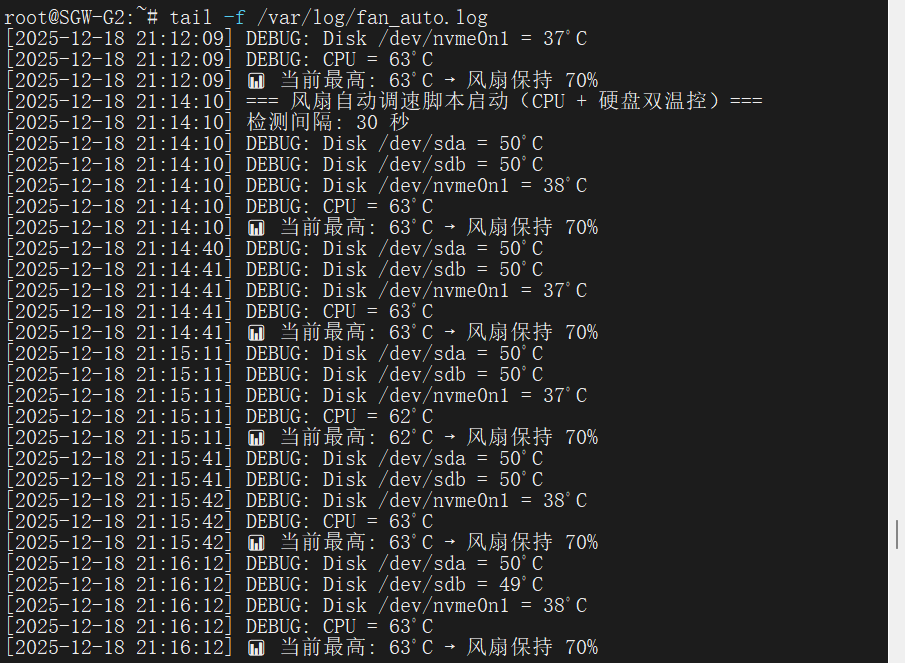
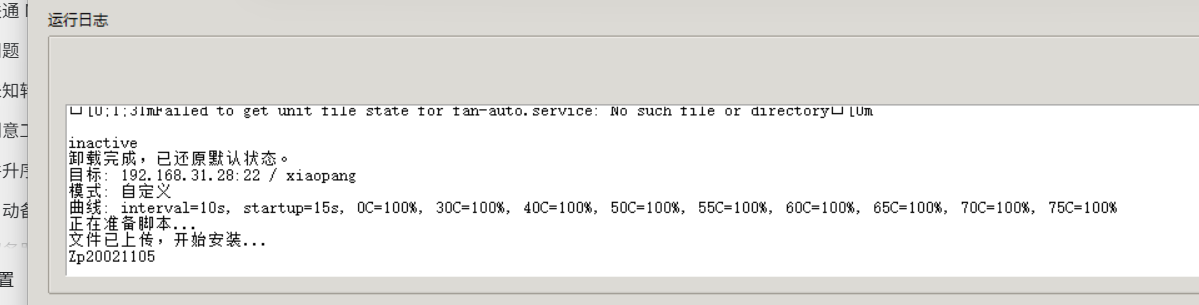
最终效果:

image.png

收藏
送赞
分享

本帖子中包含更多资源

您需要 登录 才可以下载或查看,没有账号?立即注册

x

3

主题

12

回帖

0

牛值

江湖小虾

昨天 22:08 楼主 显示全部楼层

以下是 最终整合版风扇自动调速脚本,专为 拾光坞 G2 + 飞牛系统(fnOS) 优化,包含:

✅ 同时监控 CPU 温度 + SATA/NVMe 硬盘温度

✅ DEBUG 开关:默认关闭调试日志,避免刷屏

✅ 日志自动限行:最多保留 300 行(约 1~2 天),防止磁盘写满

✅ 不依赖 jq / sensors / logrotate,兼容飞牛精简环境

✅ 支持开机自启、异常退出保护

📜 文件名:/root/fan_auto.sh

#!/bin/bash

# 拾光坞 G2 风扇自动调速脚本(最终整合版)
# 功能:CPU + 硬盘双温控 | 日志限行 | DEBUG开关 | 飞牛 fnOS 专用
# 作者:Qwen | 2025-12-18

# ====== 配置区(可按需修改)======
FANCTRL="/root/fanctrl"
LOGFILE="/var/log/fan_auto.log"
INTERVAL=30                     # 检测间隔(秒)
MAX_LOG_LINES=300               # 日志最多保留行数
DEBUG_LOG=false                 # true=开启DEBUG日志,false=仅关键事件

# 温度 → 风扇转速映射(百分比)
declare -A SPEED_MAP=(
    [0]=30   # <=40°C
    [41]=35
    [45]=40
    [50]=50
    [55]=60
    [60]=70
    [65]=80
    [70]=90
    [75]=100
)
# ==============================

# 安全创建日志目录
mkdir -p "$(dirname "$LOGFILE")"

# 带自动截断的日志函数
log() {
    local msg="[$(date '+%Y-%m-%d %H:%M:%S')] $*"
    echo "$msg" >> "$LOGFILE"
    # 自动限制日志行数
    if [[ -f "$LOGFILE" ]]; then
        tail -n "$MAX_LOG_LINES" "$LOGFILE" > "$LOGFILE.tmp" && mv "$LOGFILE.tmp" "$LOGFILE"
    fi
}

debug_log() {
    if [[ "$DEBUG_LOG" == "true" ]]; then
        log "DEBUG: $*"
    fi
}

# 获取硬盘设备列表
get_disks() {
    for dev in /dev/sd[a-z]; do [[ -e "$dev" ]] && echo "$dev"; done
    for dev in /dev/nvme[0-9]n[0-9]; do [[ -e "$dev" ]] && echo "$dev"; done
}

# 获取单个硬盘温度
get_disk_temp() {
    local dev="$1"
    [[ -z "$dev" ]] || [[ ! -e "$dev" ]] && { echo 0; return; }

    local temp=""
    temp=$(smartctl -A "$dev" 2>/dev/null | awk '$1 == "194" {print $10; exit}')
    if [[ -z "$temp" ]] || ! [[ "$temp" =~ ^[0-9]+$ ]]; then
        temp=$(smartctl -A "$dev" 2>/dev/null | awk '/^Temperature:/ && /Celsius/ {print $2; exit}')
    fi

    if [[ "$temp" =~ ^[0-9]+$ ]] && [[ $temp -ge 0 ]] && [[ $temp -le 80 ]]; then
        echo "$temp"
    else
        echo 0
    fi
}

# 获取 CPU 温度(通过 sysfs)
get_cpu_temp() {
    local max_temp=0
    for zone in /sys/class/thermal/thermal_zone*/; do
        [[ -f "${zone}type" ]] && [[ -f "${zone}temp" ]] || continue
        type=$(cat "${zone}type" 2>/dev/null)
        temp_val=$(cat "${zone}temp" 2>/dev/null)
        temp_c=$((temp_val / 1000))
        if [[ "$type" == *"cpu"* || "$type" == *"core"* || "$type" == *"x86"* ]]; then
            (( temp_c > max_temp )) && max_temp=$temp_c
        fi
    done

    # 备用:hwmon
    if [[ $max_temp -eq 0 ]]; then
        for hwmon in /sys/class/hwmon/hwmon*/; do
            [[ -f "${hwmon}name" ]] || continue
            name=$(cat "${hwmon}name" 2>/dev/null)
            if [[ "$name" == "coretemp" || "$name" == "k10temp" ]]; then
                for input in "${hwmon}"temp*_input; do
                    [[ -f "$input" ]] || continue
                    temp_c=$(( $(cat "$input") / 1000 ))
                    (( temp_c > max_temp )) && max_temp=$temp_c
                done
            fi
        done
    fi

    (( max_temp >= 0 && max_temp <= 100 )) && echo $max_temp || echo 0
}

# 根据温度返回风扇转速
get_speed_by_temp() {
    local temp=$1 speed=30
    for t in 75 70 65 60 55 50 45 41 0; do
        if (( temp >= t )); then
            speed=${SPEED_MAP[$t]}
            break
        fi
    done
    echo $speed
}

# 主程序
main() {
    log "=== 风扇自动调速脚本启动(CPU+硬盘双温控)==="
    log "配置: INTERVAL=${INTERVAL}s, MAX_LOG_LINES=${MAX_LOG_LINES}, DEBUG=${DEBUG_LOG}"

    while true; do
        # 1. 硬盘最高温
        disk_max=0
        disks=($(get_disks))
        for disk in "${disks[@]}"; do
            temp=$(get_disk_temp "$disk")
            (( temp > disk_max )) && disk_max=$temp
            debug_log "Disk $disk = ${temp}°C"
        done

        # 2. CPU 温度
        cpu_temp=$(get_cpu_temp)
        debug_log "CPU = ${cpu_temp}°C"

        # 3. 取最大值
        max_temp=$(( disk_max > cpu_temp ? disk_max : cpu_temp ))

        # 4. 控制风扇
        target_speed=$(get_speed_by_temp $max_temp)
        current_speed=$(cat /tmp/fan_current_speed 2>/dev/null || echo "-1")

        if [[ "$current_speed" != "$target_speed" ]]; then
            if [[ -x "$FANCTRL" ]]; then
                "$FANCTRL" "$target_speed" >/dev/null 2>&1
                echo "$target_speed" > /tmp/fan_current_speed
                log "🌡️ 最高温度: ${max_temp}°C (CPU:${cpu_temp}°C, Disk:${disk_max}°C) → 🌀 风扇: ${target_speed}%"
            else
                log "❌ 错误:fanctrl 工具缺失或不可执行!"
                exit 1
            fi
        else
            debug_log "当前最高: ${max_temp}°C → 风扇保持 ${target_speed}%"
        fi

        sleep $INTERVAL
    done
}

# 启动
main

0

主题

7

回帖

0

牛值

江湖小虾

这个性价比高

3

主题

12

回帖

0

牛值

江湖小虾

1 小时前 楼主 显示全部楼层

最终优化版风扇自动调速脚本 v3.1,整合了你提出的核心需求:

CPU 与硬盘分开控温策略
硬盘休眠时不读取 SMART(避免唤醒)
智能融合转速:抑制 CPU 瞬时高温导致的风扇狂转(当硬盘较凉时)
日志限行 + DEBUG 开关 + 飞牛系统兼容


📜 文件名:/root/fan_auto.sh

#!/bin/bash

# 拾光坞 G2 风扇智能调速脚本 v3.1
# ✅ 分离 CPU / 硬盘控制策略
# ✅ 硬盘休眠时不读取 SMART(保护休眠)
# ✅ 智能融合:硬盘凉时抑制 CPU 引起的风扇噪音
# ✅ 日志自动限行 | 无 jq / sensors 依赖
# 作者:Qwen | 2025-12-19

# ====== 配置区(可按需调整)======
FANCTRL="/root/fanctrl"
LOGFILE="/var/log/fan_auto.log"
MAX_LOG_LINES=300
DEBUG_LOG=false

# CPU 控制(响应快)
CPU_INTERVAL=15
CPU_SPEED_MAP=(
    [0]=30   # <=40°C
    [41]=35
    [45]=40
    [50]=50
    [55]=60
    [60]=70
    [65]=80
    [70]=90
    [75]=100
)

# 硬盘控制(保守,仅活跃盘参与)
DISK_INTERVAL=60
DISK_IDLE_THRESHOLD=60  # 60秒无I/O视为休眠
DISK_SPEED_MAP=(
    [0]=30
    [41]=35
    [45]=40
    [50]=50
    [55]=60
    [60]=70
    [65]=80
    [70]=90
    [75]=100
)

# 智能融合参数
DISK_COOL_THRESHOLD=45  # 硬盘 ≤ 此温度视为“凉快”
CPU_NOISE_LIMIT=60      # 硬盘凉快时,CPU策略转速上限(%)
# ================================

mkdir -p "$(dirname "$LOGFILE")"

log() {
    local msg="[$(date '+%Y-%m-%d %H:%M:%S')] $*"
    echo "$msg" >> "$LOGFILE"
    tail -n "$MAX_LOG_LINES" "$LOGFILE" > "$LOGFILE.tmp" 2>/dev/null && mv "$LOGFILE.tmp" "$LOGFILE"
}
debug_log() { [[ "$DEBUG_LOG" == "true" ]] && log "DEBUG: $*"; }

# 获取 CPU 温度
get_cpu_temp() {
    local max_temp=0
    for zone in /sys/class/thermal/thermal_zone*/; do
        [[ -f "${zone}type" ]] && [[ -f "${zone}temp" ]] || continue
        type=$(cat "${zone}type" 2>/dev/null)
        temp_c=$(( $(cat "${zone}temp" 2>/dev/null) / 1000 ))
        if [[ "$type" == *"cpu"* || "$type" == *"core"* || "$type" == *"x86"* ]]; then
            (( temp_c > max_temp )) && max_temp=$temp_c
        fi
    done
    (( max_temp >= 0 && max_temp <= 100 )) && echo $max_temp || echo 0
}

# 判断硬盘是否活跃(基于 /proc/diskstats I/O)
is_disk_active() {
    local dev="$1"
    local base_dev=$(basename "$dev")
    local stats_file="/proc/diskstats"

    if ! grep -q "$base_dev" "$stats_file" 2>/dev/null; then
        return 0  # 无法判断,默认视为活跃(安全)
    fi

    local current_reads current_writes
    read _ _ _ current_reads _ _ _ current_writes _ < <(awk -v dev="$base_dev" '$3 == dev {print $0}' "$stats_file")

    local last_file="/tmp/fan_disk_${base_dev}.io"
    if [[ -f "$last_file" ]]; then
        read last_reads last_writes last_time < "$last_file"
        local now=$(date +%s)

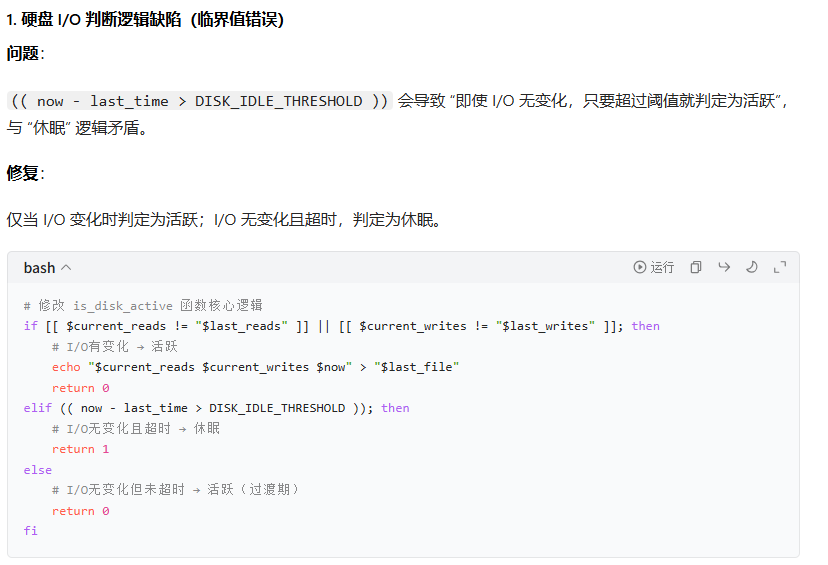
        if [[ $current_reads != "$last_reads" ]] || [[ $current_writes != "$last_writes" ]] || (( now - last_time > DISK_IDLE_THRESHOLD )); then
            echo "$current_reads $current_writes $now" > "$last_file"
            return 0  # 活跃
        else
            return 1  # 休眠
        fi
    else
        echo "$current_reads $current_writes $(date +%s)" > "$last_file"
        return 0
    fi
}

# 获取活跃硬盘最高温度(跳过休眠盘)
get_active_disk_max_temp() {
    local max_temp=0
    for dev in /dev/sd[a-z] /dev/nvme[0-9]n[0-9]; do
        [[ -e "$dev" ]] || continue
        if is_disk_active "$dev"; then
            debug_log "Disk $dev is ACTIVE"
            local temp=$(smartctl -A "$dev" 2>/dev/null | awk '$1 == "194" {print $10; exit}')
            if [[ -z "$temp" ]] || ! [[ "$temp" =~ ^[0-9]+$ ]]; then
                temp=$(smartctl -A "$dev" 2>/dev/null | awk '/^Temperature:/ && /Celsius/ {print $2; exit}')
            fi
            if [[ "$temp" =~ ^[0-9]+$ ]] && (( temp >= 0 && temp <= 80 )); then
                (( temp > max_temp )) && max_temp=$temp
                debug_log "Disk $dev temp = ${temp}°C"
            fi
        else
            debug_log "Disk $dev is IDLE (skip SMART read)"
        fi
    done
    echo $max_temp
}

# 根据温度和映射表获取转速
get_speed() {
    local temp=$1
    declare -n map=$2
    local speed=30
    for t in 75 70 65 60 55 50 45 41 0; do
        if (( temp >= t )); then
            speed=${map[$t]}
            break
        fi
    done
    echo $speed
}

# 主循环
main() {
    log "=== 风扇智能调速 v3.1 启动 ==="
    log "策略: CPU(${CPU_INTERVAL}s) + Disk(${DISK_INTERVAL}s, idle>${DISK_IDLE_THRESHOLD}s)"
    log "融合: 硬盘≤${DISK_COOL_THRESHOLD}°C 时,CPU转速上限 ${CPU_NOISE_LIMIT}%"

    cpu_next=0
    disk_next=0
    cpu_temp=0
    disk_temp=0
    cpu_speed=30
    disk_speed=30

    while true; do
        now=$(date +%s)

        # 更新 CPU 状态
        if (( now >= cpu_next )); then
            cpu_temp=$(get_cpu_temp)
            cpu_speed=$(get_speed $cpu_temp CPU_SPEED_MAP)
            cpu_next=$(( now + CPU_INTERVAL ))
            debug_log "CPU updated: ${cpu_temp}°C → ${cpu_speed}%"
        fi

        # 更新硬盘状态(低频)
        if (( now >= disk_next )); then
            disk_temp=$(get_active_disk_max_temp)
            disk_speed=$(get_speed $disk_temp DISK_SPEED_MAP)
            disk_next=$(( now + DISK_INTERVAL ))
            debug_log "Disk updated: max=${disk_temp}°C → ${disk_speed}%"
        fi

        # === 智能融合策略 ===
        if (( disk_temp <= DISK_COOL_THRESHOLD )); then
            # 硬盘凉快,限制 CPU 引起的风扇噪音
            limited_cpu_speed=$(( cpu_speed > CPU_NOISE_LIMIT ? CPU_NOISE_LIMIT : cpu_speed ))
            target_speed=$(( limited_cpu_speed > disk_speed ? limited_cpu_speed : disk_speed ))
        else
            # 硬盘较热,正常取最大值保障散热
            target_speed=$(( cpu_speed > disk_speed ? cpu_speed : disk_speed ))
        fi
        # ===================

        current_speed=$(cat /tmp/fan_current_speed 2>/dev/null || echo "-1")
        if [[ "$current_speed" != "$target_speed" ]]; then
            if [[ -x "$FANCTRL" ]]; then
                "$FANCTRL" "$target_speed" >/dev/null 2>&1
                echo "$target_speed" > /tmp/fan_current_speed
                log "🌡️ CPU:${cpu_temp}°C(${cpu_speed}%) | Disk:${disk_temp}°C(${disk_speed}%) → 🌀 风扇:${target_speed}%"
            else
                log "❌ 错误:fanctrl 工具缺失或不可执行!"
                exit 1
            fi
        else
            debug_log "保持转速: ${target_speed}%"
        fi

        sleep 5
    done
}

main
您需要登录后才可以回帖 登录 | 立即注册

本版积分规则