fnOS App Center “打开”按钮无响应 — 问题分析与修复报告
适用场景:fnOS 系统升级后,App Center / 桌面主页中点击已安装应用的”打开”按钮,完全无反应(不弹窗、不跳转、不报错)。
一、问题现象
- 在 App Center(应用中心)或桌面主页点击任意已安装应用的”打开”按钮,无任何响应
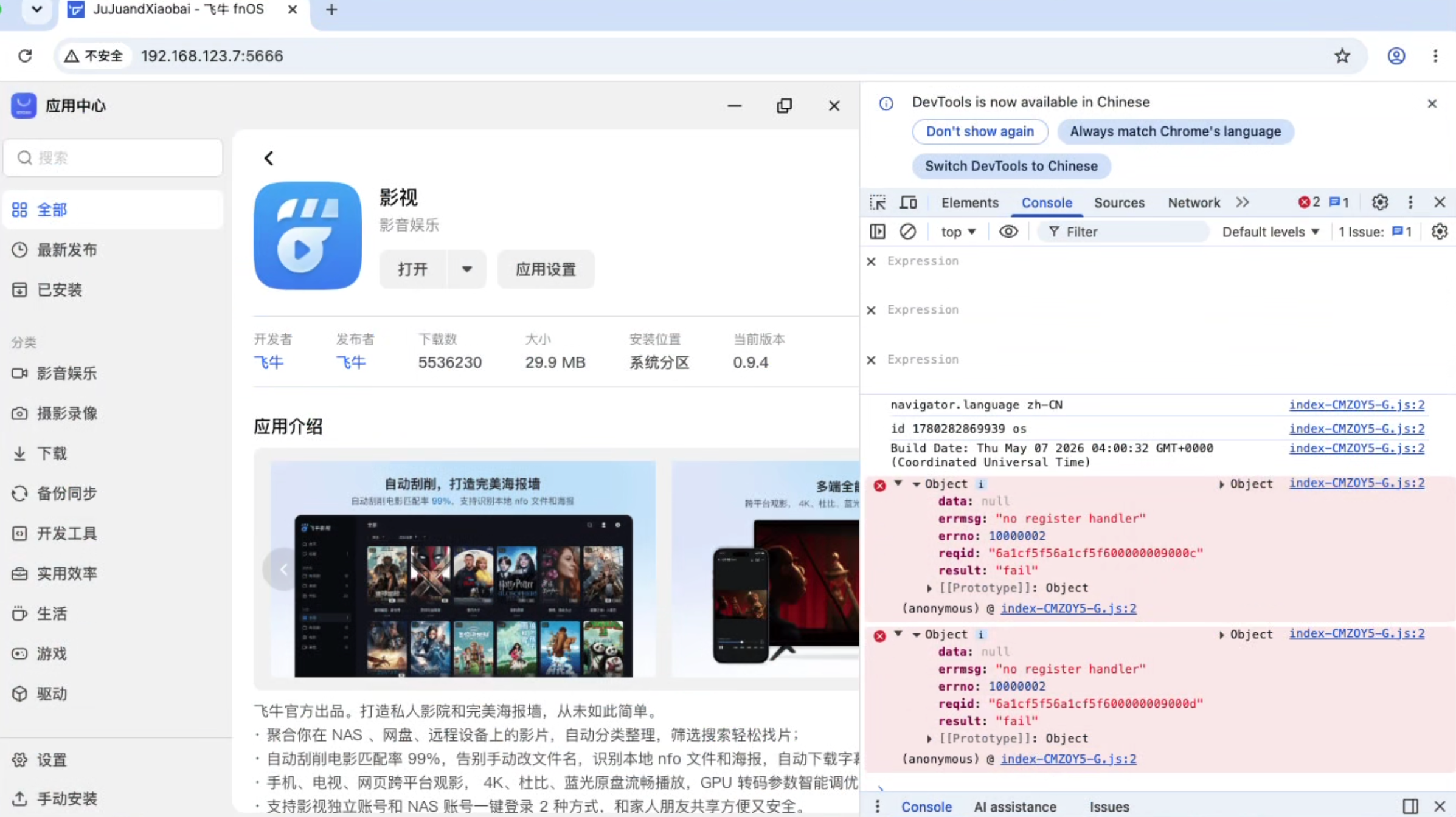
- F12 开发者工具 Console 面板显示:
{
"data":** null,**
"errmsg":** "no register handler",**
"errno":** 10000002,**
"result":** **"fail"
}
- 直接通过地址栏访问应用(如 http://NAS_IP:5666/p)可以正常打开
- App Center 后端 HTTP API 全部正常返回 200
- 仅有部分用户受影响,同一 NAS 上其他账户可能正常
二、根因分析
直接原因
SAC(trim_sac)进程的多个核心模块(entry、i18n、externalnotify、common 等)在启动时 GORM AutoMigrate 触发** panic**,被 goroutine pool 吞掉,导致 handler 未注册。
深层原因
GORM AutoMigrate 内部查询 information_schema.columns 时,会执行类似:
SELECT ... FROM pg_attribute WHERE attrelid = ... AND attnum > 0
PostgreSQL 系统表 pg_attribute.attnum 的类型是 smallint(int2),而 GORM 代码中的字面量 0 被识别为 integer(int4)。
正常情况下 PostgreSQL 有隐式类型转换,smallint > integer 能正常执行。但 fnOS 系统升级后,PostgreSQL 的 search_path 或类型转换规则发生变化,导致运算符解析失败:
ERROR: operator is not unique: integer * smallint (SQLSTATE 42725)
ERROR: operator is not unique: smallint > integer (SQLSTATE 42725)
影响链路
fnOS 升级
→ PG 系统表类型规则变化
→ GORM AutoMigrate panic(被 ants worker pool 捕获)
→ SAC handler 注册被跳过
→ 前端 WebSocket/tRPC 请求找不到 handler
→ "no register handler" (errno: 10000002)
→ "打开"按钮静默失败
关键日志特征
journalctl -u trim_sac | grep -E "panic|ERROR"
如果看到以下日志即为该问题:
ERROR: operator is not unique: smallint > integer (SQLSTATE 42725)
worker exits from panic: ERROR: ...
/app/core/modules/entry/upgrade/init.go
/app/core/modules/i18n/storage/init.go
/app/core/modules/externalnotify/storage/init.go
三、修复方案
原理
重建trim_sac数据库,让 SAC 在新 PG 环境下重新执行 AutoMigrate 创建兼容的表结构,然后恢复备份数据。
手动修复步骤
如果脚本不可用,按以下步骤手动修复:
1. SSH 登录* NAS*
ssh your_user@NAS_IP
2. 停止 SAC 服务
sudo systemctl stop trim_sac.service
3. 导出关键数据
sudo -u postgres psql -d trim_sac -c "COPY entry TO '/tmp/trim_backup_entry.csv' CSV HEADER;"
sudo** -u postgres psql -d trim_sac -c "COPY user_desktop_entry TO '/tmp/trim_backup_entry_desktop.csv' CSV HEADER;"
sudo -u postgres psql -d trim_sac -c "COPY user_preference TO '/tmp/trim_backup_preference.csv' CSV HEADER;"
sudo -u postgres psql -d trim_sac -c "COPY wallpaper TO '/tmp/trim_backup_wallpaper.csv' CSV HEADER;"
sudo -u postgres psql -d trim_sac -c **"COPY sac_config TO '/tmp/trim_backup_sac_config.csv' CSV HEADER;"
4. 重建数据库
sudo -u postgres psql -c "DROP DATABASE IF EXISTS trim_sac;"
sudo** -u postgres psql -c "CREATE DATABASE trim_sac OWNER postgres;"
sudo -u postgres psql -d trim_sac -c "GRANT ALL ON SCHEMA public TO public;"
sudo -u postgres psql -d trim_sac -c "ALTER DEFAULT PRIVILEGES IN SCHEMA public GRANT ALL ON TABLES TO public;"
sudo -u postgres psql -d trim_sac -c **"ALTER DEFAULT PRIVILEGES IN SCHEMA public GRANT ALL ON SEQUENCES TO public;"
5.启动SAC(让它创建表结构)
sudo systemctl start trim_sac.service
sleep** 5**
sudo** systemctl stop trim_sac.service**
6. 恢复数据
for t in entry user_desktop_entry user_preference wallpaper sac_config**;** do
sudo -u postgres psql -d trim_sac -c "TRUNCATE TABLE $t RESTART IDENTITY CASCADE;"
sudo -u postgres psql -d trim_sac -c "COPY $t FROM '/tmp/trim_backup_${t}.csv' CSV HEADER;"
done
7. 启动服务
sudo systemctl start trim_sac.service
sudo** systemctl restart trim_app_center.service**
sudo** systemctl restart trim_http_cgi.service**
8. 刷新浏览器验证
硬刷新 App Center 页面(Ctrl+Shift+R),点击”打开”按钮应正常响应。
四、验证方法
修复后执行以下命令确认:
# SAC 启动无报错
journalctl** -u trim_sac -n 20 **| grep -i "panic\|ERROR"
# 应该输出为空(或无可疑报错)
# entry 数据正常
sudo** -u postgres psql -d trim_sac -c **"SELECT count(*) FROM entry WHERE source='trim.app-center';"
# 应输出 11 左右
五、预防建议
- fnOS 系统升级前,建议先备份 trim_sac 数据库:
for t in entry user_desktop_entry user_preference wallpaper sac_config**;** do
sudo -u postgres psql -d trim_sac -c "COPY $t TO '/tmp/trim_backup_$t**.csv' CSV HEADER;"**
done
- 升级后如发现异常,直接执行修复脚本即可,无需联系官方支持
- 该问题只在 SAC 的 GORM AutoMigrate 阶段触发,不影响应用数据完整性
六、时间线
| 时间 |
操作 |
| 15:58 |
发现问题,开始诊断 |
| 16:30 |
定位到 SAC handler未注册 |
| 20:38 |
F12 Console确认no register handler 报错 |
| 20:48 |
从 SAC日志确认 AutoMigrate panic |
| 20:50 |
创建 PG跨类型运算符(部分修复) |
| 20:52 |
重建trim_sac 数据库 |
| 20:53 |
恢复数据,SAC 干净启动 |
| 20:55 |
验证成功,所有”打开”按钮恢复正常 |




 2026-5-18 21:06:11


 2026-6-1 09:20:30 楼主