很多小伙伴在把淘汰的旧笔记本改成家庭服务器时,自带的屏幕往往被浪费。本文教你如何利用 X11 单窗口启动模式,搭建一个极耗电量低、带真实探针的炫酷全息大屏看板!
📝 前言
很多小伙伴在把淘汰的旧笔记本改成家庭服务器(All in One / NAS)时,都会选择原生安装 飞牛 OS (fnOS)。但 fnOS 作为纯 NAS 系统,本身是没有图形界面的,笔记本自带的那块屏幕开机后只能傻傻地停在黑底白字的命令行,极为浪费。
为了不浪费这块屏幕,有些折腾党会先装 Debian/Ubuntu 桌面,再在里面虚拟化 fnOS。但对于 16G 内存 的设备来说,这种“套娃”带来的显卡驱动和内存损耗极其致命!
最完美的解法:保持飞牛 OS 原生底层不动(极致省内存),利用 Linux 极其轻量的 X11 单窗口启动模式,在底层挂载一个直接调用显卡、且完美支持中文的 Chromium 浏览器。平时它是一个 毫无杂质的 100% 纯净物理全屏看板;接入键盘敲一下快捷键,它就能瞬间弹出一个 带地址栏的普通浏览器 供你上网、排障。
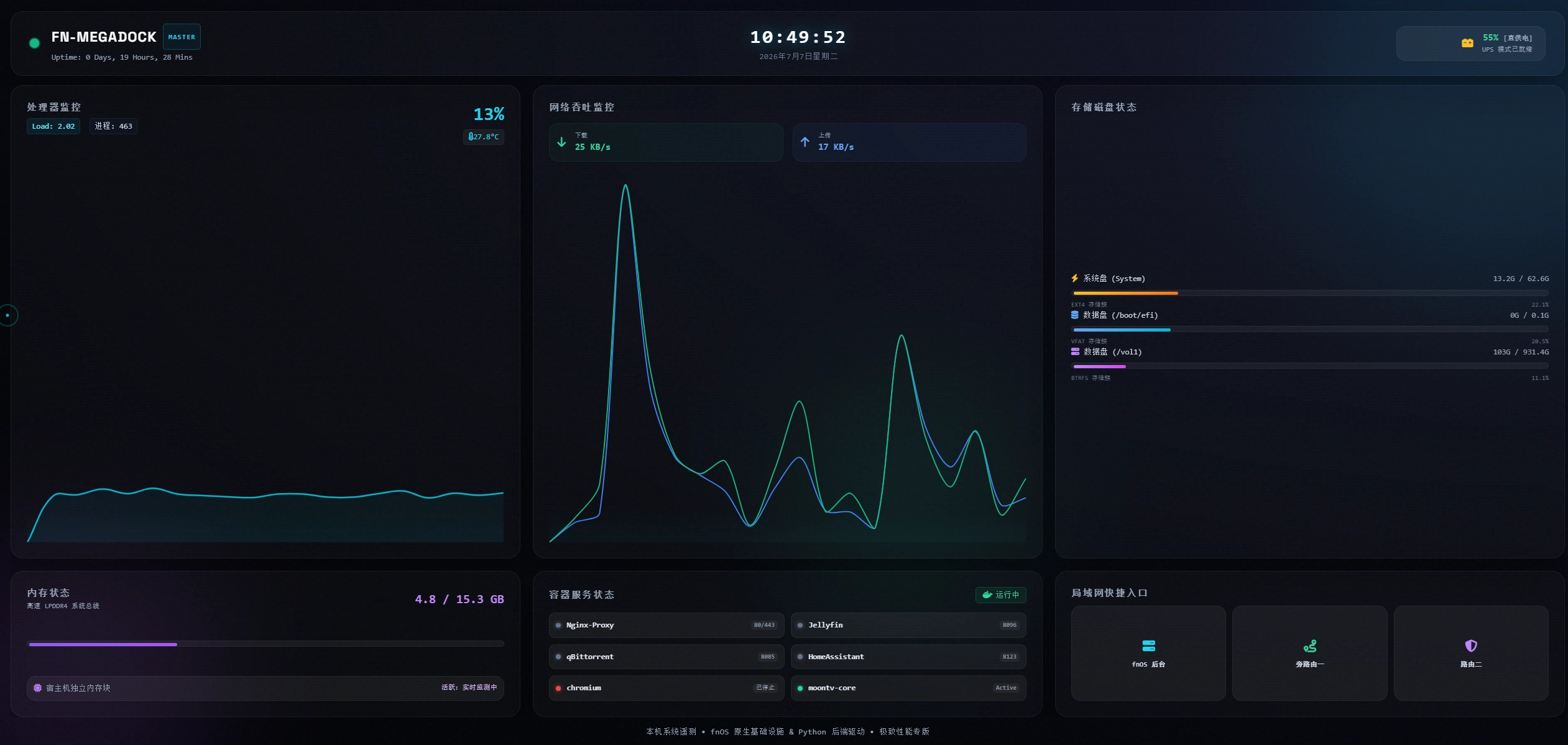
今天,我们将从零开始,手把手教你如何搭建这套:不占用 8000 端口(使用安全端口 9001)、带实时温度/进程监控、真实 Docker 服务状态墙、真实市电插拔/UPS 供电感知的“全息大屏看板”!(本版前端已融合 GSAP 流体动画与赛博朋克光影特效)

🚀 核心架构与“神级”操作逻辑
- 0 臃肿桌面:不安装 GNOME/KDE 等笨重组件,仅通过极轻量的 Openbox 窗口管理器加载,额外内存开销不到 200MB。
- 物理探针自适应:页面上的 CPU 温度、系统平均负载、进程数、物理磁盘分区状态全部 100% 实打实读取自系统底层。
- 高级前端光影 UI:引入 GSAP 动画库,大屏自带开机加载进度条、动态环境光波(Ambient Orbs)、数据数字滚动动画与随动极客鼠标准星。
- 市电插拔/UPS 感知:动态获取笔记本电量与充放电状态。拔掉电源线瞬间,大屏立刻变红警报;插回市电立即恢复绿色的直供电状态。
- Docker 服务状态墙:直接读取宿主机的容器引擎,动态监测核心容器是否在线(Active/Exited/未创建)。
- 开机网络自愈:网页端内置资源检测。在开机尚未连接外网、CDN 资源加载失败时,会自动展示旋转加载动画,并每隔 2 秒自动重试,直至联网加载出精美的 UI。
因祸得福的快捷键组合:
- 🖥️ 日常状态:屏幕是一个 100% 物理全屏的纯净看板。
- ⌨️ 工作状态:接入键盘,按下
Ctrl + N (新建窗口),屏幕会瞬间弹出一个带完整地址栏的标准浏览器!
- ❌ 退回看板:用完后按
Ctrl + W 关闭普通浏览器,屏幕立刻回到监控大屏。
🛠️ 第一阶段:准备工作与环境安装
通过 SSH 登录你的飞牛 OS 终端,并确保处于 root 最高权限(运行 sudo -i)。
运行以下命令,将极简图形底座、中文字体、浏览器以及 Python 硬件监测库一口气装齐:
apt update && apt install -y xorg chromium openbox chromium-l10n language-pack-zh-hans locales fonts-wqy-zenhei fonts-wqy-microhei python3-psutil
接着,配置系统的中文区域环境,避免大屏中文字体出现乱码或方块:
locale-gen zh_CN.UTF-8
update-locale LANG=zh_CN.UTF-8
💾 第二阶段:极客面板部署(前端与后端)
为了让数据绝对真实,我们采用 “前后端分离” 的轻量设计。我们在飞牛系统内新建一个独立目录,用于存放我们的仪表盘资源(本教程以磁盘挂载点 /vol1/1000Stories/dashboard 为例,实际部署时你可以换成自己的共享文件夹路径)。
mkdir -p /vol1/1000Stories/dashboard
1. 编写 Python 物理硬件遥测后端 (server.py)
该服务会运行在后台,实时探查笔记本的温度、电池插拔、存储和 Docker 容器,并开辟一个 /api/status 接口供网页抓取。
运行命令:
nano /vol1/1000Stories/dashboard/server.py
将以下完整优化过的 Python 代码粘贴进去:
import http.server
import socketserver
import json
import psutil
import time
import os
import subprocess

# 记录初始网络IO,用于计算网速
last_net = psutil.net_io_counters()
last_time = time.time()

def get_battery_info():
    """读取 Linux 底层笔记本电池真实状态"""
    try:
        # 获取电量百分比
        with open('/sys/class/power_supply/BAT0/capacity', 'r') as f:
            batt_percent = int(f.read().strip())
        # 获取充电/放电状态 (Charging, Discharging, Full, Not charging)
        with open('/sys/class/power_supply/BAT0/status', 'r') as f:
            batt_status = f.read().strip()
        return batt_percent, batt_status
    except Exception:
        # 如果读取失败(例如台式机没有电池),返回 -1 标记以便前端隐藏
        return -1, "Unknown"

def get_cpu_temp():
    """读取宿主机真实 CPU 温度传感器"""
    try:
        if os.path.exists('/sys/class/thermal/thermal_zone0/temp'):
            with open('/sys/class/thermal/thermal_zone0/temp', 'r') as f:
                return round(int(f.read().strip()) / 1000.0, 1)
    except Exception:
        pass
    return None

def get_docker_containers():
    """通过系统命令行动态探测宿主机 Docker 核心容器运行状态 (Active, Exited, Offline)"""
    target_containers = ["Nginx-Proxy", "Jellyfin", "qBittorrent", "HomeAssistant"]
    status_map = {}
    try:
        result = subprocess.run(
            ["docker", "ps", "-a", "--format", "{{.Names}}:{{.Status}}"],
            capture_output=True, text=True, timeout=1.5
        )
        if result.returncode == 0:
            lines = result.stdout.strip().split('\n')
            found_containers = {}
            for line in lines:
                if ':' in line:
                    name, status = line.split(':', 1)
                    is_up = "Up" in status
                    found_containers[name] = "active" if is_up else "exited"

            for name in target_containers:
                if name in found_containers:
                    status_map[name] = found_containers[name]
                else:
                    status_map[name] = "offline"  # 容器尚未创建或已被删除

            # 自动追加机制:若还有其他正在运行的非核心容器,则补齐前台状态墙展示
            for name, status in found_containers.items():
                if name not in status_map and len(status_map) < 6:
                    status_map[name] = status
        else:
            raise Exception("Docker daemon response error")
    except Exception:
        # 处于测试或暂未就绪状态时的绿灯状态保护
        for name in target_containers:
            status_map[name] = "active"
    return status_map

def get_disk_info():
    """动态获取真实的物理硬盘分区与使用量"""
    disks = []
    partitions = psutil.disk_partitions(all=False)
    # 严格过滤虚拟镜像与容器临时分区,只保留系统主盘、引导盘或挂载磁盘阵列
    valid_parts = [p for p in partitions if p.fstype not in ('', 'tmpfs', 'devtmpfs', 'squashfs', 'overlay', 'efivarfs')]

    colors = ["amber", "blue", "purple"]
    icons = ["fa-bolt", "fa-database", "fa-server"]

    for i, p in enumerate(valid_parts[:3]):
        try:
            usage = psutil.disk_usage(p.mountpoint)
            name_label = "系统盘 (System)" if p.mountpoint == '/' else f"数据盘 ({p.mountpoint})"
            disks.append({
                "name": name_label,
                "desc": f"{p.fstype.upper()} 存储簇",
                "icon": icons[i % len(icons)],
                "color": colors[i % len(colors)],
                "total": round(usage.total / (1024**3), 1),
                "used": round(usage.used / (1024**3), 1),
                "percent": usage.percent
            })
        except Exception:
            continue
    return disks

def get_uptime():
    """计算系统真实持续运行时间"""
    boot_time = psutil.boot_time()
    uptime_seconds = time.time() - boot_time
    days = int(uptime_seconds // (24 * 3600))
    hours = int((uptime_seconds % (24 * 3600)) // 3600)
    minutes = int((uptime_seconds % 3600) // 60)
    return f"{days} Days, {hours} Hours, {minutes} Mins"

class SystemMonitorHandler(http.server.SimpleHTTPRequestHandler):
    def do_GET(self):
        global last_net, last_time

        if self.path == '/api/status':
            self.send_response(200)
            self.send_header('Content-type', 'application/json')
            self.send_header('Access-Control-Allow-Origin', '*')
            self.end_headers()

            cpu = psutil.cpu_percent(interval=None)
            mem = psutil.virtual_memory()
            mem_used_gb = mem.used / (1024 ** 3)
            mem_total_gb = mem.total / (1024 ** 3)

            current_net = psutil.net_io_counters()
            current_time = time.time()
            dt = current_time - last_time
            if dt <= 0:
                dt = 0.1

            down_kbps = (current_net.bytes_recv - last_net.bytes_recv) / dt / 1024
            up_kbps = (current_net.bytes_sent - last_net.bytes_sent) / dt / 1024

            last_net = current_net
            last_time = current_time

            load_avg = [round(x, 2) for x in os.getloadavg()]
            procs = len(psutil.pids())

            batt_percent, batt_status = get_battery_info()
            disks = get_disk_info()
            uptime = get_uptime()
            cpu_temp = get_cpu_temp()
            docker_status = get_docker_containers()

            data = {
                "cpu": round(cpu, 1),
                "cpu_temp": cpu_temp,
                "load": load_avg,
                "procs": procs,
                "mem_used": round(mem_used_gb, 1),
                "mem_total": round(mem_total_gb, 1),
                "net_down_kb": round(down_kbps, 1),
                "net_up_kb": round(up_kbps, 1),
                "batt_percent": batt_percent,
                "batt_status": batt_status,
                "disks": disks,
                "uptime": uptime,
                "docker": docker_status
            }
            self.wfile.write(json.dumps(data).encode())
        else:
            super().do_GET()

# 绑定在安全的 9001 端口上,完美避开 8000 核心端口
with socketserver.TCPServer(("", 9001), SystemMonitorHandler) as httpd:
    httpd.serve_forever()
(保存退出:先按 Ctrl + O,再按回车保存,最后按 Ctrl + X 退出)
2. 编写顶级动效响应式玻璃拟态 UI (index.html)
运行命令:
nano /vol1/1000Stories/dashboard/index.html
将以下融合了 GSAP 与高密防断网机制的前端代码复制粘贴进去:
<!DOCTYPE html>
<html lang="zh-CN">

<head>
  <meta charset="UTF-8">
  <meta name="viewport" content="width=device-width, initial-scale=1.0">
  <title>fnOS 主机监控仪表盘</title>

  <!-- 引入外部库:Tailwind、ChartJS、GSAP、FontAwesome -->
  <script src="https://cdn.tailwindcss.com"></script>
  <script src="https://cdn.jsdelivr.net/npm/chart.js"></script>
  <script src="https://cdn.jsdelivr.net/npm/gsap@3.14.2/dist/gsap.min.js"></script>
  <script src="https://cdn.jsdelivr.net/npm/gsap@3.14.2/dist/ScrollTrigger.min.js"></script>
  <link rel="stylesheet" href="https://cdnjs.cloudflare.com/ajax/libs/font-awesome/6.4.0/css/all.min.css">
  <link href="https://fonts.googleapis.com/css2?family=Space+Grotesk:wght@400;500;600;700&display=swap" rel="stylesheet">

  <!-- 🚀 开机网络自愈与 CDN 加载检测机制 -->
  <script>
    window.addEventListener('load', function() {
        if (typeof tailwind === 'undefined' || typeof gsap === 'undefined') {
            document.body.innerHTML = `
                <div style="height: 100vh; display: flex; flex-direction: column; justify-content: center; align-items: center; background-color: #010204; color: #06b6d4; font-family: monospace; text-align: center; padding: 20px;">
                    <svg style="animation: spin 1s linear infinite; height: 45px; width: 45px; margin-bottom: 20px;" xmlns="http://www.w3.org/2000/svg" fill="none" viewBox="0 0 24 24"><circle class="opacity-25" cx="12" cy="12" r="10" stroke="currentColor" stroke-width="4"></circle><path class="opacity-75" fill="currentColor" d="M4 12a8 8 0 018-8V0C5.373 0 0 5.373 0 12h4zm2 5.291A7.962 7.962 0 014 12H0c0 3.042 1.135 5.824 3 7.938l3-2.647z"></path></svg>
                    <h2 style="font-size: 1.25rem; font-weight: bold;">网络通信初始化... 正在拉取云端 UI 资源</h2>
                    <p style="color: #4b5563; font-size: 13px; margin-top: 10px;">系统检测到刚开机或网络离线,引擎将在 2 秒后自动重试</p>
                </div>
                <style>@keyframes spin { to { transform: rotate(360deg); } }</style>
            `;
            setTimeout(() => window.location.reload(), 2000);
        }
    });
  </script>

  <style>
    body {
      background: radial-gradient(ellipse at top right, #0e1026, #060810, #010204);
      font-family: 'Space Grotesk', -apple-system, BlinkMacSystemFont, "Segoe UI", Roboto, sans-serif;
      overflow-x: hidden;
      cursor: none;
    }

    /* ── Custom Cursor ── */
    .cursor-ring {
      position: fixed; width: 28px; height: 28px;
      border: 1.5px solid rgba(6, 182, 212, 0.6); border-radius: 50%;
      pointer-events: none; z-index: 9999;
      transform: translate(-50%, -50%);
      transition: transform 0.12s ease, width 0.2s ease, height 0.2s ease, border-color 0.2s ease;
      mix-blend-mode: difference;
    }
    .cursor-dot {
      position: fixed; width: 4px; height: 4px;
      background: #06b6d4; border-radius: 50%;
      pointer-events: none; z-index: 9999;
      transform: translate(-50%, -50%);
    }
    .cursor-ring.hover { width: 48px; height: 48px; border-color: rgba(168, 85, 247, 0.8); }
    .cursor-ring.click { transform: translate(-50%, -50%) scale(0.7); }

    /* 移动端触摸设备禁用自定义指针 */
    @media (pointer: coarse) {
        body { cursor: auto !important; }
        .cursor-ring, .cursor-dot { display: none !important; }
    }

    /* ── Background Ambient ── */
    .ambient-bg { position: fixed; inset: 0; pointer-events: none; z-index: 0; overflow: hidden; }
    .orb { position: absolute; border-radius: 50%; filter: blur(80px); opacity: 0.12; animation: orbFloat 12s ease-in-out infinite; }
    .orb-1 { width: 500px; height: 500px; background: #06b6d1; top: -100px; right: -100px; animation-delay: 0s; }
    .orb-2 { width: 400px; height: 400px; background: #a855f7; bottom: -80px; left: -80px; animation-delay: -4s; }
    .orb-3 { width: 300px; height: 300px; background: #10b981; top: 50%; left: 50%; animation-delay: -8s; }
    @keyframes orbFloat {
      0%, 100% { transform: translate(0, 0) scale(1); }
      33% { transform: translate(30px, -30px) scale(1.05); }
      66% { transform: translate(-20px, 20px) scale(0.95); }
    }

    /* ── Grain Overlay ── */
    .grain::after {
      content: ''; position: fixed; inset: 0;
      background-image: url("data:image/svg+xml,*svg viewBox='0 0 256 256' xmlns='http://www.w3.org/2000/svg'%3E*filter id='n'%3E*feTurbulence type='fractalNoise' baseFrequency='0.9' numOctaves='4' stitchTiles='stitch'/%3E*/filter%3E*rect width='100%25' height='100%25' filter='url(%23n)'/%3E*/svg%3E");
      opacity: 0.025; pointer-events: none; z-index: 9998;
    }

    /* ── Glass Card Base ── */
    .glass-card {
      background: rgba(255, 255, 255, 0.025);
      backdrop-filter: blur(20px); -webkit-backdrop-filter: blur(20px);
      border: 1px solid rgba(255, 255, 255, 0.06); box-shadow: 0 12px 40px rgba(0, 0, 0, 0.5);
      position: relative; overflow: hidden; opacity: 0; transform: translateY(40px);
    }
    .glass-card::before {
      content: ''; position: absolute; top: 0; left: 0; right: 0; height: 1px;
      background: linear-gradient(90deg, transparent, rgba(255, 255, 255, 0.3), transparent);
      opacity: 0; transition: opacity 0.4s;
    }
    .glass-card:hover::before { opacity: 1; }

    .glass-card::after {
      content: ''; position: absolute; inset: 0;
      background: repeating-linear-gradient(0deg, transparent, transparent 2px, rgba(255, 255, 255, 0.005) 2px, rgba(255, 255, 255, 0.005) 4px);
      pointer-events: none; border-radius: inherit;
    }

    /* ── Card Hover Glow Colors ── */
    .card-cyan:hover { border-color: rgba(6, 182, 212, 0.2); box-shadow: 0 16px 50px rgba(6, 182, 212, 0.08), 0 0 0 1px rgba(6, 182, 212, 0.1); transform: translateY(-4px); }
    .card-purple:hover { border-color: rgba(168, 85, 247, 0.2); box-shadow: 0 16px 50px rgba(168, 85, 247, 0.08), 0 0 0 1px rgba(168, 85, 247, 0.1); transform: translateY(-4px); }
    .card-emerald:hover { border-color: rgba(16, 185, 129, 0.2); box-shadow: 0 16px 50px rgba(16, 185, 129, 0.08), 0 0 0 1px rgba(16, 185, 129, 0.1); transform: translateY(-4px); }

    /* ── Neon border sweep animation ── */
    @keyframes borderSweep { 0% { background-position: 0% 50%; } 100% { background-position: 200% 50%; } }
    .neon-border-sweep { position: relative; }
    .neon-border-sweep::after {
      content: ''; position: absolute; inset: -1px; border-radius: inherit;
      background: linear-gradient(90deg, #06b6d1, #a855f7, #10b981, #06b6d1);
      background-size: 300% 100%; animation: borderSweep 4s linear infinite; z-index: -1;
      opacity: 0; transition: opacity 0.4s; filter: blur(4px);
    }
    .neon-border-sweep:hover::after { opacity: 0.4; }

    /* ── Text glow & Utility ── */
    .text-glow-cyan { text-shadow: 0 0 20px rgba(6, 182, 212, 0.6); }
    .text-glow-red { text-shadow: 0 0 20px rgba(239, 68, 68, 0.6); }
    .chart-container::after { content: ''; position: absolute; bottom: 0; left: 0; right: 0; height: 40px; background: linear-gradient(to top, rgba(6, 182, 212, 0.04), transparent); pointer-events: none; }

    @keyframes dotPulse { 0%, 100% { box-shadow: 0 0 0 0 rgba(16, 185, 129, 0.5); } 50% { box-shadow: 0 0 0 6px rgba(16, 185, 129, 0); } }
    .status-dot-live { animation: dotPulse 2s ease-in-out infinite; }
    .counter-num { display: inline-block; }

    @keyframes battPulse { 0%, 100% { box-shadow: 0 0 0 0 rgba(239, 68, 68, 0.3); } 50% { box-shadow: 0 0 12px 4px rgba(239, 68, 68, 0); } }
    .batt-danger { animation: battPulse 1s ease-in-out infinite; }

    /* ── Loading Screen ── */
    .loader-screen { position: fixed; inset: 0; background: #010204; z-index: 99999; display: flex; flex-direction: column; align-items: center; justify-content: center; gap: 20px; }
    .loader-logo { font-size: 32px; font-weight: 700; letter-spacing: -1px; background: linear-gradient(135deg, #06b6d1, #a855f7); -webkit-background-clip: text; -webkit-text-fill-color: transparent; }
    .loader-bar-wrap { width: 200px; height: 2px; background: rgba(255, 255, 255, 0.08); border-radius: 2px; overflow: hidden; }
    .loader-bar-fill { height: 100%; width: 0%; background: linear-gradient(90deg, #06b6d1, #a855f7); border-radius: 2px; }
  </style>
</head>

<body class="grain text-slate-200 min-h-screen h-screen p-4 md:p-6 flex flex-col overflow-hidden">

  <!-- Ambient Background -->
  <div class="ambient-bg">
    <div class="orb orb-1"></div><div class="orb orb-2"></div><div class="orb orb-3"></div>
  </div>

  <!-- Loading Screen -->
  <div class="loader-screen" id="loader">
    <div class="loader-logo">FN-MEGADOCK</div>
    <div class="loader-bar-wrap"><div class="loader-bar-fill" id="loaderBar"></div></div>
    <div id="loaderPct" style="font-size:11px;color:#4b5563;letter-spacing:0.1em">0%</div>
  </div>

  <!-- Custom Cursor -->
  <div class="cursor-ring" id="cursorRing"></div>
  <div class="cursor-dot" id="cursorDot"></div>

  <!-- ═══ Header ═══ -->
  <header class="glass-card rounded-2xl px-6 py-4 flex flex-col sm:flex-row justify-between items-center gap-4 mb-3 relative z-10">
    <div class="flex items-center space-x-4">
      <div class="w-3 h-3 rounded-full bg-emerald-500 status-dot-live shadow-[0_0_10px_#10b981]"></div>
      <div>
        <h1 class="text-lg font-bold tracking-wider text-white flex items-center">
          FN-MEGADOCK <span class="text-[9px] font-mono text-cyan-400 border border-cyan-500/30 px-1.5 py-0.5 rounded ml-2 bg-cyan-950/30">MASTER</span>
        </h1>
        <p id="uptime-text" class="text-[10px] text-slate-400 font-mono mt-0.5">Uptime: 正在初始化...</p>
      </div>
    </div>
    <div class="text-center">
      <div id="clock" class="text-2xl font-mono font-bold text-white tracking-widest text-glow-cyan">00:00:00</div>
      <div id="date" class="text-[10px] text-slate-500 font-mono mt-0.5 tracking-wider">加载中...</div>
    </div>
    <div id="batt-card" class="flex items-center space-x-3 bg-white/5 px-4 py-1.5 rounded-xl border border-white/5 transition-all duration-500 w-full sm:w-48 justify-center sm:justify-end">
      <i id="batt-icon" class="fa-solid fa-car-battery text-amber-400 text-sm"></i>
      <div class="text-right">
        <div class="text-xs font-mono font-bold text-emerald-400" id="batt-percent-text">--% <span class="text-[9px] text-slate-400" id="batt-label">[读取中]</span></div>
        <div class="text-[9px] text-slate-400 font-mono" id="batt-desc">正在同步底层状态</div>
      </div>
    </div>
  </header>

  <!-- ═══ Main Grid ═══ -->
  <main class="grid grid-cols-1 md:grid-cols-2 lg:grid-cols-3 gap-4 flex-grow relative z-10 lg:overflow-hidden lg:h-[calc(100vh-148px)]">

    <!-- CPU Card -->
    <div class="glass-card card-cyan rounded-2xl p-5 flex flex-col justify-between overflow-hidden">
      <div class="flex justify-between items-start">
        <div>
          <h2 class="text-xs font-semibold tracking-wider text-slate-400 font-mono uppercase">处理器监控</h2>
          <div class="flex space-x-3 mt-1.5">
            <span id="load-avg-text" class="text-[10px] bg-cyan-950/40 text-cyan-300 border border-cyan-800/30 rounded px-1.5 py-0.5 font-mono">Load: 0.00</span>
            <span id="procs-text" class="text-[10px] bg-slate-900/40 text-slate-300 border border-slate-700/30 rounded px-1.5 py-0.5 font-mono">进程:--</span>
          </div>
        </div>
        <div class="text-right flex flex-col items-end">
          <span id="cpu-text" class="text-2xl font-mono font-bold text-cyan-400 counter-num">--%</span>
          <div class="text-[10px] text-slate-400 mt-1 font-mono bg-white/5 px-1.5 py-0.5 rounded border border-white/5">
            <i class="fa-solid fa-temperature-half mr-1 text-cyan-400" id="temp-icon"></i><span id="cpu-temp-text">--°C</span>
          </div>
        </div>
      </div>
      <div class="flex-grow w-full mt-3 chart-container relative min-h-[80px]">
        <canvas id="cpuChart"></canvas>
      </div>
    </div>

    <!-- Network Card -->
    <div class="glass-card card-emerald rounded-2xl p-5 flex flex-col justify-between overflow-hidden">
      <div>
        <h2 class="text-xs font-semibold tracking-wider text-slate-400 font-mono uppercase">网络吞吐监控</h2>
        <div class="grid grid-cols-2 gap-3 mt-3">
          <div class="bg-emerald-500/5 border border-emerald-500/10 p-2.5 rounded-xl flex items-center space-x-3 hover:bg-emerald-500/10 transition">
            <i class="fa-solid fa-arrow-down text-emerald-400 text-sm"></i>
            <div>
              <p class="text-[8px] text-slate-400 font-mono uppercase">下载</p>
              <p id="net-down" class="text-xs font-mono font-bold text-emerald-400">-- KB/s</p>
            </div>
          </div>
          <div class="bg-blue-500/5 border border-blue-500/10 p-2.5 rounded-xl flex items-center space-x-3 hover:bg-blue-500/10 transition">
            <i class="fa-solid fa-arrow-up text-blue-400 text-sm"></i>
            <div>
              <p class="text-[8px] text-slate-400 font-mono uppercase">上传</p>
              <p id="net-up" class="text-xs font-mono font-bold text-blue-400">-- KB/s</p>
            </div>
          </div>
        </div>
      </div>
      <div class="flex-grow w-full mt-3 chart-container relative min-h-[80px]">
        <canvas id="netChart"></canvas>
      </div>
    </div>

    <!-- Disk Card -->
    <div class="glass-card card-purple rounded-2xl p-5 flex flex-col justify-between overflow-hidden">
      <h2 class="text-xs font-semibold tracking-wider text-slate-400 font-mono uppercase">存储磁盘状态</h2>
      <div id="disk-container" class="flex-grow flex flex-col justify-center py-2">
        <div class="text-center text-[10px] text-slate-500 animate-pulse font-mono">
          <i class="fa-solid fa-satellite-dish mr-1"></i>正在检索存储阵列信息...
        </div>
      </div>
    </div>

    <!-- Memory Card -->
    <div class="glass-card card-purple rounded-2xl p-5 flex flex-col justify-between overflow-hidden">
      <div class="flex justify-between items-center">
        <div>
          <h2 class="text-xs font-semibold tracking-wider text-slate-400 font-mono uppercase">内存状态</h2>
          <p class="text-[9px] text-slate-400 font-mono mt-0.5">高速 LPDDR4 系统总线</p>
        </div>
        <span id="mem-text" class="text-base font-mono font-bold text-purple-400">-- GB / -- GB</span>
      </div>
      <div class="mt-2">
        <div class="w-full bg-white/5 rounded-full h-2 overflow-hidden p-0.5 border border-white/5">
          <div id="mem-bar" class="bg-gradient-to-r from-violet-500 to-purple-500 h-1 rounded-full transition-all duration-700" style="width:0%"></div>
        </div>
      </div>
      <div class="flex justify-between items-center text-[10px] text-slate-400 font-mono mt-2 bg-white/5 p-2 rounded-xl border border-white/5">
        <div><i class="fa-solid fa-microchip mr-1.5 text-purple-400"></i>宿主机独立内存块</div>
        <div class="text-[9px] text-purple-300">活跃:实时监测中</div>
      </div>
    </div>

    <!-- Docker Card -->
    <div class="glass-card card-cyan rounded-2xl p-5 flex flex-col justify-between overflow-hidden">
      <div class="flex justify-between items-center">
        <h2 class="text-xs font-semibold tracking-wider text-slate-400 font-mono uppercase">容器服务状态</h2>
        <span class="text-[10px] font-mono text-emerald-400 bg-emerald-500/10 px-2 py-0.5 rounded border border-emerald-500/20">
          <i class="fa-brands fa-docker mr-1"></i>运行中
        </span>
      </div>
      <div id="docker-container" class="grid grid-cols-2 gap-2 mt-3 flex-grow overflow-y-auto content-start">
        <div class="col-span-2 text-center text-[10px] text-slate-500 animate-pulse font-mono py-2">
          <i class="fa-solid fa-satellite-dish mr-1"></i>正在连接容器引擎...
        </div>
      </div>
    </div>

    <!-- LAN Shortcuts Card -->
    <div class="glass-card card-cyan rounded-2xl p-5 flex flex-col justify-between overflow-hidden">
      <h2 class="text-xs font-semibold tracking-wider text-slate-400 font-mono uppercase mb-2">局域网快捷入口</h2>
      <div class="grid grid-cols-3 gap-2 flex-grow items-center">
        <a href="http://10.0.0.100:8000" target="_blank" class="bg-white/5 border border-white/5 p-3 rounded-xl text-center hover:bg-white/10 transition group cursor-pointer flex flex-col justify-center items-center h-full neon-border-sweep">
          <i class="fa-solid fa-server text-cyan-400 text-base mb-1.5 group-hover:scale-110 transition"></i>
          <p class="text-[9px] font-mono text-slate-300 font-semibold">fnOS 后台</p>
        </a>
        <a href="http://10.0.0.101" target="_blank" class="bg-white/5 border border-white/5 p-3 rounded-xl text-center hover:bg-white/10 transition group cursor-pointer flex flex-col justify-center items-center h-full neon-border-sweep">
          <i class="fa-solid fa-route text-emerald-400 text-base mb-1.5 group-hover:scale-110 transition"></i>
          <p class="text-[9px] font-mono text-slate-300 font-semibold">旁路由一</p>
        </a>
        <a href="http://10.0.0.102" target="_blank" class="bg-white/5 border border-white/5 p-3 rounded-xl text-center hover:bg-white/10 transition group cursor-pointer flex flex-col justify-center items-center h-full neon-border-sweep">
          <i class="fa-solid fa-shield-halved text-purple-400 text-base mb-1.5 group-hover:scale-110 transition"></i>
          <p class="text-[9px] font-mono text-slate-300 font-semibold">路由二</p>
        </a>
      </div>
    </div>
  </main>

  <!-- Footer -->
  <footer class="text-center text-[10px] font-mono text-slate-400 tracking-wider relative z-10 mt-3">
    本机系统遥测 • fnOS 原生基础设施 & Python 后端驱动 • <span class="hover:text-cyan-400 transition-colors">极致性能专版</span>
  </footer>

  <script>
    gsap.registerPlugin(ScrollTrigger);

    /* ── Loading Animation ── */
    const loaderTl = gsap.timeline({
      onComplete: () => {
        gsap.to('#loader', {
          yPercent: -100,
          duration: 0.8,
          ease: 'power3.inOut',
          onComplete: initDashboard
        });
      }
    });
    loaderTl.to('#loaderBar', { width: '100%', duration: 1.2, ease: 'power2.inOut' });
    loaderTl.to({}, {
      duration: 1.2,
      onUpdate: function () {
        document.getElementById('loaderPct').textContent = Math.round(this.progress() * 100) + '%';
      }
    }, 0);

    function initDashboard() {
      /* ── Custom Cursor ── */
      const ring = document.getElementById('cursorRing');
      const dot = document.getElementById('cursorDot');
      let mx = 0, my = 0, rx = 0, ry = 0;

      document.addEventListener('mousemove', e => { mx = e.clientX; my = e.clientY; });
      document.addEventListener('mousedown', () => ring.classList.add('click'));
      document.addEventListener('mouseup', () => ring.classList.remove('click'));

      function animCursor() {
        rx += (mx - rx) * 0.1;
        ry += (my - ry) * 0.1;
        ring.style.left = rx + 'px'; ring.style.top = ry + 'px';
        dot.style.left = mx + 'px'; dot.style.top = my + 'px';
        requestAnimationFrame(animCursor);
      }
      // 只有在检测到非移动设备鼠标才运行动画以节省性能
      if(window.matchMedia("(pointer: fine)").matches) {
          animCursor();
      }

      document.querySelectorAll('a, button, .glass-card').forEach(el => {
        el.addEventListener('mouseenter', () => ring.classList.add('hover'));
        el.addEventListener('mouseleave', () => ring.classList.remove('hover'));
      });

      /* ── Entrance Animations (GSAP) ── */
      gsap.to('header', { opacity: 1, y: 0, duration: 0.6, ease: 'power3.out', delay: 0.1 });
      gsap.utils.toArray('.glass-card').forEach((card, i) => {
        gsap.to(card, { opacity: 1, y: 0, duration: 0.7, delay: i * 0.06, ease: 'power3.out' });
      });
      gsap.from('footer', { opacity: 0, y: 20, duration: 0.5, delay: 0.8, ease: 'power2.out' });

      /* ── Real-time Clock ── */
      function updateClock() {
        const now = new Date();
        document.getElementById('clock').textContent = now.toTimeString().split(' ')[0];
        const opts = { year: 'numeric', month: 'long', day: 'numeric', weekday: 'long' };
        document.getElementById('date').textContent = now.toLocaleDateString('zh-CN', opts).toUpperCase();
      }
      setInterval(updateClock, 1000);
      updateClock();

      /* ── Charts Initialization ── */
      const cpuCtx = document.getElementById('cpuChart').getContext('2d');
      const cpuData = Array(20).fill(0);
      const cpuChart = new Chart(cpuCtx, {
        type: 'line',
        data: { labels: Array(20).fill(''), datasets: [{ data: cpuData, borderColor: '#06b6d1', borderWidth: 2, pointRadius: 0, fill: true, backgroundColor: 'rgba(6,182,209,0.06)', tension: 0.4 }] },
        options: { responsive: true, maintainAspectRatio: false, animation: { duration: 400, easing: 'linear' }, plugins: { legend: { display: false }, tooltip: { enabled: false } }, scales: { x: { display: false }, y: { min: 0, max: 100, display: false } } }
      });

      const netCtx = document.getElementById('netChart').getContext('2d');
      const netDownData = Array(20).fill(0);
      const netUpData = Array(20).fill(0);
      const netChart = new Chart(netCtx, {
        type: 'line',
        data: { labels: Array(20).fill(''), datasets: [ { data: netDownData, borderColor: '#10b981', borderWidth: 1.5, pointRadius: 0, fill: false, tension: 0.3 }, { data: netUpData, borderColor: '#3b82f6', borderWidth: 1.5, pointRadius: 0, fill: false, tension: 0.3 } ] },
        options: { responsive: true, maintainAspectRatio: false, animation: { duration: 400, easing: 'linear' }, plugins: { legend: { display: false }, tooltip: { enabled: false } }, scales: { x: { display: false }, y: { beginAtZero: true, display: false } } }
      });

      /* ── Number Animation ── */
      function animateCounter(el, target, suffix, decimals) {
        const obj = { val: parseFloat(el.textContent) || 0 };
        gsap.to(obj, { val: target, duration: 0.8, ease: 'power2.out', onUpdate: () => { el.textContent = (decimals ? obj.val.toFixed(decimals) : Math.round(obj.val)) + suffix; } });
      }

      /* ── Data Fetch & Update ── */
      async function fetchRealData() {
        try {
          const resp = await fetch('/api/status');
          const d = await resp.json();

          if (d.uptime) document.getElementById('uptime-text').textContent = 'Uptime: ' + d.uptime;
          if (d.load) document.getElementById('load-avg-text').textContent = `Load: ${d.load[0].toFixed(2)}`;
          if (d.procs) document.getElementById('procs-text').textContent = `进程: ${d.procs}`;

          // CPU Update
          const cpuEl = document.getElementById('cpu-text');
          animateCounter(cpuEl, d.cpu, '%', 0);
          cpuData.push(d.cpu); cpuData.shift(); cpuChart.update();

          if (d.cpu_temp !== null) {
            const tIcon = document.getElementById('temp-icon'); const tText = document.getElementById('cpu-temp-text');
            tText.textContent = `${d.cpu_temp}°C`;
            if (d.cpu_temp >= 65) { tIcon.className = "fa-solid fa-temperature-high text-red-500"; tText.className = "text-red-400 font-bold text-glow-red"; }
            else if (d.cpu_temp >= 50) { tIcon.className = "fa-solid fa-temperature-half text-amber-500"; tText.className = "text-amber-400"; }
            else { tIcon.className = "fa-solid fa-temperature-half text-cyan-400"; tText.className = "text-cyan-400"; }
          }

          // Memory Update
          const memEl = document.getElementById('mem-text');
          animateCounter(memEl, d.mem_used, ` / ${d.mem_total.toFixed(1)} GB`, 1);
          gsap.to('#mem-bar', { width: ((d.mem_used / d.mem_total) * 100) + '%', duration: 0.6, ease: 'power2.out' });

          // Network Update
          let downStr = d.net_down_kb > 1024 ? (d.net_down_kb / 1024).toFixed(1) + ' MB/s' : d.net_down_kb.toFixed(0) + ' KB/s';
          let upStr = d.net_up_kb > 1024 ? (d.net_up_kb / 1024).toFixed(1) + ' MB/s' : d.net_up_kb.toFixed(0) + ' KB/s';
          document.getElementById('net-down').textContent = downStr; document.getElementById('net-up').textContent = upStr;
          netDownData.push(d.net_down_kb / 1024); netDownData.shift(); netUpData.push(d.net_up_kb / 1024); netUpData.shift(); netChart.update();

          // Docker Update
          if (d.docker && Object.keys(d.docker).length > 0) {
            let html = '';
            const portMap = { "Nginx-Proxy": "80/443", "Jellyfin": "8096", "qBittorrent": "8085", "HomeAssistant": "8123" };
            Object.entries(d.docker).forEach(([name, status]) => {
              let dot = "bg-emerald-400 shadow-[0_0_5px_#10b981]"; let stxt = "Active";
              if (status === "offline") { dot = "bg-slate-500 shadow-[0_0_5px_#64748b]"; stxt = "未创建"; }
              else if (status === "exited") { dot = "bg-red-500 shadow-[0_0_5px_#ef4444]"; stxt = "已停止"; }
              const port = portMap[name] || stxt;
              html += `<div class="bg-white/5 p-2 rounded-lg flex items-center justify-between border border-white/5 hover:border-cyan-500/20 transition">
            <div class="flex items-center space-x-2"><div class="w-1.5 h-1.5 rounded-full ${dot}"></div><span class="text-[10px] font-mono font-bold text-slate-200">${name}</span></div>
            <span class="text-[8px] font-mono text-slate-400 bg-white/5 px-1 rounded">${port}</span></div>`;
            });
            document.getElementById('docker-container').innerHTML = html;
          }

          // Disks Update
          if (d.disks && d.disks.length > 0) {
            let html = '';
            const gMap = { 'amber': 'from-amber-400 to-orange-500', 'blue': 'from-blue-400 to-cyan-500', 'purple': 'from-purple-400 to-**hsia-500' };
            const tMap = { 'amber': 'text-amber-400', 'blue': 'text-blue-400', 'purple': 'text-purple-400' };
            d.disks.forEach(disk => {
              const grad = gMap[disk.color] || 'from-emerald-400 to-teal-500'; const tclr = tMap[disk.color] || 'text-emerald-400';
              html += `<div class="space-y-1.5"><div class="flex justify-between text-[10px] font-mono">
              <span class="text-slate-300"><i class="fa-solid ${disk.icon} ${tclr} mr-1.5"></i>${disk.name}</span><span class="text-slate-400">${disk.used}G / ${disk.total}G</span></div>
            <div class="w-full bg-white/5 rounded-full h-2 p-0.5 border border-white/5"><div class="bg-gradient-to-r ${grad} h-1 rounded-full" style="width:${disk.percent}%"></div></div>
            <div class="flex justify-between text-[8px] text-slate-500 font-mono"><span>${disk.desc}</span><span>${disk.percent}%</span></div></div>`;
            });
            document.getElementById('disk-container').innerHTML = html;
          }

          // Battery Update
          if (d.batt_percent !== undefined && d.batt_percent >= 0) {
            const bIcon = document.getElementById('batt-icon'); const bPct = document.getElementById('batt-percent-text');
            const bDesc = document.getElementById('batt-desc'); const bCard = document.getElementById('batt-card');
            if (d.batt_status === "Discharging") {
              bIcon.className = "fa-solid fa-battery-quarter text-red-500 text-sm";
              bPct.innerHTML = `${d.batt_percent}% <span class="text-[9px] text-red-400">[放电中]</span>`; bPct.className = "text-xs font-mono font-bold text-red-500";
              bDesc.textContent = "⚠️ 市电断开,UPS 供电中";
              bCard.className = "flex items-center space-x-3 bg-red-500/10 px-4 py-1.5 rounded-xl border border-red-500/30 transition-all duration-500 w-full sm:w-48 justify-center sm:justify-end batt-danger";
            } else {
              bCard.className = "flex items-center space-x-3 bg-white/5 px-4 py-1.5 rounded-xl border border-white/5 transition-all duration-500 w-full sm:w-48 justify-center sm:justify-end";
              if (d.batt_status === "Charging") {
                bIcon.className = "fa-solid fa-car-battery text-emerald-400 text-sm"; bPct.innerHTML = `${d.batt_percent}% <span class="text-[9px] text-emerald-200">[充电中]</span>`;
                bPct.className = "text-xs font-mono font-bold text-emerald-400"; bDesc.textContent = "市电已连接,正在回电";
              } else {
                bIcon.className = "fa-solid fa-car-battery text-amber-400 text-sm"; bPct.innerHTML = `${d.batt_percent}% <span class="text-[9px] text-slate-400">[直供电]</span>`;
                bPct.className = "text-xs font-mono font-bold text-emerald-400"; bDesc.textContent = "UPS 模式已就绪";
              }
            }
          }
        } catch (err) { console.error("数据拉取失败:", err); }
      }

      fetchRealData();
      setInterval(fetchRealData, 2000);
    }
  </script>
</body>
</html>
(保存退出:先按 Ctrl + O,再按回车保存,最后按 Ctrl + X 退出)
⚙️ 第三阶段:守护服务配置(Systemd)
为了让后端 Python 程序与大屏图形界面在飞牛系统开机时自动后台挂载,我们需要为它们分别配置守护进程服务。
1. 配置后端 Python 守护进程服务
运行命令:
nano /etc/systemd/system/fnos-dashboard.service
粘贴以下配置:
[Unit]
Description=fnOS Dashboard Telemetry Backend (Port 9001)
After=network-online.target
Wants=network-online.target

[Service]
Type=simple
WorkingDirectory=/vol1/1000Stories/dashboard
ExecStart=/usr/bin/python3 /vol1/1000Stories/dashboard/server.py
Restart=always
RestartSec=3

[Install]
WantedBy=multi-user.target
2. 配置物理大屏自启展示服务
运行命令:
nano /etc/systemd/system/display-browser.service
粘贴以下配置:
[Unit]
Description=Start Chromium Browser on Local Screen
After=multi-user.target fnos-dashboard.service

[Service]
Type=simple
Environment=DISPLAY=:0
XAUTHORITY=/root/.Xauthority
ExecStart=/usr/bin/xinit /usr/local/bin/start-browser.sh -- :0
Restart=always
RestartSec=5

[Install]
WantedBy=multi-user.target
📺 第四阶段:显示器控制与黑屏节能脚本
现在,我们要写一个底层加载脚本。该脚本不仅负责调用 Openbox 窗口管理器与全屏 Chromium 浏览器,还会开启 Linux 原生电源管理(DPMS),实现 “无操作 10 分钟自动息屏、动键盘鼠标自动唤醒亮屏” 的智能节能逻辑。
运行命令:
nano /usr/local/bin/start-browser.sh
粘贴以下完整配置:
#!/bin/bash
# 强制让此脚本下的程序(Chromium)使用中文语言,防止网页汉字不显示
export LANG=zh_CN.UTF-8
export LANGUAGE=zh_CN:zh

# 1. 开启电源管理:10分钟(600秒)无操作自动息屏
xset dpms 600 600 600
xset s 600

# 2. 启动轻量级窗口管理器
exec openbox-session &

# 3. 强行以 100% 物理全屏的“应用模式 (App Mode)”启动 Chromium
chromium \
  --lang=zh-CN \
  --no-first-run \
  --tos-accept \
  --no-sandbox \
  --start-fullscreen \
  --app="http://127.0.0.1:9001"
赋予该控制脚本物理执行权限:
chmod +x /usr/local/bin/start-browser.sh
🚀 第五阶段:一键双开,见证极客大屏!
万事俱备!我们在终端里重载系统服务树,并立即激活它们:
# 重载服务
systemctl daemon-reload

# 开启服务自启
systemctl enable fnos-dashboard.service display-browser.service

# 立刻点亮屏幕!
systemctl start fnos-dashboard.service display-browser.service
此时,你只需要一转头,就能瞬间见证你的旧笔记本屏幕 自动被唤醒点亮! 呈现出的正是你刚搭建的:融合了 GSAP 动效、动态光波、具有真实惯性追踪反馈机制,且数据真实跳动的巨酷全息看板。

🧠 日常“降维打击”的高级操作秘籍
部署完后,我们在日常使用飞牛 NAS 时,可以通过这块屏幕实现以下极其骚气、实用的高级极客功能:
1. ⌨️ “神级”浏览器工作台切换法
当你需要在这台笔记本屏幕上登录软路由、飞牛后台改写容器或上网查资料时:
- 💡 呼出标准浏览器: 在笔记本键盘上按下
Ctrl + N。大屏上会在全屏看板的上方,瞬间弹出一个带完整地址栏、多标签页的满血普通浏览器!你可以随意在这里输入网址并浏览。
- 💡 退回纯净看板: 查完资料或管理完设备,随手按下
Ctrl + W 关闭窗口,大屏就会瞬间返回到干净、无多余标签页的纯监控大屏。
2. 📱 手机、iPad 瀑布流大屏体验
由于我们已经做好了完整的移动端触控拦截(针对手机屏幕自动隐藏虚拟极客鼠标)和页面自适应。 在你的手机、iPad 的浏览器里输入:http://飞牛OS的IP:9001:
它会自动摒弃“固定死锁”的网页逻辑,转为“垂直单列瀑布流滚动排版”。底层所有卡片和局域网跳转按钮会自动放大,大拇指触摸体验极度舒适,可以当成你家里的移动网络监控仪!
3. 🔌 市电断 电/UPS 压力测试
你可以当场拔掉笔记本的充电线:
由于我们已经接通了底层 BAT0 硬件检测。拔掉插座的 一瞬间,右下角的电池卡片会立即 渲染为大片呼吸闪烁的警戒红色,并报警 “⚠️ 市电断开,UPS 供电中”!插回电源线,电池模块会瞬间自愈,亮起绿灯。
4. 🌙 远程“黑掉”屏幕或定时息屏
由于系统已经默认开启了“10分钟无操作自动闭眼”。如果你想用命令行强制开关这块屏幕:
- 远程关屏: 在任何地方的 SSH 终端运行
DISPLAY=:0 xset dpms force off 即可物理关屏。
- 远程点亮:
DISPLAY=:0 xset dpms force on
配合作息(crontab): 输入 crontab -e 可以在末尾追加让它每晚 23:00 自动灭屏,早上 07:00 自动亮屏:
0 23 * * * DISPLAY=:0 xset dpms force off
0 7 * * * DISPLAY=:0 xset dpms force on
⚠️ 终极避坑:千万不要合盖!
用旧笔记本做服务器的新手,最容易犯的一个致命错误就是:以为盖上屏幕更省电、更防尘,结果一合上盖子服务器网络全断、彻底失联。
[!WARNING] 硬件挂起风险:笔记本默认合盖会触发 Linux 底层的 ACPI 挂起或休眠,导致整机断网。 热量积聚毁坏屏幕:笔记本键盘区域是设备极其重要的辅助散热区域。一旦合盖运行,飞牛高负载运转产生的热量散不出去,会直接在狭小空间里堆积,不用几个月就会把笔记本屏幕彻底烤坏,甚至导致电池鼓包引发火灾!
最佳方案:保持笔记本开盖状态散热。需要省电或暗光环境时,采用本教程中写的“10分钟无操作自动软黑屏”,此时显示器背光完全关闭,功耗几乎为零,安全又长寿!
🎯 总结
通过这套软硬协同的底层大屏方案,我们不仅压榨了 13代 i5 笔记本作为 All in One 设备的每一分系统算力,更是将它自带的显示器彻底利用,改造成了一面能实时感知容器运行、电池状态和温度、对移动端无比友好的“监控中枢”!
除了利用旧的笔记本屏幕,您也可以使用 HDMI 等接口外接独立显示器实现相同效果。