建议:正在使用的,请勿将硬盘插在第二盘位(自上而下)!!!正在蹲的要三思啊。
机器买了一年多,连接 hdmi 后发现以下日志,心急,则翻阅论坛,即炸裂[裂开]。(早知道我就不插上看了)
错误日志图
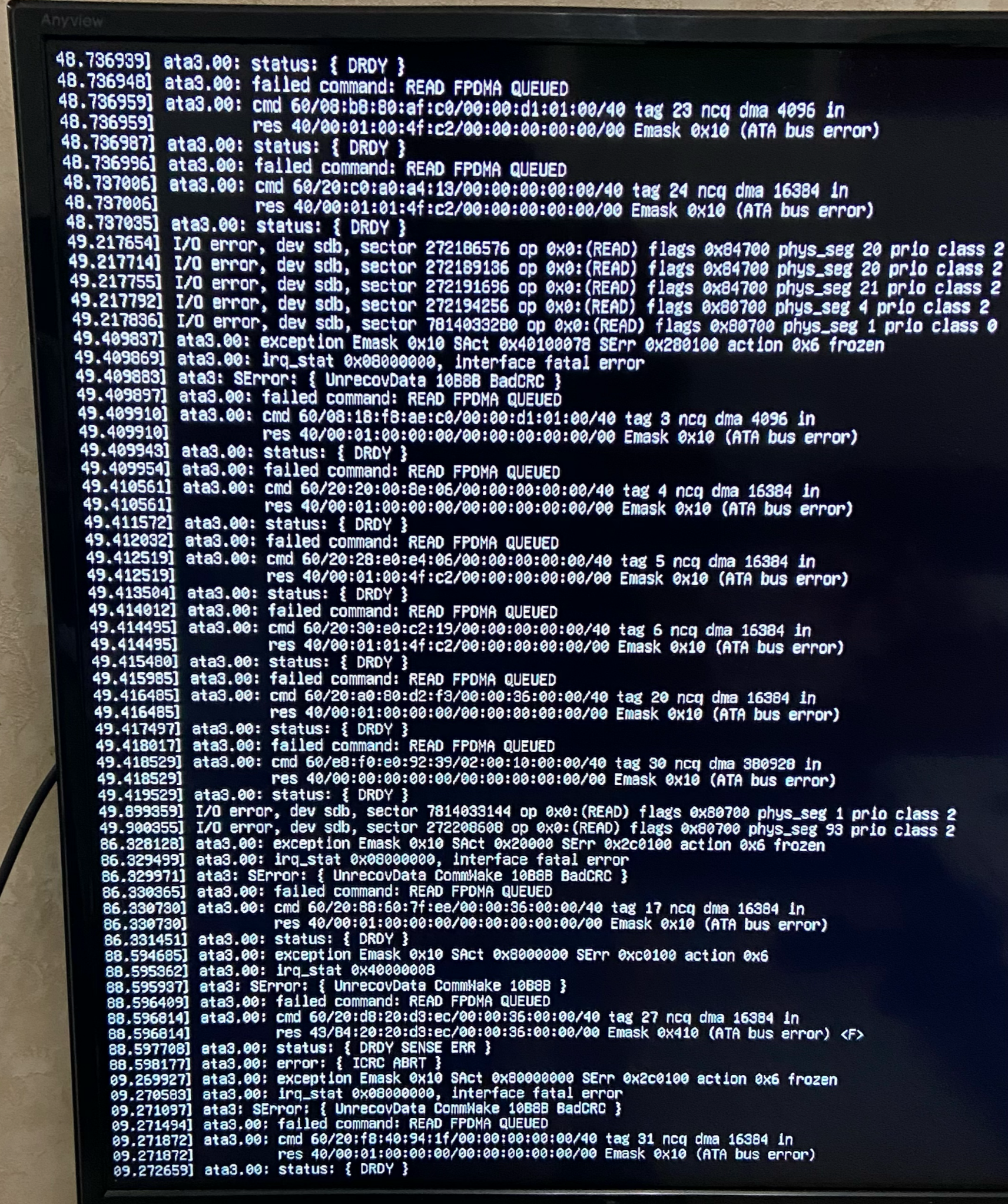
日志分析
failed command: read fpdma queued
cmd 60/20:c0:a0/40 tag 24 ncq dma 16384 in
res 40/00:01/00
emask 0x10 (ATA bus error)

I/O error, dev sdb, sector 272186576 op 0x0:(READ) flags 0x84700 phys_seg 20 prio class 2
I/O error, dev sdb, sector 7014033280 op 0x0:(READ) flags 0x84700 phys_seg 1 prio class 0
问题磁盘:/dev/sdb
发生了真实的扇区级读失败(不是假警告)
定位硬盘
使用 lsblk -o NAME,SIZE,MODEL,SERIAL查看具体硬盘
lsblk -o NAME,SIZE,MODEL,SERIAL                                                                                                                                                                              [11:48:07]
NAME                                                SIZE MODEL                SERIAL
sda                                               931.5G ST1000LM048-2E7172   WL1HEJxx
**─sda1                                            931.5G
  **─md2                                           931.4G
    **─trim_fab54333_73e1_4bd0_baf0_fdb72d57d8ed-0 931.4G
sdb                                                 3.6T ST4000VX015-3CU104   WW61CSxx
**─sdb1                                              3.6T
  **─trim_d40587c6_18b6_4db3_9359_237872b18a17-0     3.6T
sdc                                                 3.6T ST4000HKVS002-3FC104 ZW62Gxx6
**─sdc1                                              3.6T
  **─trim_9726de6a_cbfd_46e8_b127_0c8fc7c256c6-0     3.6T
sdd                                               931.5G ST1000LM048-2E7172   WKPMBxxD
**─sdd1                                            931.5G
  **─md1                                           931.4G
    **─trim_16968c37_6319_46a0_a0a1_5ae27b7e203e-0 931.4G
nvme1n1                                             1.9T HYV2TBX4             AA00000000000xx
**─nvme1n1p1                                         1.9T
  **─md127                                           1.9T
    **─trim_9bc1fdd1_427c_42ff_b047_e09c1f754af0-0   1.9T
nvme0n1                                           931.5G CT1000P3PSSD8        241948CD5Fxxx
**─nvme0n1p1                                          94M
**─nvme0n1p2                                        63.9G
**─nvme0n1p3                                       867.5G
  **─md0                                           867.4G
    **─trim_0de1354b_706d_48a3_b114_d461ee176ec3-0 867.4G
**更具日志分析到的挂载位置 **/dev/sdb
sdb                                                 3.6T ST4000VX015-3CU104   WW61CSxx
**─sdb1                                              3.6T
  **─trim_d40587c6_18b6_4db3_9359_237872b18a17-0     3.6T
确定是否与飞牛CRC磁盘信息一致
磁盘信息查看
sudo smartctl -a /dev/sdb

smartctl 7.3 2022-02-28 r5338 [x86_64-linux-6.12.18-trim] (local build)
Copyright (C) 2002-22, Bruce Allen, Christian Franke, www.smartmontools.org

=== START OF INFORMATION SECTION ===
Device Model:     ST4000VX015-3CU104
Serial Number:    WW61CSxx
LU WWN Device Id: 5 000c50 0f20c63ea
Firmware Version: CV10
User Capacity:    4,000,787,030,016 bytes [4.00 TB]
Sector Sizes:     512 bytes logical, 4096 bytes physical
Rotation Rate:    5400 rpm
Form Factor:      3.5 inches
Device is:        Not in smartctl database 7.3/6045
ATA Version is:   ACS-3 T13/2161-D revision 5
SATA Version is:  SATA 3.1, 6.0 Gb/s (current: 1.5 Gb/s)
Local Time is:    Wed Dec 31 13:52:19 2025 CST
SMART support is: Available - device has SMART capability.
SMART support is: Enabled

=== START OF READ SMART DATA SECTION ===
SMART overall-health self-assessment test result: PASSED

General SMART Values:
Offline data collection status:  (0x00) Offline data collection activity
                    was never started.
                    Auto Offline Data Collection: Disabled.
Self-test execution status:      ( 249) Self-test routine in progress...
                    90% of test remaining.
Total time to complete Offline
data collection:        (    0) seconds.
Offline data collection
capabilities:            (0x73) SMART execute Offline immediate.
                    Auto Offline data collection on/off support.
                    Suspend Offline collection upon new
                    command.
                    No Offline surface scan supported.
                    Self-test supported.
                    Conveyance Self-test supported.
                    Selective Self-test supported.
SMART capabilities:            (0x0003) Saves SMART data before entering
                    power-saving mode.
                    Supports SMART auto save timer.
Error logging capability:        (0x01) Error logging supported.
                    General Purpose Logging supported.
Short self-test routine
recommended polling time:    (   1) minutes.
Extended self-test routine
recommended polling time:    ( 452) minutes.
Conveyance self-test routine
recommended polling time:    (   2) minutes.
SCT capabilities:          (0x70bd) SCT Status supported.
                    SCT Error Recovery Control supported.
                    SCT Feature Control supported.
                    SCT Data Table supported.

SMART Attributes Data Structure revision number: 10
Vendor Specific SMART Attributes with Thresholds:
ID# ATTRIBUTE_NAME          FLAG     VALUE WORST THRESH TYPE      UPDATED  WHEN_FAILED RAW_VALUE
  1 Raw_Read_Error_Rate     0x000f   069   064   006    Pre-fail  Always       -       8697120
  3 Spin_Up_Time            0x0003   096   095   000    Pre-fail  Always       -       0
  4 Start_Stop_Count        0x0032   099   099   020    Old_age   Always       -       1552
  5 Reallocated_Sector_Ct   0x0033   100   100   010    Pre-fail  Always       -       0
  7 Seek_Error_Rate         0x000f   070   060   045    Pre-fail  Always       -       10836519
  9 Power_On_Hours          0x0032   089   089   000    Old_age   Always       -       10500
 10 Spin_Retry_Count        0x0013   100   100   097    Pre-fail  Always       -       0
 12 Power_Cycle_Count       0x0032   100   100   020    Old_age   Always       -       14
183 Runtime_Bad_Block       0x0032   076   076   000    Old_age   Always       -       24
184 End-to-End_Error        0x0032   100   100   099    Old_age   Always       -       0
187 Reported_Uncorrect      0x0032   100   100   000    Old_age   Always       -       0
188 Command_Timeout         0x0032   100   099   000    Old_age   Always       -       12885098554
189 High_Fly_Writes         0x003a   100   100   000    Old_age   Always       -       0
190 Airflow_Temperature_Cel 0x0022   075   059   040    Old_age   Always       -       25 (Min/Max 17/30)
191 G-Sense_Error_Rate      0x0032   100   100   000    Old_age   Always       -       0
192 Power-Off_Retract_Count 0x0032   100   100   000    Old_age   Always       -       101
193 Load_Cycle_Count        0x0032   098   098   000    Old_age   Always       -       5053
194 Temperature_Celsius     0x0022   025   041   000    Old_age   Always       -       25 (0 14 0 0 0)
195 Hardware_ECC_Recovered  0x001a   069   064   000    Old_age   Always       -       8697120
197 Current_Pending_Sector  0x0012   100   100   000    Old_age   Always       -       0
198 Offline_Uncorrectable   0x0010   100   100   000    Old_age   Offline      -       0
199 UDMA_CRC_Error_Count    0x003e   200   198   000    Old_age   Always       -       4048
240 Head_Flying_Hours       0x0000   100   253   000    Old_age   Offline      -       5110 (11 214 0)
241 Total_LBAs_Written      0x0000   100   253   000    Old_age   Offline      -       6945546172
242 Total_LBAs_Read         0x0000   100   253   000    Old_age   Offline      -       19938387874

SMART Error Log Version: 1
No Errors Logged

SMART Self-test log structure revision number 1
Num  Test_Description    Status                  Remaining  LifeTime(hours)  LBA_of_first_error
# 1  Extended offline    Self-test routine in progress 90%     10500         -
# 2  Extended offline    Interrupted (host reset)      00%     10485         -
# 3  Extended offline    Interrupted (host reset)      00%     10485         -
# 4  Extended offline    Aborted by host               90%     10472         -
# 5  Extended offline    Aborted by host               90%     10193         -

SMART Selective self-test log data structure revision number 1
 SPAN  MIN_LBA  MAX_LBA  CURRENT_TEST_STATUS
    1        0        0  Not_testing
    2        0        0  Not_testing
    3        0        0  Not_testing
    4        0        0  Not_testing
    5        0        0  Not_testing
Selective self-test flags (0x0):
  After scanning selected spans, do NOT read-scan remainder of disk.
If Selective self-test is pending on power-up, resume after 0 minute delay.
199 UDMA_CRC_Error_Count 0x003e 200 198 000 Old_age Always - 4048
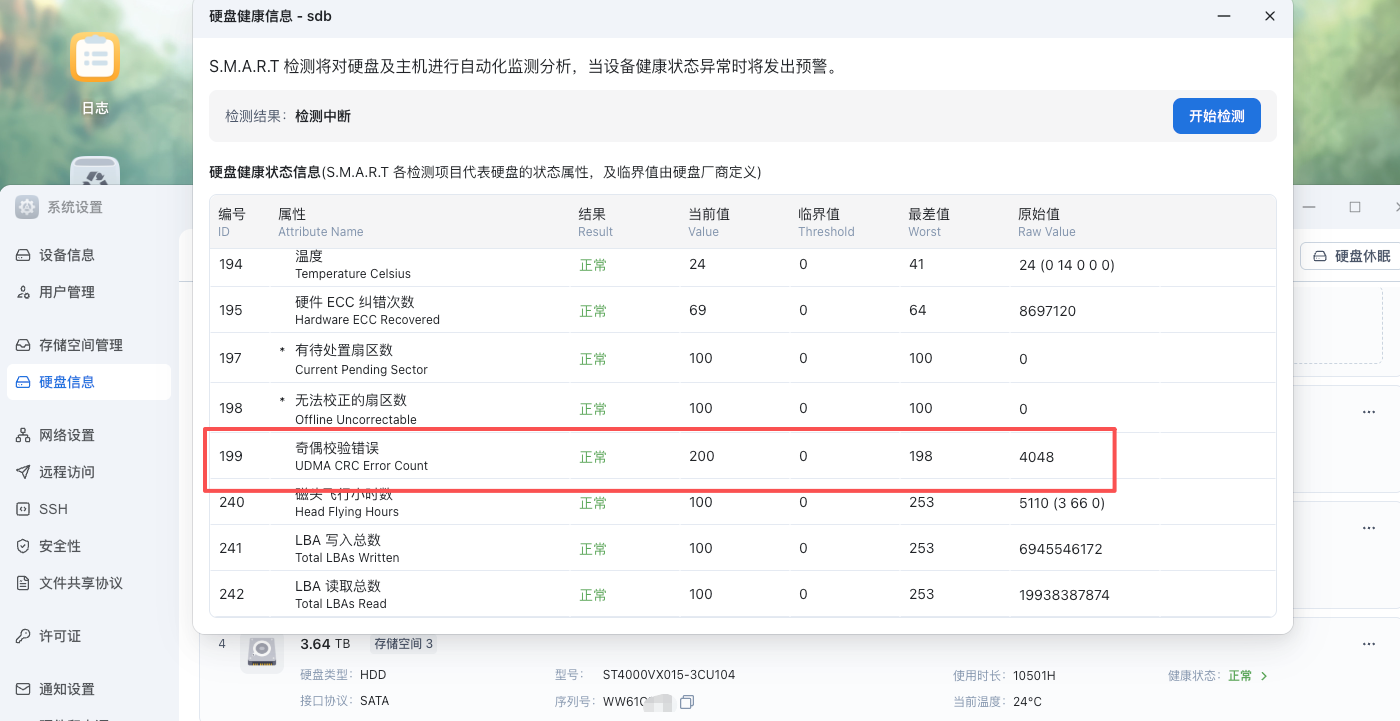
查阅CRC 错误开始时间
**我的机器安装过飞牛后并未刷机,因为经常更新系统重启,故只能通过 **<span class="ne-text">/var/log/kern.log</span> 日志查出
sudo grep "I/O error, dev sdb" /var/log/kern.log* | tail -n 1                                                                                                                                                               [14:12:33]
2024-11-28T12:45:23.027750+08:00 fnos-nas kernel: [1789895.599316] I/O error, dev sdb, sector 2107630896 op 0x0:(READ) flags 0x84700 phys_seg 44 prio class 2
**如果从未关机重启可通过 **<span class="ne-text">journalctl</span>查找
sudo journalctl -k | grep "I/O error, dev sdb" | head -n 1
问题定位须知
如何获取历史日志
- hdmi 连接显示器查阅
- **通过 **
<span class="ne-text">sudo grep "I/O error" /var/log/kern.log*</span> 或 <span class="ne-text">sudo journalctl -k | grep "I/O error"</span>
日志关键词
**2024-11-28T12:45:23.027750+08:00 fnos-nas kernel: [1789895.599316] I/O error, **dev sdx
**后续定位 需要根据 **<span class="ne-text">dev sdx</span> **关键词定位挂载位置 /dev/sdx,配合 **<strong><span class="ne-text">lsblk -o NAME,SIZE,MODEL,SERIAL</span></strong>可查阅出硬盘序列号以及型号
尝试性解决
更新bios,升级教程。
部分机器屏蔽IO可能有效吧,但是我的机器并无效果,错误依旧。
售后
机器是2024年10月份买的,质保内售后邮费需要自费(给爷整笑了),机器后背拆过清灰则无质保。
购买过机器的还是检查一下硬盘吧,数据无价。




 2025-12-31 16:44:38


 2026-2-18 17:40:44 楼主