在linux底下用smartctl可以查看到硬盘监控状态如下:
sudo smartctl -a -d sat /dev/sdb
smartctl 7.3 2022-02-28 r5338 [x86_64-linux-6.12.18-trim] (local build)
Copyright (C) 2002-22, Bruce Allen, Christian Franke, www.smartmontools.org
=== START OF INFORMATION SECTION ===
Model Family: Western Digital Red Plus
Device Model: WDC WD40EFPX-68C6CN0
Serial Number: WD-WX32D954AZZK
Firmware Version: 81.00A81
User Capacity: 4,000,787,030,016 bytes [4.00 TB]
Sector Size: 512 bytes logical/physical
Rotation Rate: 5400 rpm
Device is: In smartctl database 7.3/6061
ATA Version is: ATA/ATAPI-7 (minor revision not indicated)
Local Time is: Thu Jan 29 09:54:50 2026 CST
SMART support is: Available - device has SMART capability.
SMART support is: Enabled
=== START OF READ SMART DATA SECTION ===
SMART Status not supported: Incomplete response, ATA output registers missing
SMART overall-health self-assessment test result: PASSED
Warning: This result is based on an Attribute check.
General SMART Values:
Offline data collection status: (0x00) Offline data collection activity
				was never started.

				Auto Offline Data Collection: Disabled.
Self-test execution status: ( 0) The previous self-test routine completed
				without error or no self-test has ever

				been run.
Total time to complete Offline
data collection: (40200) seconds.
Offline data collection
capabilities: (0x7b) SMART execute Offline immediate.
				Auto Offline data collection on/off support.

				Suspend Offline collection upon new

				command.

				Offline surface scan supported.

				Self-test supported.

				Conveyance Self-test supported.

				Selective Self-test supported.
SMART capabilities: (0x0003) Saves SMART data before entering
				power-saving mode.

				Supports SMART auto save timer.
Error logging capability: (0x01) Error logging supported.
No General Purpose Logging support.
Short self-test routine
recommended polling time: ( 2) minutes.
Extended self-test routine
recommended polling time: ( 419) minutes.
Conveyance self-test routine
recommended polling time: ( 5) minutes.
SMART Attributes Data Structure revision number: 16
Vendor Specific SMART Attributes with Thresholds:
ID# ATTRIBUTE_NAME FLAG VALUE WORST THRESH TYPE UPDATED WHEN_FAILED RAW_VALUE
1 Raw_Read_Error_Rate 0x002f 200 200 051 Pre-fail Always - 0
3 Spin_Up_Time 0x0027 208 207 021 Pre-fail Always - 2558
4 Start_Stop_Count 0x0032 100 100 000 Old_age Always - 76
5 Reallocated_Sector_Ct 0x0033 200 200 140 Pre-fail Always - 0
7 Seek_Error_Rate 0x002e 100 253 000 Old_age Always - 0
9 Power_On_Hours 0x0032 100 100 000 Old_age Always - 289
10 Spin_Retry_Count 0x0032 100 253 000 Old_age Always - 0
11 Calibration_Retry_Count 0x0032 100 253 000 Old_age Always - 0
12 Power_Cycle_Count 0x0032 100 100 000 Old_age Always - 7
192 Power-Off_Retract_Count 0x0032 200 200 000 Old_age Always - 5
193 Load_Cycle_Count 0x0032 200 200 000 Old_age Always - 173
194 Temperature_Celsius 0x0022 116 107 000 Old_age Always - 31
196 Reallocated_Event_Count 0x0032 200 200 000 Old_age Always - 0
197 Current_Pending_Sector 0x0032 200 200 000 Old_age Always - 0
198 Offline_Uncorrectable 0x0030 100 253 000 Old_age Offline - 0
199 UDMA_CRC_Error_Count 0x0032 200 200 000 Old_age Always - 0
200 Multi_Zone_Error_Rate 0x0008 100 253 000 Old_age Offline - 0
SMART Error Log Version: 1
No Errors Logged
SMART Self-test log structure revision number 1
No self-tests have been logged. [To run self-tests, use: smartctl -t]
SMART Selective self-test log data structure revision number 1
SPAN MIN_LBA MAX_LBA CURRENT_TEST_STATUS
1        0        0  Not\_testing

2        0        0  Not\_testing

3        0        0  Not\_testing

4        0        0  Not\_testing

5        0        0  Not\_testing
Selective self-test flags (0x0):
After scanning selected spans, do NOT read-scan remainder of disk.
If Selective self-test is pending on power-up, resume after 0 minute delay.
基于以上结果已经包含硬盘温度、使用时长等信息了,飞牛上仍然显示“不支持检测”,原因应该就是那句“
SMART Status not supported: Incomplete response, ATA output registers missing
”,硬盘柜控制器没有完整返回ATA寄存器的状态标志,但这实际上并不影响实际SMART数据的读取。硬盘柜的USB/SATA控制器在返回 SMART Status字段时没有完全遵循ATA规范,缺少了某些寄存器信息。飞牛NAS的Web界面可能过于严格地检查了这个状态标志。
我会联系硬盘柜商家反馈他们的该问题。同时希望飞牛技术人员能看到,考虑帮忙解决一下这个问题,是不是不需要那么严格的检查这个状态标志?




 2026-1-26 18:14:29
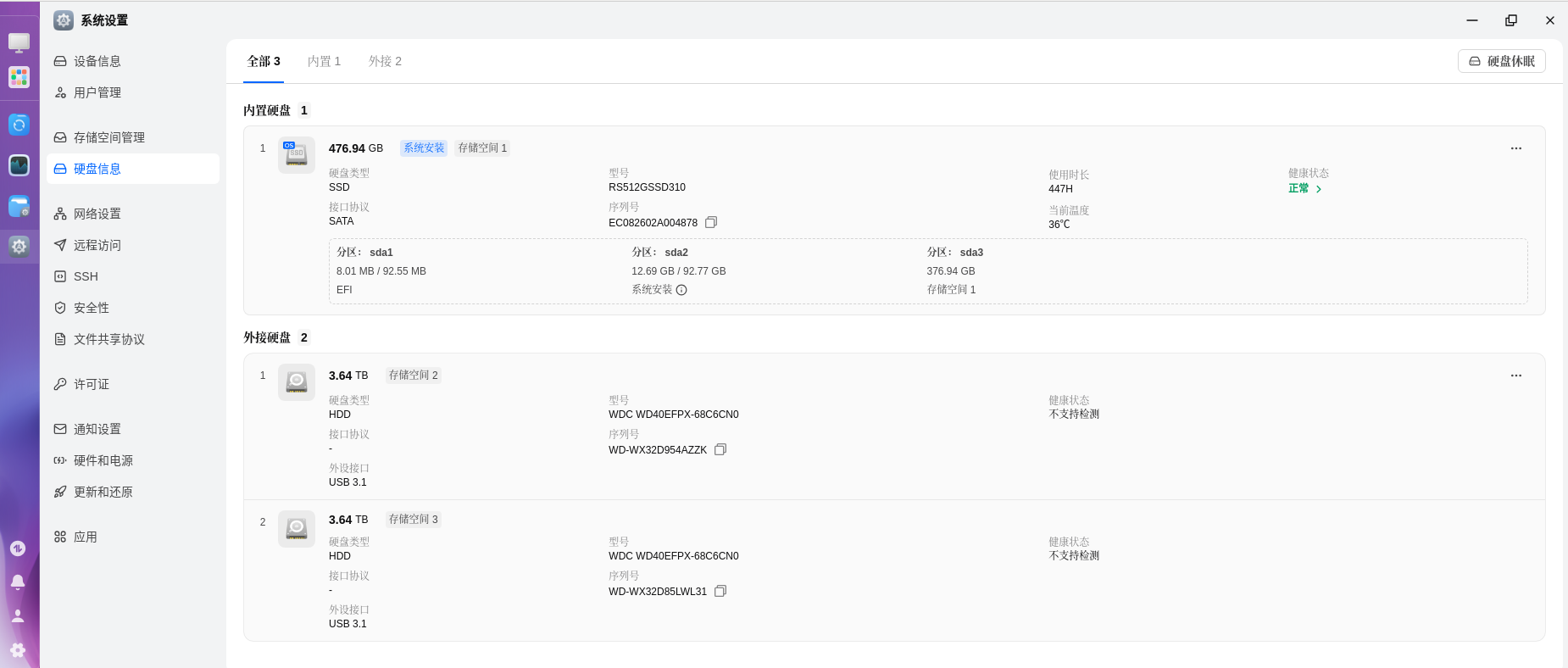


 2026-1-26 18:16:19 楼主