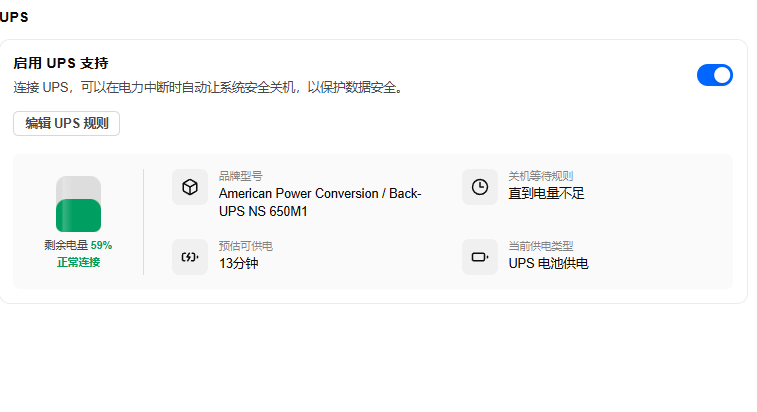
这段时间,家里电力老是不稳定,京东买了个便宜的UPS,之前也没有研究,想着UPS用USB连上NAS就好了,但是连上之后傻眼了。
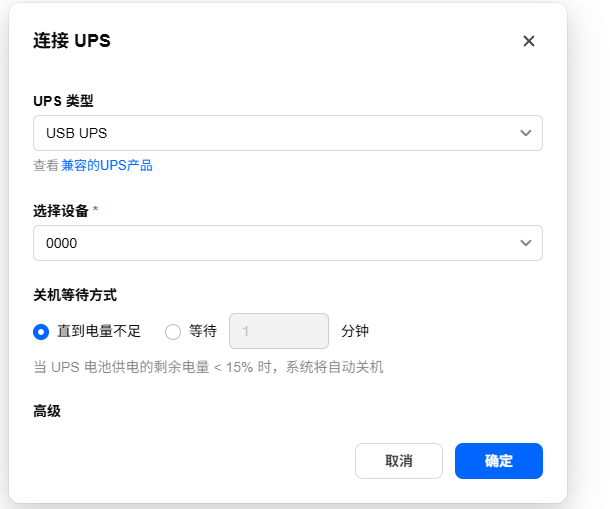
选择设备是0000,然后确定也点不了,看了一下
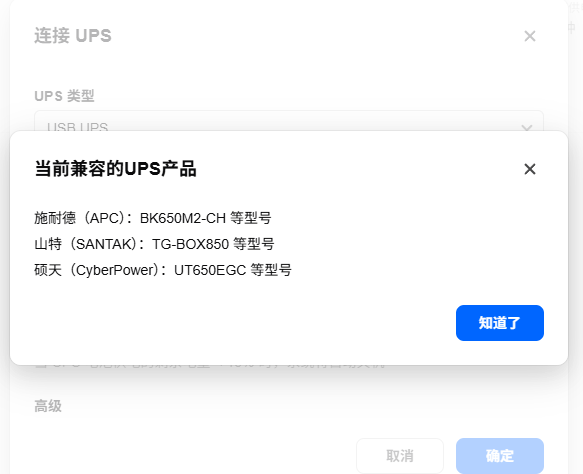
然后逛了一下论坛,想找找有没有类似帖子,没找到,这找到两位佬的方案:
https://club.fnnas.com/forum.php?mod=viewthread&tid=49920&highlight=
https://club.fnnas.com/forum.php?mod=viewthread&tid=60796&highlight=
大概是探针模式,但我想了一下,还是不实用,然后突然灵光一闪,能够显示0000,但是无法识别,是否是驱动不兼容的问题呢,那能否让AI帮我们改一个驱动出来呢?
然后我就开始了改造之旅。
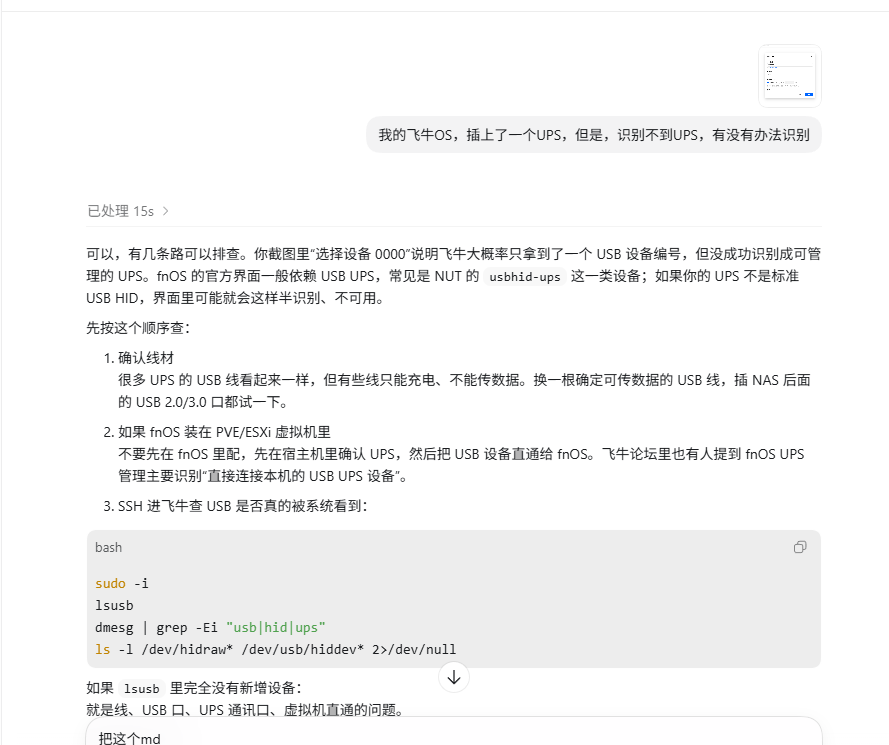
果然让codex一阵分析,它也觉得是驱动问题,然后我就给了它我的ssh信息,让他直接去分析。
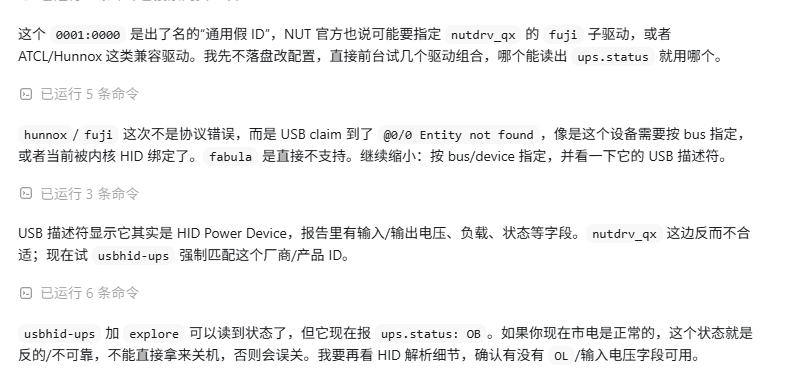
但是不太对,能抓到设备信息,但是无法读取。
然后我又翻了一下论坛,发现了个官方发的回复:关于UPS我们已经增加了多种驱动,可以ssh后,输入sudo nut-scanner -u检查一下是否支持
然后我把这句话发给了codex,让他按照这个命令去尝试解决。然后居然就神奇的找到了!
然后就给大家看看成品:
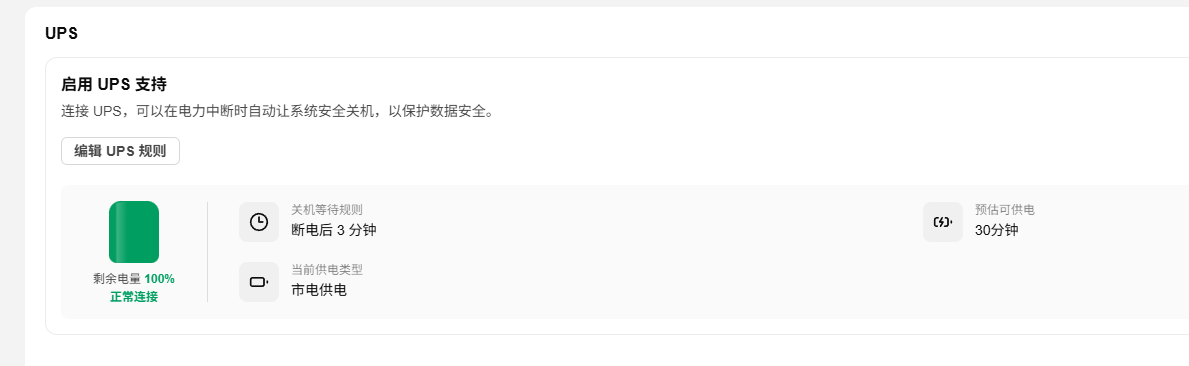
最开始还有品牌型号的,但是被我搞不见了= =,但是不影响使用,就懒得管了。
后面尝试更改配置,改关机时间,结果就又恢复了,让AI跑了之后发现,保存配置会自动恢复原版的UPS设置,后面又考虑了万一升级的话,会不会把UPS设置再次恢复,所以又让codex加了个开机脚本,开机查询UPS,不对就自动修复。
感叹一下,现在AI真的很厉害了,像我这样的技术小白居然也能享受到科技的红利了。
作为一个参考给大家用便宜UPS的的解决方案把,我买下来200,带USB通讯口。
如果买再便宜的,没有USB通讯口的,那我觉得可以使用探针方案,就是我贴的两位大佬的方案。
最后,如果你也有个飞牛官方不支持的UPS,带通讯口的,那你也可以尝试下面的指导文本(我让codex整理额度),让AI帮你尝试解决一下~
当然也希望官方能上手官方支持各类UPS,那更好不过了。
# fnOS + Pudidun PD1000 UPS 识别与自动修复流程

这份文档用于在飞牛 OS / fnOS 上处理 Pudidun PD1000 UPS 识别异常的问题。

目标:

- 让 fnOS/NUT 正常识别 Pudidun PD1000。
- 让飞牛 UPS 页面能显示连接、电量、品牌型号、预计可供电时间。
- 允许在飞牛界面里修改关机等待时间。
- 防止飞牛保存规则或系统更新后覆盖 UPS 驱动配置。

本文不包含任何个人 IP、用户名、密码或设备私密信息。实际操作时请把占位符替换成自己的。

## 需要提供给我什么

下次遇到类似问题,可以直接把下面信息发给我:

`text
NAS 系统:fnOS / 飞牛 OS
UPS 型号:Pudidun PD1000
NAS 型号:例如 蜗牛星际 C
NAS 电源额定功率:例如 250W
希望断 电后多久关机:例如 1 分钟 / 3 分钟
SSH 地址:ssh 用户名@NAS_IP -p 端口
是否允许我通过 SSH 执行 sudo 诊断和修改:允许 / 不允许
不要直接公开发送密码。如果必须远程操作,建议临时创建一个账号或临时密码,操作完成后修改。
核心结论
当前验证过的推荐策略:断 电后等待 3 分钟关机。对应飞牛配置里 power-policy.value = 180,即 180 秒。
注意:PD1000 的飞牛“编辑 UPS 规则”弹窗里,“选择设备”下拉框可能为空。这通常是飞牛的扫描列表兼容问题,不代表底层保护失效。以主页面和 upsc 1100231@localhost 为准;只要能看到 ups.status: OL、battery.charge、ups.model: Pudidun PD1000,说明底层正常。
Pudidun PD1000 在 Linux 下可能显示为:
0001:0000 Fry's Electronics
fnOS 默认扫描可能会写成:
[1100231]
driver    = "nutdrv_qx"
port      = "auto"
vendorid  = "0001"
productid = "0000"
bus       = "001"
但这样通常会启动失败,日志里会出现:
Device not supported!
Driver not connected
关键是必须指定:
subdriver  = "krauler"
langid_fix = "0x0409"
一、SSH 诊断
连接 NAS:
ssh 用户名@NAS_IP -p 端口
进入 root 或使用 sudo:
sudo -i
检查 USB 设备:
lsusb
如果看到类似下面内容,说明 UPS 已经被 USB 枚举:
Bus 001 Device 003: ID 0001:0000 Fry's Electronics
检查 NUT 扫描:
nut-scanner -U
注意:USB 扫描参数是大写 -U。小写 -u 在部分版本中不是 USB 扫描。
期望看到类似:
[nutdev1]
    driver = "nutdrv_qx"
    port = "auto"
    vendorid = "0001"
    productid = "0000"
    bus = "001"
二、测试正确子驱动
先停止 NUT driver,避免占用:
systemctl stop nut-driver@1100231.service || true
如果内核 usbhid 抢占了设备,先解绑:
printf '1-3:1.0' > /sys/bus/usb/drivers/usbhid/unbind 2>/dev/null || true
测试 krauler 子驱动:
export NUT_STATEPATH=/tmp
/lib/nut/nutdrv_qx -s test -u root -d 1 \
  -x subdriver=krauler \
  -x vendorid=0001 \
  -x productid=0000 \
  -x bus=001 \
  -x port=auto \
  -x langid_fix=0x0409
成功时会看到:
Using protocol: Q1
input.voltage: ...
output.voltage: ...
ups.status: OL
OL 表示市电在线。断 电时通常会变成 OB。
三、写入 NUT 配置
备份原配置:
cp -a /etc/nut/ups.conf /etc/nut/ups.conf.$(date +%Y%m%d_%H%M%S).bak
编辑:
nano /etc/nut/ups.conf
写入或修正为:
maxretry = 3

[1100231]
driver                          = "nutdrv_qx"
port                            = "auto"
vendorid                        = "0001"
productid                       = "0000"
bus                             = "001"
subdriver                       = "krauler"
langid_fix                      = "0x0409"
offdelay                        = "120"
ondelay                         = "60"
desc                            = "Pudidun PD1000 UPS"
override.ups.model              = "Pudidun PD1000"
override.device.model           = "Pudidun PD1000"
override.device.mfr             = "Pudidun"
override.ups.mfr                = "Pudidun"
override.ups.realpower.nominal  = "600"
default.battery.voltage.high    = "13.0"
default.battery.voltage.low     = "10.4"
default.battery.voltage.nominal = "12.0"
runtimecal                      = "300,100,1800,10"
idleload                        = "10"
chargetime                      = "43200"
override.battery.runtime        = "1800"
override.x.additional.lowbatt   = "15"
说明:
subdriver = "krauler" 是让 PD1000 正常识别的关键。langid_fix = "0x0409" 是这个类型设备常见的语言 ID 兼容参数。battery.runtime = 1800 表示估算可供电 1800 秒,即 30 分钟。runtimecal 是续航估算参考,不影响断 电状态识别。offdelay/ondelay 是 UPS 延迟关/开负载参数,是否真正支持取决于 UPS 和子驱动。
四、恢复飞牛原生 UPS 事件回调
如果曾经写过自定义关机脚本,建议恢复飞牛原生回调。
编辑:
nano /etc/nut/upssched.conf
内容:
CMDSCRIPT /usr/trim/bin/upssched_cmd.sh

PIPEFN /run/nut/upssched.pipe
LOCKFN /run/nut/upssched.lock

AT ONBATT * EXECUTE onbatt
AT ONLINE * EXECUTE online
AT COMMBAD * EXECUTE commbad
AT COMMOK * EXECUTE commok
AT LOWBATT * EXECUTE lowbatt
这样断 电后的关机时间仍由飞牛 OS 页面里的 UPS 规则控制。
五、重启 NUT 服务并验证
printf '1-3:1.0' > /sys/bus/usb/drivers/usbhid/unbind 2>/dev/null || true

systemctl restart nut-driver@1100231.service
sleep 8
systemctl restart nut-server.service nut-monitor.service
sleep 3
检查服务:
systemctl is-active nut-driver@1100231.service nut-server.service nut-monitor.service
正常应输出:
active
active
active
检查 UPS:
upsc 1100231@localhost
正常应看到:
ups.status: OL
battery.charge: 100
battery.runtime: 1800
ups.model: Pudidun PD1000
向飞牛 UPS 后端补发连接正常事件:
/usr/trim/bin/upssched_cmd.sh commok || true
/usr/trim/bin/upssched_cmd.sh online || true
然后刷新飞牛 UPS 页面。
六、开机脚本保护
飞牛保存 UPS 规则或系统更新后,可能会覆盖 /etc/nut/ups.conf,导致 subdriver 丢失,UPS 再次断开。也可能改写 /etc/nut/device.conf,导致关机等待时间或绑定设备信息异常。
因此需要写一个修复脚本:
nano /usr/local/sbin/pd1000-fix-ups-conf.py
内容:
#!/usr/bin/env python3
from pathlib import Path
import subprocess
import sys

UPS_CONF = Path('/etc/nut/ups.conf')
DEVICE_CONF = Path('/etc/nut/device.conf')

required_ups = {
    'driver': 'driver                          = "nutdrv_qx"',
    'port': 'port                            = "auto"',
    'vendorid': 'vendorid                        = "0001"',
    'productid': 'productid                       = "0000"',
    'bus': 'bus                             = "001"',
    'subdriver': 'subdriver                       = "krauler"',
    'langid_fix': 'langid_fix                      = "0x0409"',
    'offdelay': 'offdelay                        = "120"',
    'ondelay': 'ondelay                         = "60"',
    'desc': 'desc                            = "Pudidun PD1000 UPS"',
    'override.ups.model': 'override.ups.model              = "Pudidun PD1000"',
    'override.device.model': 'override.device.model           = "Pudidun PD1000"',
    'override.device.mfr': 'override.device.mfr             = "Pudidun"',
    'override.ups.mfr': 'override.ups.mfr                = "Pudidun"',
    'override.ups.realpower.nominal': 'override.ups.realpower.nominal  = "600"',
    'default.battery.voltage.high': 'default.battery.voltage.high    = "13.0"',
    'default.battery.voltage.low': 'default.battery.voltage.low     = "10.4"',
    'default.battery.voltage.nominal': 'default.battery.voltage.nominal = "12.0"',
    'runtimecal': 'runtimecal                      = "300,100,1800,10"',
    'idleload': 'idleload                        = "10"',
    'chargetime': 'chargetime                      = "43200"',
    'override.battery.runtime': 'override.battery.runtime        = "1800"',
}

required_device = {
    'enable': 'enable                            = true',
    'last-device.name': 'last-device.name                  = 1100231',
    'last-device.driver': 'last-device.driver                = nutdrv_qx',
    'last-device.port': 'last-device.port                  = auto',
    'last-device.vendorid': 'last-device.vendorid              = 0001',
    'last-device.productid': 'last-device.productid             = 0000',
    'last-device.product': 'last-device.product               = Pudidun PD1000',
    'last-device.serial': 'last-device.serial                = Pudidun-PD1000',
    'last-device.vendor': 'last-device.vendor                = Pudidun',
    'last-device.bus': 'last-device.bus                   = 001',
    'x.additional.devicetype': 'x.additional.devicetype           = USB',
}

def repair_section_file(path: Path) -> bool:
    text = path.read_text() if path.exists() else ''
    lines = text.splitlines()
    out = []
    in_target = False
    seen = set()
    found_target = False
    changed = False

    def flush_missing():
        nonlocal changed
        for key, line in required_ups.items():
            if key not in seen:
                out.append(line)
                changed = True

    for line in lines:
        stripped = line.strip()
        if stripped.startswith('[') and stripped.endswith(']'):
            if in_target:
                flush_missing()
            in_target = stripped == '[1100231]'
            if in_target:
                found_target = True
                seen = set()
            out.append(line)
            continue
        if in_target and '=' in stripped:
            key = stripped.split('=', 1)[0].strip()
            if key in required_ups:
                out.append(required_ups[key])
                seen.add(key)
                if line != required_ups[key]:
                    changed = True
                continue
        out.append(line)

    if in_target:
        flush_missing()

    if not found_target:
        if out and out[-1].strip():
            out.append('')
        out.append('[1100231]')
        out.extend(required_ups.values())
        changed = True

    new_text = '\n'.join(out) + '\n'
    if new_text != text:
        path.write_text(new_text)
        changed = True
    return changed

def repair_key_value_file(path: Path) -> bool:
    text = path.read_text() if path.exists() else ''
    lines = text.splitlines()
    seen = set()
    out = []
    changed = False

    for line in lines:
        stripped = line.strip()
        if '=' in stripped and not stripped.startswith('#'):
            key = stripped.split('=', 1)[0].strip()
            if key in required_device:
                out.append(required_device[key])
                seen.add(key)
                if line != required_device[key]:
                    changed = True
                continue
        out.append(line)

    for key, line in required_device.items():
        if key not in seen:
            out.append(line)
            changed = True

    new_text = '\n'.join(out) + '\n'
    if new_text != text:
        path.write_text(new_text)
        changed = True
    return changed

changed = False
changed = repair_section_file(UPS_CONF) or changed
changed = repair_key_value_file(DEVICE_CONF) or changed

try:
    Path('/sys/bus/usb/drivers/usbhid/unbind').write_text('1-3:1.0')
except Exception:
    pass

if changed or '--restart' in sys.argv:
    subprocess.run(['systemctl', 'daemon-reload'], check=False)
    subprocess.run(['systemctl', 'restart', 'nut-driver@1100231.service'], check=False)
    subprocess.run(['sleep', '8'], check=False)
    subprocess.run(['systemctl', 'restart', 'nut-server.service', 'nut-monitor.service'], check=False)
    subprocess.run(['sleep', '3'], check=False)
    subprocess.run(['/usr/trim/bin/upssched_cmd.sh', 'commok'], check=False)
    subprocess.run(['/usr/trim/bin/upssched_cmd.sh', 'online'], check=False)
授权:
chmod +x /usr/local/sbin/pd1000-fix-ups-conf.py
再写开机脚本:
nano /usr/local/sbin/pd1000-boot-fix.sh
内容:
#!/bin/sh
# Boot-time UPS repair for Pudidun PD1000 on fnOS.
# fnOS may rewrite /etc/nut/ups.conf after UPS rule changes or updates.
# This restores the driver options required by this UPS and restarts NUT.

set -eu

/usr/local/sbin/pd1000-fix-ups-conf.py --restart
授权:
chmod +x /usr/local/sbin/pd1000-boot-fix.sh
创建开机服务:
nano /etc/systemd/system/pd1000-boot-fix.service
内容:
[Unit]
Description=Run Pudidun PD1000 UPS boot repair script
After=local-fs.target systemd-udev-settle.service
Wants=systemd-udev-settle.service

[Service]
Type=oneshot
ExecStart=/usr/local/sbin/pd1000-boot-fix.sh

[Install]
WantedBy=multi-user.target
启用:
systemctl daemon-reload
systemctl enable pd1000-boot-fix.service
systemctl start pd1000-boot-fix.service
七、保存/修改 UPS 规则后自动修复
创建 path 监听服务:
nano /etc/systemd/system/pd1000-fix-ups-conf.service
内容:
[Unit]
Description=Repair Pudidun PD1000 NUT config after fnOS saves UPS rules

[Service]
Type=oneshot
ExecStart=/usr/local/sbin/pd1000-fix-ups-conf.py --restart
创建 path 监听:
nano /etc/systemd/system/pd1000-fix-ups-conf.path
内容:
[Unit]
Description=Watch fnOS UPS config for Pudidun PD1000 repairs

[Path]
PathChanged=/etc/nut/ups.conf
PathChanged=/etc/nut/device.conf
Unit=pd1000-fix-ups-conf.service

[Install]
WantedBy=multi-user.target
启用:
systemctl daemon-reload
systemctl enable --now pd1000-fix-ups-conf.path
这样在飞牛页面里修改 UPS 规则并保存后,如果 ups.conf 或 device.conf 被覆盖,系统会自动修复。
如果要手动设置断 电后 3 分钟关机,可以直接改 /etc/nut/device.conf:
sed -i -E 's/^(power-policy\.value[[:space:]]*=[[:space:]]*).*/\1180/' /etc/nut/device.conf
/usr/local/sbin/pd1000-fix-ups-conf.py --restart
180 表示 180 秒,即 3 分钟。改完必须确认驱动仍在线:
upsc 1100231@localhost | egrep '^(ups.status|battery.charge|battery.runtime|ups.model|device.model):'
八、验证自动修复
模拟飞牛覆盖配置:
cp -a /etc/nut/ups.conf /etc/nut/ups.conf.$(date +%Y%m%d_%H%M%S).testbak
sed -i '/subdriver/d;/langid_fix/d;/override\.ups\.model/d' /etc/nut/ups.conf
等待 20 秒:
sleep 20
检查是否自动恢复:
grep -E 'subdriver|langid_fix|override\.ups\.model' /etc/nut/ups.conf
正常应看到:
subdriver                       = "krauler"
langid_fix                      = "0x0409"
override.ups.model              = "Pudidun PD1000"
检查服务:
systemctl is-active pd1000-fix-ups-conf.path
systemctl is-active nut-driver@1100231.service nut-server.service nut-monitor.service
upsc 1100231@localhost ups.status
正常应看到:
active
active
active
active
OL
九、续航估算
蜗牛星际 C 这类 NAS 的 250W 通常是电源额定功率,不是实际功耗。
常见估算:
空闲/轻负载:25-40W
多硬盘运行:40-70W
硬盘启动瞬间:80-120W+
PD1000 标称约 1000VA / 600W。不接其他设备,仅接 NAS 时,保守估算:
40W:约 40-70 分钟
50W:约 30-55 分钟
70W:约 20-35 分钟
100W:约 10-25 分钟
为了页面显示,配置中填了:
battery.runtime = 1800 秒
即约 30 分钟,是偏保守值。真实续航以电池健康度和实际硬盘数量为准。
十、常见问题
1. 飞牛页面显示“失去连接”
先看底层是否正常:
upsc 1100231@localhost ups.status
如果输出 OL,说明底层正常,页面可能还没刷新。执行:
/usr/trim/bin/upssched_cmd.sh commok || true
/usr/trim/bin/upssched_cmd.sh online || true
然后刷新页面。
如果输出 Driver not connected,检查:
cat /etc/nut/ups.conf
systemctl status nut-driver@1100231.service --no-pager
journalctl -u nut-driver@1100231.service -n 50 --no-pager
重点确认是否存在:
subdriver = "krauler"
langid_fix = "0x0409"
2. 修改飞牛 UPS 规则后又断开
说明飞牛保存规则时覆盖了 /etc/nut/ups.conf。
确认自动修复监听是否启用:
systemctl is-enabled pd1000-fix-ups-conf.path
systemctl is-active pd1000-fix-ups-conf.path
如果不是 enabled/active,重新启用:
systemctl enable --now pd1000-fix-ups-conf.path
如果只是要修改等待时间,建议直接改秒数。例如断 电后 3 分钟关机:
sed -i -E 's/^(power-policy\.value[[:space:]]*=[[:space:]]*).*/\1180/' /etc/nut/device.conf
/usr/local/sbin/pd1000-fix-ups-conf.py --restart
upsc 1100231@localhost | egrep '^(ups.status|battery.charge|ups.model):'
如果这里出现 Driver not connected,优先检查 /etc/nut/ups.conf 里是否还存在 subdriver = "krauler" 和 langid_fix = "0x0409",然后重新运行修复脚本。
3. 系统更新后失效
检查:
systemctl is-enabled pd1000-boot-fix.service
systemctl is-enabled pd1000-fix-ups-conf.path
ls -l /usr/local/sbin/pd1000-fix-ups-conf.py
ls -l /usr/local/sbin/pd1000-boot-fix.sh
如果文件被更新清理掉,按本文第六、七节重建。
给 AI 助手的复用提示
如果下次要让 AI 助手直接处理,可以发送:
我的 fnOS 上 Pudidun PD1000 UPS 被识别成 0001:0000,需要按 nutdrv_qx + krauler 修复。
请按以下流程做:
1. SSH 连接后先运行 lsusb、nut-scanner -U、upsc 1100231@localhost。
2. 如果 /etc/nut/ups.conf 被飞牛覆盖,请补回 subdriver=krauler、langid_fix=0x0409、Pudidun PD1000 显示字段、电池电压估算和 runtime。
3. 恢复 /etc/nut/upssched.conf 为飞牛原生 /usr/trim/bin/upssched_cmd.sh 回调,不要写自定义关机策略。
4. 重启 nut-driver@1100231、nut-server、nut-monitor。
5. 写入开机修复脚本 /usr/local/sbin/pd1000-boot-fix.sh。
6. 写入 PathChanged=/etc/nut/ups.conf 和 PathChanged=/etc/nut/device.conf 的 systemd path 监听,飞牛保存 UPS 规则后自动修复。
7. 如果要改成断 电后 3 分钟关机,把 /etc/nut/device.conf 里的 power-policy.value 设置为 180。
8. 最后模拟删除 subdriver/langid_fix,验证 20 秒内能自动修复,并确认 upsc 返回 OL。




 2026-5-18 15:37:20