飞牛 NAS 系统更新失败问题反馈报告
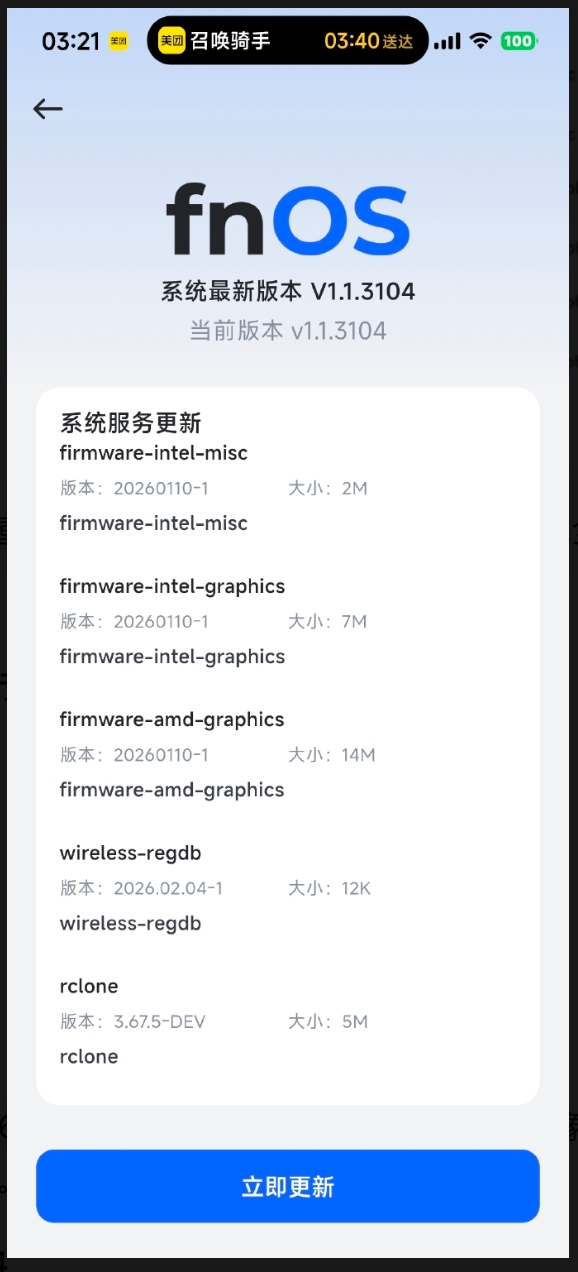
总结:自从 1.30+版本更新推送之后,增加了 firmware-intel-msc 依赖问题,更新功能就坏掉了,修复功能的脚本也解决不了这个问题。每次更新虽然都显示失败,重启之后版本号又是最新的,仍然会提示更新,每次更新列表里都会遗留 firmware-intel-*这些包。
通过 AI 多次分析日志后,发现 firmware-misc-nonfree 版本过旧,导致 firmware-intel-misc 无法安装,想通过手动安装又遇到 debian 官方包与飞牛包发生冲突。
root@codingx-mini:~# apt update
Hit:1 https://mirrors.aliyun.com/debian bookworm InRelease
Hit:2 https://mirrors.aliyun.com/debian bookworm-updates InRelease
Hit:3 https://repo.fnnas.com/repo bookworm InRelease
Hit:4 https://mirrors.aliyun.com/debian-security bookworm-security InRelease
Hit:5 https://mirrors.ustc.edu.cn/debian bookworm InRelease
Hit:6 https://mirrors.ustc.edu.cn/debian bookworm-updates InRelease
Hit:7 https://mirrors.ustc.edu.cn/debian bookworm-backports InRelease
Hit:8 https://mirrors.ustc.edu.cn/debian-security bookworm-security InRelease
Hit:9 https://mirrors.ustc.edu.cn/docker-ce/linux/debian bookworm InRelease
Reading package lists... Done
Building dependency tree... Done
Reading state information... Done
187 packages can be upgraded. Run 'apt list --upgradable' to see them.
root@codingx-mini:~# apt install -t bookworm-backports firmware-amd-graphics -y
Reading package lists... Done
Building dependency tree... Done
Reading state information... Done
The following package was automatically installed and is no longer required:
  slirp4netns
Use 'apt autoremove' to remove it.
The following additional packages will be installed:
  firmware-bnx2 firmware-intel-graphics firmware-intel-misc firmware-linux
  firmware-linux-nonfree firmware-mediatek firmware-misc-nonfree firmware-nvidia-graphics
  firmware-realtek
The following NEW packages will be installed:
  firmware-intel-graphics firmware-intel-misc firmware-mediatek firmware-nvidia-graphics
The following packages will be upgraded:
  firmware-amd-graphics firmware-bnx2 firmware-linux firmware-linux-nonfree
  firmware-misc-nonfree firmware-realtek                                                      6 upgraded, 4 newly installed, 0 to remove and 274 not upgraded.
Need to get 89.9 MB of archives.                                                              After this operation, 142 MB of additional disk space will be used.
Get:1 https://mirrors.ustc.edu.cn/debian bookworm-backports/non-free-firmware amd64 firmware-amd-graphics all 20250410-2~bpo12+1 [15.1 MB]
Get:2 https://mirrors.ustc.edu.cn/debian bookworm-backports/non-free-firmware amd64 firmware-linux all 20250410-2~bpo12+1 [71.9 kB]
Get:3 https://mirrors.ustc.edu.cn/debian bookworm-backports/non-free-firmware amd64 firmware-linux-nonfree all 20250410-2~bpo12+1 [71.9 kB]
Get:4 https://mirrors.ustc.edu.cn/debian bookworm-backports/non-free-firmware amd64 firmware-misc-nonfree all 20250410-2~bpo12+1 [4,331 kB]
Get:5 https://mirrors.ustc.edu.cn/debian bookworm-backports/non-free-firmware amd64 firmware-bnx2 all 20250410-2~bpo12+1 [155 kB]
Get:6 https://mirrors.ustc.edu.cn/debian bookworm-backports/non-free-firmware amd64 firmware-intel-graphics all 20250410-2~bpo12+1 [6,419 kB]
Get:7 https://mirrors.ustc.edu.cn/debian bookworm-backports/non-free-firmware amd64 firmware-intel-misc all 20250410-2~bpo12+1 [1,868 kB]
Get:8 https://mirrors.ustc.edu.cn/debian bookworm-backports/non-free-firmware amd64 firmware-mediatek all 20250410-2~bpo12+1 [19.6 MB]
Get:9 https://mirrors.ustc.edu.cn/debian bookworm-backports/non-free-firmware amd64 firmware-nvidia-graphics all 20250410-2~bpo12+1 [39.5 MB]
Get:10 https://mirrors.ustc.edu.cn/debian bookworm-backports/non-free-firmware amd64 firmware-realtek all 20250410-2~bpo12+1 [2,860 kB]
Fetched 89.9 MB in 9s (9,841 kB/s)
apt-listchanges: Reading changelogs...
apt-listchanges: News
---------------------

firmware-nonfree (20230625-3~exp1) experimental; urgency=medium

  Several firmware files were moved from firmware-misc-nonfree into
  their own package:
  - firmware-nvidia-graphics: This package now holds the firmware files for
    Nvidia GPU hardware.
  - firmware-intel-graphics: This package now holds the firmware files
    for Intel Graphics Media Driver chips (mostly i915) as found in                               'modern' Intel CPUs with integrated graphics in the Broadwell and
    the various 'Lake' CPU series.                                                              - firmware-intel-misc: This package now holds the firmware files for Intel
    devices and chips which do not belong in one of the other Intel firmware
    packages. These devices/chips include for example Omni-Path devices,
    Ethernet/Network chips/devices and QuickAssist Technology crypto
    accelerators.
  - firmware-mediatek: This package now holds the firmware files for
    devices and chips made by MediaTek and Ralink, which is part of
    MediaTek.

 -- Diederik de Haas <didi.debian@cknow.org>  Thu, 18 Jan 2024 14:00:00 +0100

                 apt-listchanges: Mailing root: apt-listchanges: news for codingx-mini
2026-05-31 03:24:02 1wTPHu-0009Os-1p Cannot open main log file "/var/log/exim4/mainlog": Permission denied: euid=102 egid=109
2026-05-31 03:24:02 1wTPHu-0009Os-1p <= root@trim U=root P=local S=1494                       2026-05-31 03:24:02 1wTPHu-0009Os-1p Cannot open main log file "/var/log/exim4/mainlog": Permission denied: euid=102 egid=109
exim: could not open panic log - aborting: see message(s) above
apt-listchanges warning: Failed to send mail to root: Command '['/usr/sbin/sendmail', '-oi', '-t']' returned non-zero exit status 1.
(Reading database ... 115635 files and directories currently installed.)
Preparing to unpack .../0-firmware-amd-graphics_20250410-2~bpo12+1_all.deb ...
Unpacking firmware-amd-graphics (20250410-2~bpo12+1) over (20230210-5) ...
Preparing to unpack .../1-firmware-linux_20250410-2~bpo12+1_all.deb ...
Unpacking firmware-linux (20250410-2~bpo12+1) over (20230210-5) ...
Preparing to unpack .../2-firmware-linux-nonfree_20250410-2~bpo12+1_all.deb ...
Unpacking firmware-linux-nonfree (20250410-2~bpo12+1) over (20230210-5) ...
Preparing to unpack .../3-firmware-misc-nonfree_20250410-2~bpo12+1_all.deb ...
Unpacking firmware-misc-nonfree (20250410-2~bpo12+1) over (20230210-5) ...
dpkg: warning: unable to delete old directory '/lib/firmware/intel': Directory not empty
dpkg: warning: unable to delete old directory '/lib/firmware/i915': Directory not empty
Preparing to unpack .../4-firmware-bnx2_20250410-2~bpo12+1_all.deb ...
Unpacking firmware-bnx2 (20250410-2~bpo12+1) over (20230210-5) ...
Selecting previously unselected package firmware-intel-graphics.
Preparing to unpack .../5-firmware-intel-graphics_20250410-2~bpo12+1_all.deb ...
Unpacking firmware-intel-graphics (20250410-2~bpo12+1) ...
Preparing to unpack .../6-firmware-intel-misc_20250410-2~bpo12+1_all.deb ...
Unpacking firmware-intel-misc (20250410-2~bpo12+1) ...
Selecting previously unselected package firmware-mediatek.
Preparing to unpack .../7-firmware-mediatek_20250410-2~bpo12+1_all.deb ...                    Unpacking firmware-mediatek (20250410-2~bpo12+1) ...
dpkg: error processing archive /tmp/apt-dpkg-install-kXdaMB/7-firmware-mediatek_20250410-2~bpo12+1_all.deb (--unpack):
 trying to overwrite '/lib/firmware/mediatek/BT_RAM_CODE_MT7961_1a_2_hdr.bin', which is also in package firmware-linux-trim 20260330-22
Selecting previously unselected package firmware-nvidia-graphics.
Preparing to unpack .../8-firmware-nvidia-graphics_20250410-2~bpo12+1_all.deb ...
Unpacking firmware-nvidia-graphics (20250410-2~bpo12+1) ...
Preparing to unpack .../9-firmware-realtek_20250410-2~bpo12+1_all.deb ...
Unpacking firmware-realtek (20250410-2~bpo12+1) over (20230210-5) ...
dpkg: error processing archive /tmp/apt-dpkg-install-kXdaMB/9-firmware-realtek_20250410-2~bpo12+1_all.deb (--unpack):
 trying to overwrite '/lib/firmware/rtl_bt/rtl8192ee_fw.bin', which is also in package firmware-linux-trim 20260330-22
Errors were encountered while processing:                                                      /tmp/apt-dpkg-install-kXdaMB/7-firmware-mediatek_20250410-2~bpo12+1_all.deb
 /tmp/apt-dpkg-install-kXdaMB/9-firmware-realtek_20250410-2~bpo12+1_all.deb                   E: Sub-process /usr/bin/dpkg returned an error code (1)
一、设备信息
- 设备型号:8745HS 迷你主机(AMD 平台)
- 当前系统版本:v1.1.3104
- 系统架构:x86_64 / Debian 12 (bookworm)
二、问题概述
系统更新时提示"未知错误",firmware-intel-misc 等固件包无法安装。经过排查,发现是 dpkg 数据库损坏 与 飞牛自定义包和 Debian 官方包文件冲突 共同导致。
三、详细问题链
问题 1:firmware-intel-misc 依赖失败
- 系统更新列表显示
firmware-intel-misc 待更新
- 安装失败,提示
firmware-misc-nonfree 版本不满足依赖(要求 >= 20230625-3~,实际安装 20230210-5)
- 触发飞牛自动修复脚本
fixlib.sh / fixapt-423.sh,执行 20+ 分钟
问题 2:dpkg 数据库损坏
修复过程中反复出现警告:
dpkg: warning: files list file for package 'openzfs-libzpool6' missing
dpkg: warning: files list file for package 'liveupdate' missing
实际排查发现:
openzfs-libzpool6 已不存在,系统已升级至 openzfs-libzpool7(2.4.1-2),但 openzfs-zfs-modules-6.12.18-trim(2.3.3-1)残留为 rc 状态liveupdate(0.9.6)状态正常,但 files list 文件缺失
问题 3:重启后版本号正确但包未更新
系统版本显示 v1.1.3104(已是最新),但更新列表中的固件包实际未安装:
| 包名 |
当前版本 |
应更新版本 |
firmware-amd-graphics |
20230210-5 |
20260110-1 |
rclone |
1.67.2-DEV |
3.67.5-DEV |
wireless-regdb |
2025.07.10 |
2026.02.04 |
问题 4:firmware-linux-trim 与官方包文件冲突
手动执行 apt install -t bookworm-backports firmware-amd-graphics 时,firmware-mediatek 和 firmware-realtek 安装失败:
dpkg: error processing archive firmware-mediatek_20250410-2~bpo12+1_all.deb:
 trying to overwrite '/lib/firmware/mediatek/BT_RAM_CODE_MT7961_1a_2_hdr.bin',
 which is also in package firmware-linux-trim 20260330-22

dpkg: error processing archive firmware-realtek_20250410-2~bpo12+1_all.deb:
 trying to overwrite '/lib/firmware/rtl_bt/rtl8192ee_fw.bin',
 which is also in package firmware-linux-trim 20260330-22
四、根因分析
- 依赖链断裂:
firmware-misc-nonfree 版本过旧,导致 firmware-intel-misc 无法安装
- dpkg 状态残留:旧内核 ZFS 模块包未清理,dpkg 数据库不一致
- 包冲突设计缺陷:
firmware-linux-trim(飞牛自定义包)与 Debian 官方 firmware-mediatek、firmware-realtek 包含相同文件路径,未声明 Replaces/Breaks 关系
五、建议修复方案
-
更新 firmware-linux-trim 打包逻辑
- 声明
Replaces: firmware-mediatek, firmware-realtek, firmware-intel-misc 等
- 或调整文件路径避免冲突
-
系统更新前预检 dpkg 状态
- 清理
rc 状态的残留包(如旧内核 ZFS 模块)
- 重建缺失的
files list 文件
-
优化修复脚本
fixapt-423.sh 执行时间过长且无进度反馈,建议增加日志输出或分段执行
-
版本号同步机制
- 确保系统版本号更新与独立包更新原子性完成,避免"版本号对了但包没装"的中间状态
六、临时 workaround(供其他用户参考)
# 1. 清理残留配置
dpkg --purge openzfs-zfs-modules-6.12.18-trim
touch /var/lib/dpkg/info/liveupdate.list

# 2. 强制覆盖安装冲突包
apt download firmware-mediatek firmware-realtek
dpkg -i --force-overwrite ./firmware-mediatek_*.deb ./firmware-realtek_*.deb

# 3. 修复依赖
apt-get install -f
dpkg --configure -a --force-overwrite
七、附件
/var/log/dpkg.log 相关片段/var/log/apt/term.log 相关片段dpkg -l 输出(显示包状态)
希望官方能尽快修复包冲突问题,避免每次系统更新都需要手动干预。




 2026-5-31 03:41:21


