Homepage一个功能强大而且简洁快速的个人导航页面,自带有100多个服务非常方便个人快速设置,方便监控你的服务和网站的状态。Homepage不仅是一个导航页面,还可以理解它为一个仪表板可以实时监控服务的信息,非常值得深入研究,话不多说直接上入门级效果图。

1、安装部署Homepage
docker run --name homepage
-e HOMEPAGE_ALLOWED_HOSTS=*        #必须设置成homepage访问地址,或者用*代替
-e PUID=0
-e PGID=0
-p 3005:3000                                            #自定义端口号
-v /vol1/1000/Docker/homepage/config:/app/config
-v /vol1/1000/Docker/homepage/icons:/app/public/icons        #图标挂载路径
-v /var/run/docker.sock:/var/run/docker.sock:ro
--restart unless-stopped
docker.1ms.run/gethomepage/homepage:latest
2、优化Homepage页面,推荐用Visual Studio Code软件编辑YAML配置文件
2.1、页面小组件内容的设置,配置widgets.yaml
---
# For configuration options and examples, please see:
# https://gethomepage.dev/configs/info-widgets/

- greeting:
    text_size: 2xl
    text:

- resources:
    label: 资源监控
    cpu: true
    memory: true

- resources:
    label: 存储
    expanded: true
    disk:
      - /

- search:
    provider: baidu
    focus: true
    target: _blank

- datetime:
    text_size: md
    format:
      dateStyle: short
      timeStyle: short
      hour12: true

- weatherapi:
    label:                 #城市名称
    latitude:              #经纬度
    longitude:             #经纬度
    units: metric
    apiKey:                #注册并获取API密钥,访问OpenWeatherMap,注册一个账户并创建一个API
    cache: 5
2.2、页面效果以及功能的设置,配置settings.yaml
---
# For configuration options and examples, please see:
# https://gethomepage.dev/configs/settings/

title: Fnos Home      #自定义标题
hideVersion: true     #隐藏页面系统版本
background: /icons/bing.png   #页面背景
language: zh-CN
layout:               #行版布局
  服务:
    style: row
    columns: 4
  影音:
    style: row
    columns: 5
  下载:
    style: row
    columns: 3
  标签:
    #icon: bq.png       #可以加图标
    style: row
    columns: 7

providers:
  openweathermap: openweathermapapikey
  weatherapi: weatherapiapikey
2.3、应用服务内容的设置,配置services.yaml
---
# For configuration options and examples, please see:
# https://gethomepage.dev/configs/services/

- 服务:

    - Synology:
        icon: /icons/synology.png           #应用图标
        href:                               #应用服务网址
        description: 存储服务器              #备注用途
        siteMonitor:                        #应用服务网址
        widget:
                type: diskstation           #组件名称
                url:                        #应用服务网址
                username:
                password:
    - Fnos:
        icon: /icons/fn.ico
        href:
        description: 存储服务器
        siteMonitor:
    - Kodbox:
        icon: /icons/kodbox.png
        href:
        description: 网盘存储
        siteMonitor:
- 影音:
    - Nastool:
        icon: /icons/nastool.png
        href:
        description: 影音管理
        siteMonitor:

    - 飞牛影音:
        icon: /icons/fnmedia.png
        href:
        description: 流媒体
        siteMonitor:

    - Openlist:
        icon: /icons/alist.png
        href:
        description: 云盘
        siteMonitor:

- 下载:
    - qBittorrent:
        icon: /icons/qbittorrent.png
        href:
        description: 下载器
        siteMonitor:
        widget:
                type: qbittorrent
                url:
                username:
                password:
    - Aria2:
        icon: /icons/ariang.png
        href:
        description: 下载器
        siteMonitor:
- 标签:
    - dockerhub:                               #这里配置过标签后,删除bookmarks.yaml配置
        icon: /icons/dockerhub.png
        href: https://hub.docker.com/
    - github:
        #icon: /icons/github.png
        href: https://github.com/
    - **:
        #icon: /icons/**.png
        href: https://m.**.com/
2.4、配置页面样式custom.css
/* service */
.service .service-card {
  margin-bottom: 0.75rem;
 }

 .service .service-icon {
  padding: 10px;
  width: initial;
 }

 .service .service-icon img {
  height: 64px !important;
  width: 64px !important;
 }

 .service .service-name {
  font-size: 1.25rem;
  line-height: 1.25rem;
 }

 /* bookmark */
 .bookmark a {
  height: 2.75rem;
 }

 .bookmark .bookmark-icon,
 .bookmark .bookmark-description {
  display: none;
 }

 .bookmark .bookmark-name {
  font-size: 1rem;
  text-align: center;
  line-height: 2.75rem;
  padding: 0;
 }




 2025-12-24 11:17:53


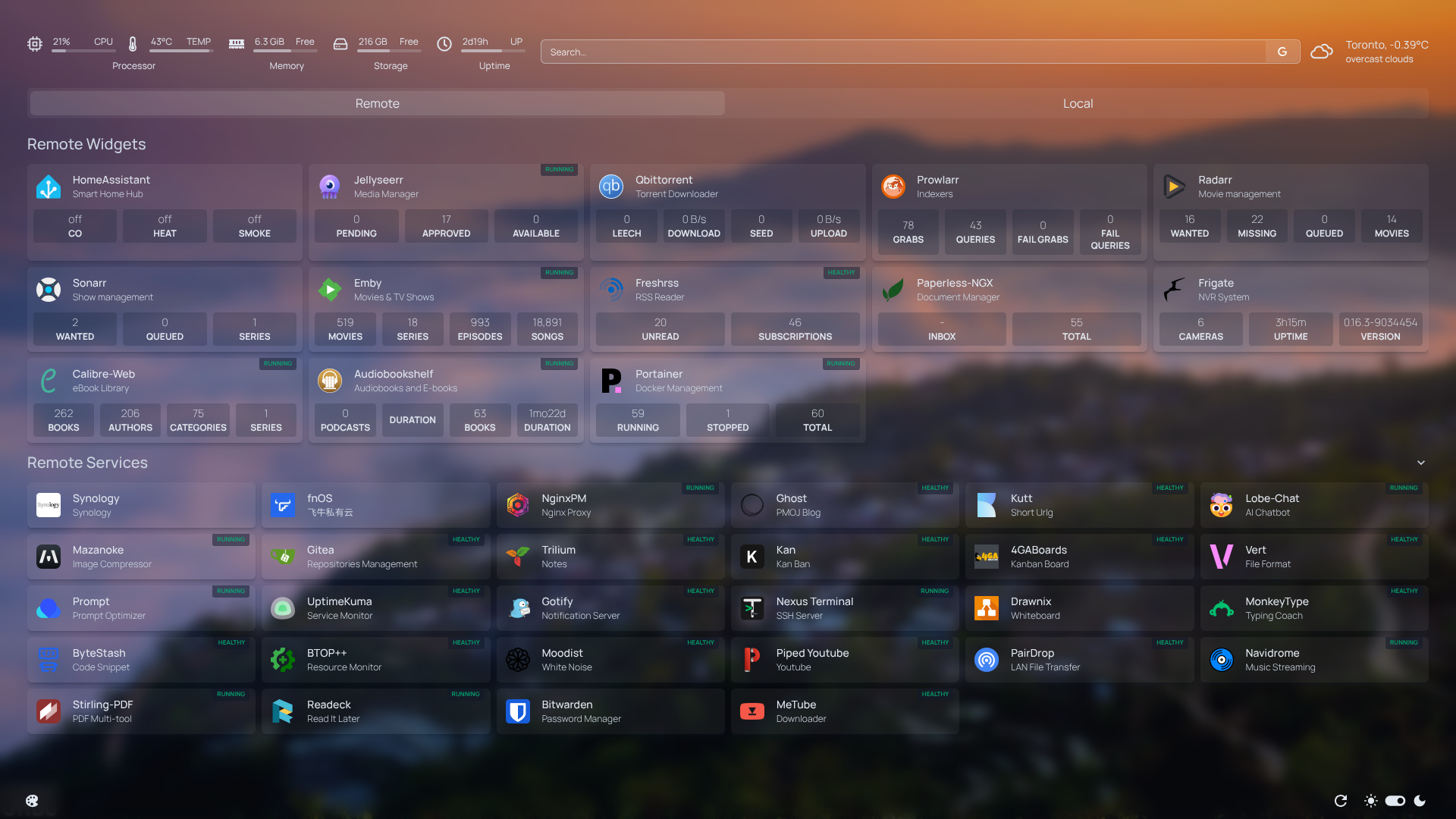
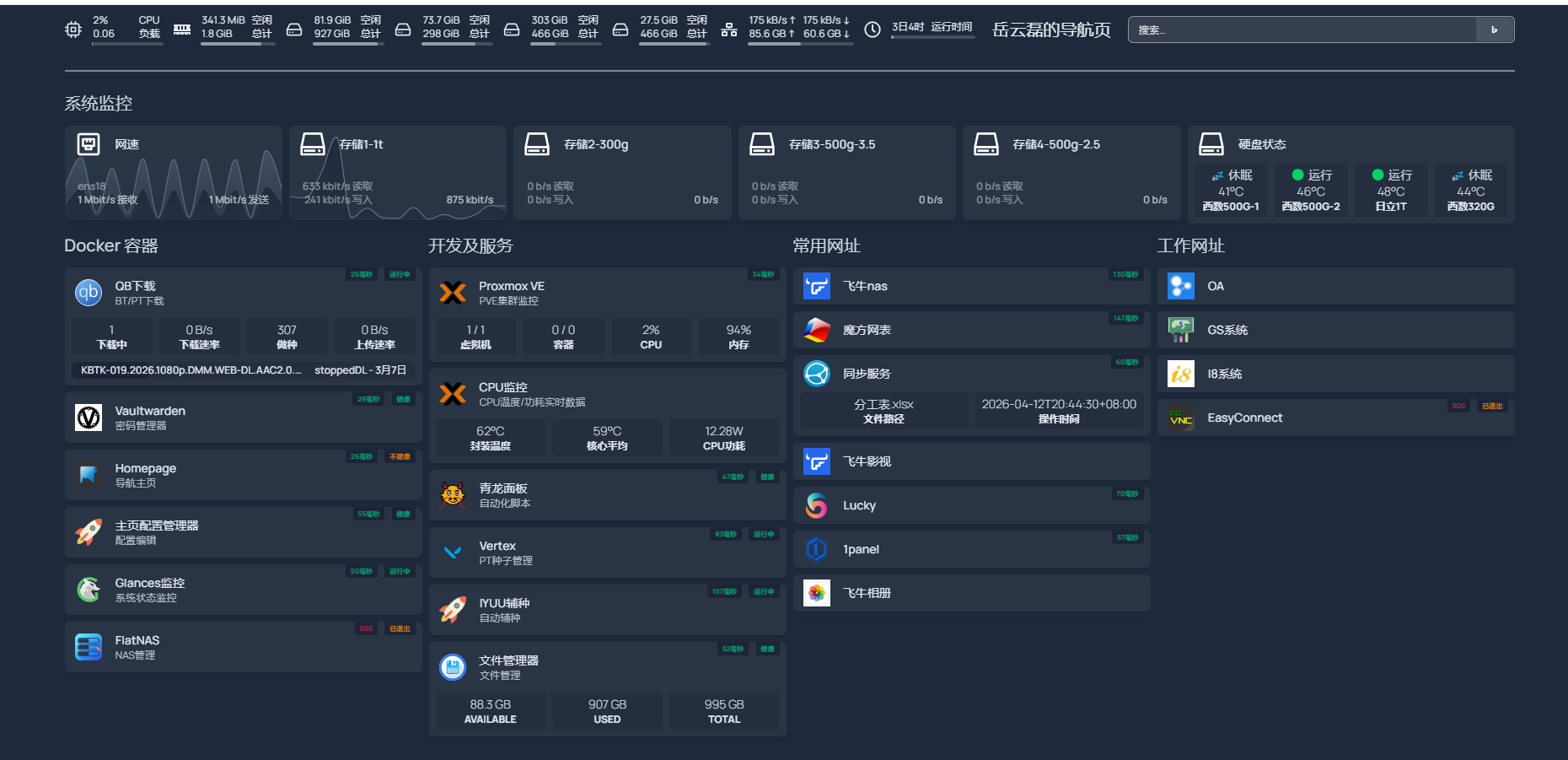 设置了很久,为了显示更多信息想要的信息,还得做一个api服务读取各种信息给homepage,