收起左侧

PVE9.2 虚拟核显SR-IOV分配飞牛OS使用

8
回复
790
查看
[ 复制链接 ]

6

主题

6

回帖

0

牛值

江湖小虾

2026-6-9 18:57:16 显示全部楼层 阅读模式

i5-12400安装PVE9后,将核显虚拟到飞牛OS上

使用PVE-Tools虚拟化核显

  1. 先使用 https://github.com/PVE-Tools/PVE-Tools-9在PVE上进行核显虚拟化,使用命令 bash <(curl -sSL https://ghfast.top/raw.githubusercontent.com/PVE-Tools/PVE-Tools-9/main/PVE-Tools.sh)运行脚本。
  2. 依次选择后完成虚拟化:
4  . 硬件直通与显卡 ( 核显 / NVIDIA / AMD / IOMMU / 磁盘直通 )
1  . Intel 核显虚拟化管理 (SR-IOV/GVT-g)
1  . Intel 11-15代 SR-IOV 核显虚拟化
  1. 核显被分成3个虚拟显卡,在飞牛OS的虚拟机上,添加分配出来的虚拟核显,从第二个开始选择,比如 0000:00:02.1,不能选择 0000:00:02.0

安装驱动

  1. 飞牛中应用中心安装驱动:i915-sriov-dkms

  2. 此时飞牛影视等还是会调用失败,选择启动GPU会显示:获取/设置 GPU 失败

  3. 终端中的查看状态,GuC失败

    ~# dmesg | grep -i i915
    [    1.765555] i915: You are using the i915-sriov-dkms module, a ported version of the i915/xe module with SR-IOV support.
    [    1.765556] i915: Please file any bug report at https://github.com/strongtz/i915-sriov-dkms/issues/new.
    [    1.765556] i915: Module Homepage: https://github.com/strongtz/i915-sriov-dkms
    [    1.765729] i915 0000:01:00.0: [drm] Found alderlake_s (device ID 4682) integrated display version 12.00 stepping C0
    [    1.765756] i915 0000:01:00.0: Running in SR-IOV VF mode
    [    1.765902] i915 0000:01:00.0: [drm] *ERROR* GuC submission disabled
    [    1.908779] i915 0000:01:00.0: [drm] *ERROR* Device initialization failed (-19)
    
  4. 查看启动参数,默认未配置 i915 GuC 及相关 IOMMU 参数

    ~# cat /etc/default/grub | grep GRUB_CMDLINE_LINUX_DEFAULT
    GRUB_CMDLINE_LINUX_DEFAULT="quiet splash"
    
  5. 修改grub,将原先的GRUB_CMDLINE_LINUX_DEFAULT="quiet splash"修改

sudo nano /etc/default/grub
GRUB_CMDLINE_LINUX_DEFAULT="quiet splash intel_iommu=on iommu=pt i915.enable_guc=3 module_blacklist=xe"
  1. 更新配置并重启
sudo update-grub
sudo update-initramfs -u
sudo reboot
  1. 验证驱动
~# dmesg | grep -i i915
[    0.000000] Command line: BOOT_IMAGE=/boot/vmlinuz-6.18.18-trim root=UUID=f7abaacf-749c-41b8-a20d-74ff1c6adb3f ro modprobe.blacklist=pcspkr pcie_aspm=off quiet splash intel_iommu=on iommu=pt i915.enable_guc=3 module_blacklist=xe
[    0.016006] Kernel command line: BOOT_IMAGE=/boot/vmlinuz-6.18.18-trim root=UUID=f7abaacf-749c-41b8-a20d-74ff1c6adb3f ro modprobe.blacklist=pcspkr pcie_aspm=off quiet splash intel_iommu=on iommu=pt i915.enable_guc=3 module_blacklist=xe
[    1.414832] i915: You are using the i915-sriov-dkms module, a ported version of the i915/xe module with SR-IOV support.
[    1.414833] i915: Please file any bug report at https://github.com/strongtz/i915-sriov-dkms/issues/new.
[    1.414833] i915: Module Homepage: https://github.com/strongtz/i915-sriov-dkms
[    1.414972] i915 0000:01:00.0: [drm] Found alderlake_s (device ID 4682) integrated display version 12.00 stepping C0
[    1.414990] i915 0000:01:00.0: Running in SR-IOV VF mode
[    1.415831] i915 0000:01:00.0: [drm] GT0: GUC: interface version 0.1.24.4
[    1.416048] i915 0000:01:00.0: [drm] VT-d active for gfx access
[    1.416064] i915 0000:01:00.0: [drm] Using Transparent Hugepages
[    1.416974] i915 0000:01:00.0: [drm] GT0: GUC: interface version 0.1.24.4
[    1.417235] i915 0000:01:00.0: [drm] GT0: GUC: interface version 0.1.24.4
[    1.417421] i915 0000:01:00.0: GuC firmware PRELOADED version 0.0 submission:SR-IOV VF
[    1.417423] i915 0000:01:00.0: HuC firmware PRELOADED
[    1.419425] i915 0000:01:00.0: [drm] Protected Xe Path (PXP) protected content support initialized
[    1.419427] i915 0000:01:00.0: [drm] PMU not supported for this GPU.
[    1.419485] [drm] Initialized i915 1.6.0 for 0000:01:00.0 on minor 1

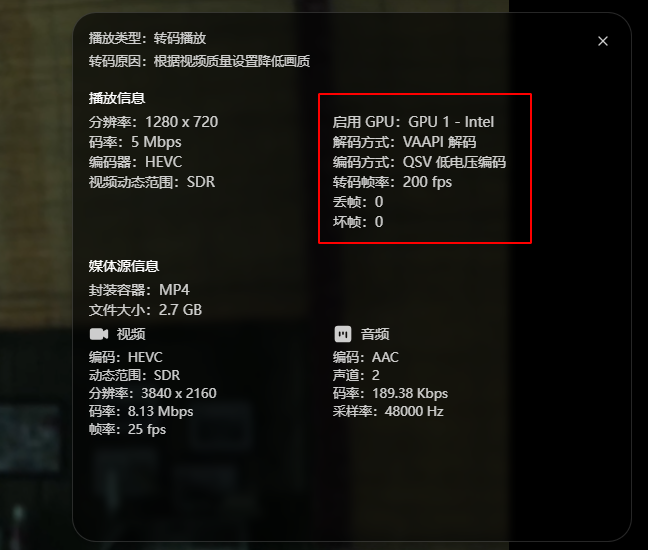
8.在影视中选择首选GPU不再报错,验证转码播放正常调用GPU

收藏
送赞
分享

本帖子中包含更多资源

您需要 登录 才可以下载或查看,没有账号?立即注册

x

3

主题

4

回帖

0

牛值

江湖小虾

2026-6-12 09:42:42 显示全部楼层

你好,

宿主机是unraid。分配给飞牛的SRIOV核显无法驱动,之前版本好好的,从新安装最新的系统发现无法驱动,通过SSH连接得到如下:

dmesg | grep -i i915
[ 1.085754] i915: unknown parameter 'module_blacklist' ignored
[ 1.086005] i915: You are using the i915-sriov-dkms module, a ported version of the i915/xe module with SR-IOV support.
[ 1.086006] i915: Please file any bug report at https://github.com/strongtz/i915-sriov-dkms/issues/new.
[ 1.086007] i915: Module Homepage: https://github.com/strongtz/i915-sriov-dkms
[ 1.432160] xe: You are using the i915-sriov-dkms module, a ported version of the i915/xe module with SR-IOV support.
[ 1.432161] xe: Please file any bug report at https://github.com/strongtz/i915-sriov-dkms/issues/new.
[ 1.432161] xe: Module Homepage: https://github.com/strongtz/i915-sriov-dkms
use xe.force_probe='4682' and i915.force_probe='!4682'
CONFIG_DRM_I915_FORCE_PROBE='!4682' configuration options.
[ 310.090849] i915: unknown parameter 'module_blacklist' ignored
[ 367.977034] i915: unknown parameter 'module_blacklist' ignored
[ 534.586927] i915: unknown parameter 'module_blacklist' ignored
[ 534.587201] i915: You are using the i915-sriov-dkms module, a ported version of the i915/xe module with SR-IOV support.
[ 534.587203] i915: Please file any bug report at https://github.com/strongtz/i915-sriov-dkms/issues/new.
[ 534.587203] i915: Module Homepage: https://github.com/strongtz/i915-sriov-dkms
[ 647.777221] i915: unknown parameter 'module_blacklist' ignored
[ 647.777525] i915: You are using the i915-sriov-dkms module, a ported version of the i915/xe module with SR-IOV support.
[ 647.777526] i915: Please file any bug report at https://github.com/strongtz/i915-sriov-dkms/issues/new.
[ 647.777527] i915: Module Homepage: https://github.com/strongtz/i915-sriov-dkms
[ 659.291697] i915: unknown parameter 'module_blacklist' ignored
[ 659.291938] i915: You are using the i915-sriov-dkms module, a ported version of the i915/xe module with SR-IOV support.
[ 659.291939] i915: Please file any bug report at https://github.com/strongtz/i915-sriov-dkms/issues/new.
[ 659.291940] i915: Module Homepage: https://github.com/strongtz/i915-sriov-dkms

按照你的方法修改过后。

dmesg | grep -i i915

[ 0.000000] Command line: BOOT_IMAGE=/boot/vmlinuz-6.18.18-trim root=UUID=c52db466-3c95-46b4-9620-c6ce9e891ec9 ro modprobe.blacklist=pcspkr pcie_aspm=off quiet splash intel_iommu=on iommu=pt i915.enable_guc=3 module_blacklist=xe
[ 0.014326] Kernel command line: BOOT_IMAGE=/boot/vmlinuz-6.18.18-trim root=UUID=c52db466-3c95-46b4-9620-c6ce9e891ec9 ro modprobe.blacklist=pcspkr pcie_aspm=off quiet splash intel_iommu=on iommu=pt i915.enable_guc=3 module_blacklist=xe
[ 1.379337] i915: unknown parameter 'module_blacklist' ignored
[ 1.379517] i915: You are using the i915-sriov-dkms module, a ported version of the i915/xe module with SR-IOV support.
[ 1.379517] i915: Please file any bug report at https://github.com/strongtz/i915-sriov-dkms/issues/new.
[ 1.379518] i915: Module Homepage: https://github.com/strongtz/i915-sriov-dkms

lspci
00:00.0 Host bridge: Intel Corporation 82G33/G31/P35/P31 Express DRAM Controller
00:01.0 PCI bridge: Red Hat, Inc. QEMU PCIe Root port
00:01.1 PCI bridge: Red Hat, Inc. QEMU PCIe Root port
00:01.2 PCI bridge: Red Hat, Inc. QEMU PCIe Root port
00:01.3 PCI bridge: Red Hat, Inc. QEMU PCIe Root port
00:01.4 PCI bridge: Red Hat, Inc. QEMU PCIe Root port
00:01.5 PCI bridge: Red Hat, Inc. QEMU PCIe Root port
00:07.0 USB controller: Intel Corporation 82801I (ICH9 Family) USB UHCI Controller #1 (rev 03)
00:07.1 USB controller: Intel Corporation 82801I (ICH9 Family) USB UHCI Controller #2 (rev 03)
00:07.2 USB controller: Intel Corporation 82801I (ICH9 Family) USB UHCI Controller #3 (rev 03)
00:07.7 USB controller: Intel Corporation 82801I (ICH9 Family) USB2 EHCI Controller #1 (rev 03)
00:1f.0 ISA bridge: Intel Corporation 82801IB (ICH9) LPC Interface Controller (rev 02)
00:1f.2 SATA controller: Intel Corporation 82801IR/IO/IH (ICH9R/DO/DH) 6 port SATA Controller [AHCI mode] (rev 02)
00:1f.3 SMBus: Intel Corporation 82801I (ICH9 Family) SMBus Controller (rev 02)
01:00.0 Ethernet controller: Red Hat, Inc. Virtio 1.0 network device (rev 01)
02:00.0 Communication controller: Red Hat, Inc. Virtio 1.0 console (rev 01)
06:00.0 VGA compatible controller: Intel Corporation Alder Lake-S GT1 [UHD Graphics 730] (rev 0c)

麻烦给指导一下吧,谢谢了!

抱歉,没用过unraid,完全不了解这个,会不会是unraid的i915的驱动太旧了?重新编译一下呢?然后把飞牛驱动重新卸载安装,或者新建一个飞牛虚拟机,从头开始看能不能正常识别。也可能是module_blacklist=xe要改成 把  详情 回复
2026-6-15 20:56

6

主题

6

回帖

0

牛值

江湖小虾

2026-6-15 20:56:49 楼主 显示全部楼层
zzcn2008 发表于 2026-6-12 09:42
你好,
宿主机是unraid。分配给飞牛的SRIOV核显无法驱动,之前版本好好的,从新安装最新的系统发现无法驱动 ...

抱歉,没用过unraid,完全不了解这个,会不会是unraid的i915的驱动太旧了?重新编译一下呢?然后把飞牛驱动重新卸载安装,或者新建一个飞牛虚拟机,从头开始看能不能正常识别。也可能是module_blacklist=xe要改成modprobe.blacklist=xe。问题的可能太多了,我只是在pve9.2加飞牛最新系统环境正常,其它环境无能为力了。把这些输出去问一下ai,我去看了一下,按照ai的提示输出一些命令结果返回,让它给你分析是哪里出了问题,只有你自己去排查一下了。

6

主题

19

回帖

0

牛值

江湖小虾

2026-6-20 17:17:03 显示全部楼层

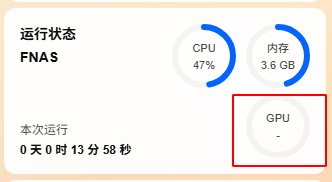
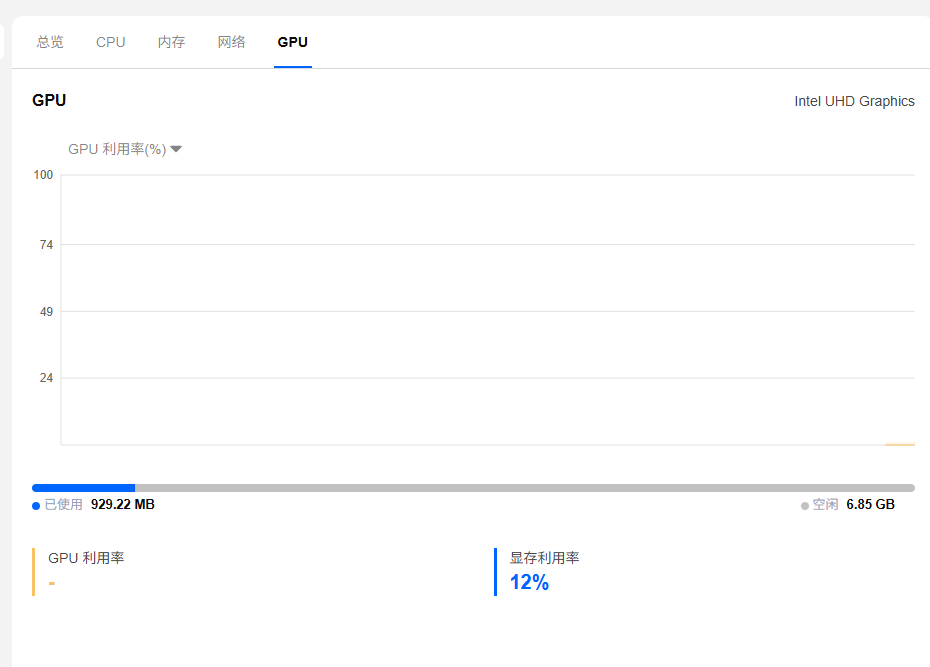
我的是n100 cpu,直通核显给飞牛后,gpu占用一直不显示,不管是否开启sr-iov,gpu占用一直是-,但是查看飞牛影视,应该可以调用gpu

微信图片_20260620165635_101638_919.png

微信图片_20260620164629_101633_919.png

微信图片_20260620164522_16459_1413.png

本帖子中包含更多资源

您需要 登录 才可以下载或查看,没有账号?立即注册

x
我的也是pve8.4,飞牛直通核显,页面也是不显示gpu数值,pve没有重装,重装飞牛还是一样,看是可以调用gpu的。只是不显示。  详情 回复
2026-7-1 10:03

3

主题

9

回帖

0

牛值

江湖小虾

2026-6-23 19:35:17 显示全部楼层

太感谢博主了,我的是 pve8.4,n100,之前用着好好的,飞牛里这阵子突然不能用了,用了你的方法直接可以使用了

0

主题

3

回帖

0

牛值

江湖小虾

2026-7-1 10:03:16 显示全部楼层
Kimi_TT 发表于 2026-6-20 17:17
我的是n100 cpu,直通核显给飞牛后,gpu占用一直不显示,不管是否开启sr-iov,gpu占用一直是-,但是查看飞 ...

我的也是pve8.4,飞牛直通核显,页面也是不显示gpu数值,pve没有重装,重装飞牛还是一样,看是可以调用gpu的。只是不显示。

0

主题

1

回帖

0

牛值

江湖小虾

[upload 附件:fix_fnos_gpu_info.zip]()

用这个脚本运行修复一下就可以显示GPU调用信息,我也是再飞牛论坛上看见这个教程的,但是现在找不到那个帖子了,sweat 按照教程写了一个脚本

本帖子中包含更多资源

您需要 登录 才可以下载或查看,没有账号?立即注册

x

1

主题

1

回帖

0

牛值

江湖小虾

我的pve更新到7.0.14内核后,i915-sriov-dkms编译失败了是不兼容吗

2

主题

16

回帖

0

牛值

江湖小虾

有用!我也是升级pve9无法硬解,根据你的方法好了!

您需要登录后才可以回帖 登录 | 立即注册

本版积分规则