收起左侧

【1.1.23版本已修复】1.1.18版本后出现网络异常的处理方法

90
回复
5374
查看
  [ 复制链接 ]

277

主题

1万

回帖

0

牛值

管理员

fnOS1.0上线纪念勋章

2026-2-13 14:38:58 显示全部楼层 阅读模式

该方法适用于网卡出现pci link is down;系统获取不到IPv4地址重启后恢复等等情况,目前修复版本已进行内测预计年后推送更新,遇到问题的牛友可以先手动恢复。

一、前提条件

请确认满足以下条件:

✅ NAS 已开启 SSH 功能

✅ 你知道 NAS 的 IP 地址

✅ 你知道 NAS 管理员登录账号与密码

✅ Windows 10 / 11(系统自带 SSH 客户端)


二、打开 Windows CMD

方法一(推荐)

  1. Win + R
  2. 输入:
cmd
  1. 回车

三、SSH 登录 NAS

在 CMD 输入:

ssh 用户名@NAS_IP

示例

假设:

  • NAS IP:192.168.1.100
  • 用户名:root

则输入:

ssh root@192.168.1.100

第一次连接会提示

Are you sure you want to continue connecting (yes/no)?

输入:

yes

然后回车


接着输入密码

password:

👉 输入 NAS 密码(输入时不会显示,这是正常的)

👉 回车


四、执行修复脚本命令

切换管理员权限

登录成功后执行:

sudo -i

输入当前账号密码后回车(输入密码时不会有任何显示,是正常的)

登录成功后,直接复制执行:

curl -fsSL https://static2.fnnas.com/aptfix/fix-eth.sh | bash

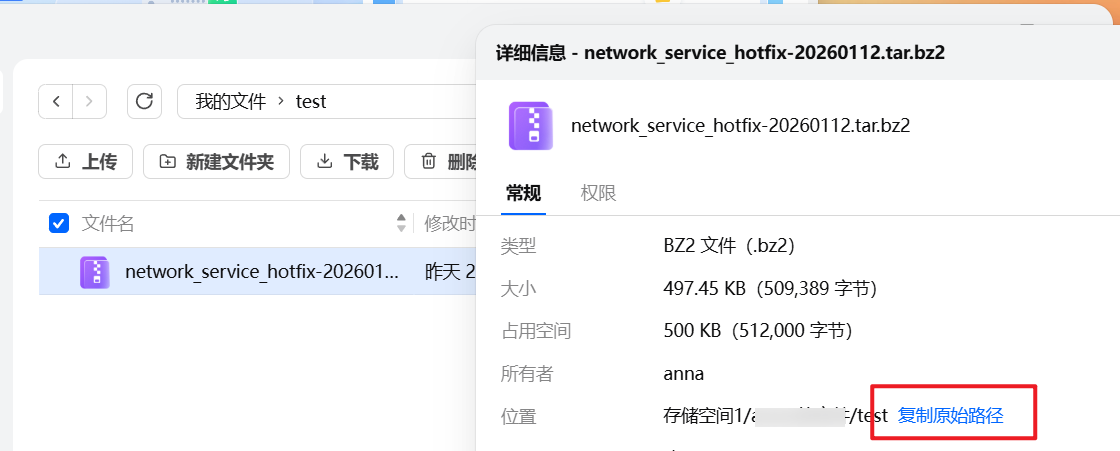
五、下载👇👇👇修复包并上传到NAS文件夹内,复制原始路径使用(注意路径最好是全英文的)。

点击下载
  1. 到终端执行命令解压修复包
(这个是示例,不要直接复制)cd /vol1/1000/test
/vol1/1000/test 替换成你的路径
执行命令进行解压
tar xf network_service_hotfix-20260112.tar.bz2
  1. 进到解压缩的目录,安装修复包
cd network_service_hotfix/
./deploy.sh

命令执行成功显示如下👇:
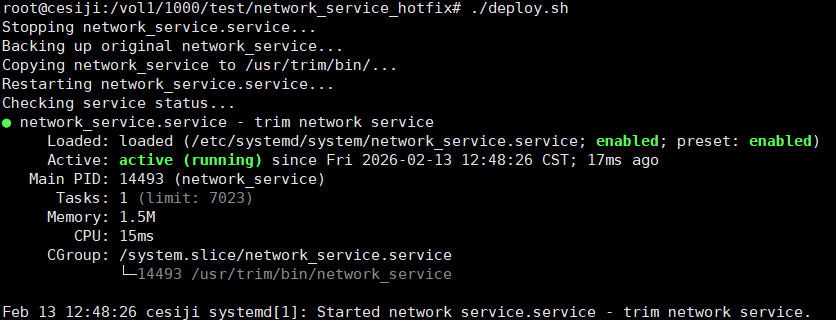
如果执行命令后网络还存在异常的情况,可以在下方进行评论区描述具体问题并附上网卡型号,我们会对脚本进行更新适配。

收藏
送赞 2
分享

2

主题

16

回帖

0

牛值

江湖小虾

2026-2-13 17:15:04 显示全部楼层

升级到1.1.19后,nas 都丢失了,也就是nas 页面都打不开的怎么办?

0

主题

1

回帖

0

牛值

江湖小虾

2026-2-13 18:06:22 显示全部楼层
network_service_hotfix-20260112.tar.bz2 这个文件在哪里下载

1

主题

5

回帖

0

牛值

江湖小虾

2026-2-13 21:22:05 显示全部楼层

r8152也同样有问题

➜  ~ dmesg | grep -i usb
dmesg | grep -i "firmware\|error"
[    1.745495] usb 4-1: Product: USB Mass Storage
[    1.745497] usb 4-1: Manufacturer: JMicron
[    1.745500] usb 4-1: SerialNumber: 00000000006A
[    1.896586] usb 3-4: new full-speed USB device number 3 using xhci_hcd
[    2.064109] usb 3-4: New USB device found, idVendor=04f3, idProduct=0c58, bcdDevice= 2.16
[    2.064117] usb 3-4: New USB device strings: Mfr=1, Product=2, SerialNumber=0
[    2.064122] usb 3-4: Product: ELAN:Fingerprint
[    2.064127] usb 3-4: Manufacturer: ELAN
[    3.629306] usb-storage 4-1:1.0: USB Mass Storage device detected
[    3.629658] scsi host2: usb-storage 4-1:1.0
[    3.629840] usbcore: registered new interface driver usb-storage
[    3.631323] usbcore: registered new interface driver uas
[    3.633400] usbcore: registered new device driver r8152-cfgselector
[    3.848319] r8152-cfgselector 2-2: reset SuperSpeed USB device number 2 using xhci_hcd
[    3.917133] usbcore: registered new interface driver r8152
[    3.919709] usbcore: registered new interface driver cdc_ether
[    3.920789] usbcore: registered new interface driver cdc_ncm
[    7.064018] usbcore: registered new interface driver btusb
[    7.078287] usb 1-3: Found UVC 1.10 device Integrated Camera (174f:244c)
[    7.106890] usbcore: registered new interface driver uvcvideo
[   57.992684] r8152-cfgselector 2-2: reset SuperSpeed USB device number 2 using xhci_hcd
[  155.824167] r8152-cfgselector 2-2: reset SuperSpeed USB device number 2 using xhci_hcd
[  301.425651] r8152-cfgselector 2-2: reset SuperSpeed USB device number 2 using xhci_hcd
[  388.242121] r8152-cfgselector 2-2: reset SuperSpeed USB device number 2 using xhci_hcd
[  405.938213] r8152-cfgselector 2-2: reset SuperSpeed USB device number 2 using xhci_hcd
[  512.370812] r8152-cfgselector 2-2: reset SuperSpeed USB device number 2 using xhci_hcd
[  540.210942] r8152-cfgselector 2-2: reset SuperSpeed USB device number 2 using xhci_hcd
[  617.428845] r8152-cfgselector 2-2: reset SuperSpeed USB device number 2 using xhci_hcd
[  634.325210] r8152-cfgselector 2-2: reset SuperSpeed USB device number 2 using xhci_hcd
[  648.853582] r8152-cfgselector 2-2: reset SuperSpeed USB device number 2 using xhci_hcd
[  720.854767] r8152-cfgselector 2-2: reset SuperSpeed USB device number 2 using xhci_hcd
[  787.095348] r8152-cfgselector 2-2: reset SuperSpeed USB device number 2 using xhci_hcd
[  844.952366] r8152-cfgselector 2-2: reset SuperSpeed USB device number 2 using xhci_hcd
[  893.400893] r8152-cfgselector 2-2: reset SuperSpeed USB device number 2 using xhci_hcd
[  966.393433] r8152-cfgselector 2-2: reset SuperSpeed USB device number 2 using xhci_hcd
[  981.753937] r8152-cfgselector 2-2: reset SuperSpeed USB device number 2 using xhci_hcd
[ 1060.410243] r8152-cfgselector 2-2: reset SuperSpeed USB device number 2 using xhci_hcd
[ 1505.473817] r8152-cfgselector 2-2: reset SuperSpeed USB device number 2 using xhci_hcd
[ 1537.924606] r8152-cfgselector 2-2: reset SuperSpeed USB device number 2 using xhci_hcd
[ 2078.792531] r8152-cfgselector 2-2: reset SuperSpeed USB device number 2 using xhci_hcd
[ 2121.992738] r8152-cfgselector 2-2: reset SuperSpeed USB device number 2 using xhci_hcd
[ 2237.193784] r8152-cfgselector 2-2: reset SuperSpeed USB device number 2 using xhci_hcd
[ 2323.082486] r8152-cfgselector 2-2: reset SuperSpeed USB device number 2 using xhci_hcd
[ 2630.796951] r8152-cfgselector 2-2: reset SuperSpeed USB device number 2 using xhci_hcd
[ 2650.381382] r8152-cfgselector 2-2: reset SuperSpeed USB device number 2 using xhci_hcd
[ 2742.638234] r8152-cfgselector 2-2: reset SuperSpeed USB device number 2 using xhci_hcd
[ 2762.894560] r8152-cfgselector 2-2: reset SuperSpeed USB device number 2 using xhci_hcd
[ 2804.078808] r8152-cfgselector 2-2: reset SuperSpeed USB device number 2 using xhci_hcd
[ 3052.304909] r8152-cfgselector 2-2: reset SuperSpeed USB device number 2 using xhci_hcd
[ 3113.617766] r8152-cfgselector 2-2: reset SuperSpeed USB device number 2 using xhci_hcd
[ 3294.803525] r8152-cfgselector 2-2: reset SuperSpeed USB device number 2 using xhci_hcd
[ 3336.147675] r8152-cfgselector 2-2: reset SuperSpeed USB device number 2 using xhci_hcd
[ 3413.460707] r8152-cfgselector 2-2: reset SuperSpeed USB device number 2 using xhci_hcd
[ 3465.365192] r8152-cfgselector 2-2: reset SuperSpeed USB device number 2 using xhci_hcd
[ 4448.311318] r8152-cfgselector 2-2: reset SuperSpeed USB device number 2 using xhci_hcd
[ 4467.030869] r8152-cfgselector 2-2: reset SuperSpeed USB device number 2 using xhci_hcd
[ 4496.214850] r8152-cfgselector 2-2: reset SuperSpeed USB device number 2 using xhci_hcd
[ 4532.054527] r8152-cfgselector 2-2: reset SuperSpeed USB device number 2 using xhci_hcd
[ 4560.214312] r8152-cfgselector 2-2: reset SuperSpeed USB device number 2 using xhci_hcd
[ 4659.253698] r8152-cfgselector 2-2: reset SuperSpeed USB device number 2 using xhci_hcd
[ 4675.413368] r8152-cfgselector 2-2: reset SuperSpeed USB device number 2 using xhci_hcd
[ 4767.989333] r8152-cfgselector 2-2: reset SuperSpeed USB device number 2 using xhci_hcd
[ 4818.677188] r8152-cfgselector 2-2: reset SuperSpeed USB device number 2 using xhci_hcd
[ 4907.668863] r8152-cfgselector 2-2: reset SuperSpeed USB device number 2 using xhci_hcd
[ 4979.156804] r8152-cfgselector 2-2: reset SuperSpeed USB device number 2 using xhci_hcd
[ 5035.988907] r8152-cfgselector 2-2: reset SuperSpeed USB device number 2 using xhci_hcd
[ 5082.068811] r8152-cfgselector 2-2: reset SuperSpeed USB device number 2 using xhci_hcd
[ 5174.740987] r8152-cfgselector 2-2: reset SuperSpeed USB device number 2 using xhci_hcd
[ 5204.244644] r8152-cfgselector 2-2: reset SuperSpeed USB device number 2 using xhci_hcd
[ 5357.077326] r8152-cfgselector 2-2: reset SuperSpeed USB device number 2 using xhci_hcd
[ 5705.686078] r8152-cfgselector 2-2: reset SuperSpeed USB device number 2 using xhci_hcd
[ 5841.366713] r8152-cfgselector 2-2: reset SuperSpeed USB device number 2 using xhci_hcd
[ 5994.615320] r8152-cfgselector 2-2: reset SuperSpeed USB device number 2 using xhci_hcd
[ 6147.703960] r8152-cfgselector 2-2: reset SuperSpeed USB device number 2 using xhci_hcd
[ 6231.576733] r8152-cfgselector 2-2: reset SuperSpeed USB device number 2 using xhci_hcd
[ 6331.864781] r8152-cfgselector 2-2: reset SuperSpeed USB device number 2 using xhci_hcd
[ 6395.225190] r8152-cfgselector 2-2: reset SuperSpeed USB device number 2 using xhci_hcd
[ 6482.361208] r8152-cfgselector 2-2: reset SuperSpeed USB device number 2 using xhci_hcd
[ 6537.753456] r8152-cfgselector 2-2: reset SuperSpeed USB device number 2 using xhci_hcd
[ 6592.762101] r8152-cfgselector 2-2: reset SuperSpeed USB device number 2 using xhci_hcd
[ 7027.452137] r8152-cfgselector 2-2: reset SuperSpeed USB device number 2 using xhci_hcd
[ 7107.932391] r8152-cfgselector 2-2: reset SuperSpeed USB device number 2 using xhci_hcd
[ 7194.972824] r8152-cfgselector 2-2: reset SuperSpeed USB device number 2 using xhci_hcd
[ 7217.917052] r8152-cfgselector 2-2: reset SuperSpeed USB device number 2 using xhci_hcd
[ 7335.549518] r8152-cfgselector 2-2: reset SuperSpeed USB device number 2 using xhci_hcd
[ 7354.493582] r8152-cfgselector 2-2: reset SuperSpeed USB device number 2 using xhci_hcd
[ 7467.229745] r8152-cfgselector 2-2: reset SuperSpeed USB device number 2 using xhci_hcd
[ 7531.550193] r8152-cfgselector 2-2: reset SuperSpeed USB device number 2 using xhci_hcd
[ 7577.726668] r8152-cfgselector 2-2: reset SuperSpeed USB device number 2 using xhci_hcd
[ 7632.606676] r8152-cfgselector 2-2: reset SuperSpeed USB device number 2 using xhci_hcd
[ 7673.598876] r8152-cfgselector 2-2: reset SuperSpeed USB device number 2 using xhci_hcd
[ 7757.247660] r8152-cfgselector 2-2: reset SuperSpeed USB device number 2 using xhci_hcd
[ 7799.135482] r8152-cfgselector 2-2: reset SuperSpeed USB device number 2 using xhci_hcd
[ 8021.760688] r8152-cfgselector 2-2: reset SuperSpeed USB device number 2 using xhci_hcd
[ 8066.081031] r8152-cfgselector 2-2: reset SuperSpeed USB device number 2 using xhci_hcd
[ 8092.289292] r8152-cfgselector 2-2: reset SuperSpeed USB device number 2 using xhci_hcd
[ 8270.658435] r8152-cfgselector 2-2: reset SuperSpeed USB device number 2 using xhci_hcd
[ 8574.414970] r8152-cfgselector 2-2: reset SuperSpeed USB device number 2 using xhci_hcd
[ 8655.313728] r8152-cfgselector 2-2: reset SuperSpeed USB device number 2 using xhci_hcd
[ 8707.027103] r8152-cfgselector 2-2: reset SuperSpeed USB device number 2 using xhci_hcd
[ 8718.579429] r8152-cfgselector 2-2: reset SuperSpeed USB device number 2 using xhci_hcd
[ 8742.836236] r8152-cfgselector 2-2: reset SuperSpeed USB device number 2 using xhci_hcd
[ 9120.316829] r8152-cfgselector 2-2: reset SuperSpeed USB device number 2 using xhci_hcd
[ 9158.397166] r8152-cfgselector 2-2: reset SuperSpeed USB device number 2 using xhci_hcd
[ 9190.334000] r8152-cfgselector 2-2: reset SuperSpeed USB device number 2 using xhci_hcd
[ 9222.910460] r8152-cfgselector 2-2: reset SuperSpeed USB device number 2 using xhci_hcd
[ 9612.228713] r8152-cfgselector 2-2: reset SuperSpeed USB device number 2 using xhci_hcd
[ 9660.165510] r8152-cfgselector 2-2: reset SuperSpeed USB device number 2 using xhci_hcd
[ 9699.173950] r8152-cfgselector 2-2: reset SuperSpeed USB device number 2 using xhci_hcd
[ 9724.582264] r8152-cfgselector 2-2: reset SuperSpeed USB device number 2 using xhci_hcd
[ 9753.862667] r8152-cfgselector 2-2: reset SuperSpeed USB device number 2 using xhci_hcd
[ 9783.046940] r8152-cfgselector 2-2: reset SuperSpeed USB device number 2 using xhci_hcd
[ 9797.703258] r8152-cfgselector 2-2: reset SuperSpeed USB device number 2 using xhci_hcd
[ 9895.560429] r8152-cfgselector 2-2: reset SuperSpeed USB device number 2 using xhci_hcd
[10617.109446] r8152-cfgselector 2-2: reset SuperSpeed USB device number 2 using xhci_hcd
[10642.902284] r8152-cfgselector 2-2: reset SuperSpeed USB device number 2 using xhci_hcd
[10764.568627] r8152-cfgselector 2-2: reset SuperSpeed USB device number 2 using xhci_hcd
[10792.633462] r8152-cfgselector 2-2: reset SuperSpeed USB device number 2 using xhci_hcd
[10865.946900] r8152-cfgselector 2-2: reset SuperSpeed USB device number 2 using xhci_hcd
[11010.941701] r8152-cfgselector 2-2: reset SuperSpeed USB device number 2 using xhci_hcd
[11070.526361] r8152-cfgselector 2-2: reset SuperSpeed USB device number 2 using xhci_hcd
[11232.641208] r8152-cfgselector 2-2: reset SuperSpeed USB device number 2 using xhci_hcd
[11562.374444] r8152-cfgselector 2-2: reset SuperSpeed USB device number 2 using xhci_hcd
[11674.920105] r8152-cfgselector 2-2: reset SuperSpeed USB device number 2 using xhci_hcd
[11718.952738] r8152-cfgselector 2-2: reset SuperSpeed USB device number 2 using xhci_hcd
[12130.798596] r8152-cfgselector 2-2: reset SuperSpeed USB device number 2 using xhci_hcd
[12153.742899] r8152-cfgselector 2-2: reset SuperSpeed USB device number 2 using xhci_hcd
[12294.736980] r8152-cfgselector 2-2: reset SuperSpeed USB device number 2 using xhci_hcd
[12334.257644] r8152-cfgselector 2-2: reset SuperSpeed USB device number 2 using xhci_hcd
[12399.284570] r8152-cfgselector 2-2: reset SuperSpeed USB device number 2 using xhci_hcd
[12553.406500] r8152-cfgselector 2-2: reset SuperSpeed USB device number 2 using xhci_hcd
[12762.921404] r8152-cfgselector 2-2: reset SuperSpeed USB device number 2 using xhci_hcd
[12982.898685] r8152-cfgselector 2-2: reset SuperSpeed USB device number 2 using xhci_hcd
[13180.632921] r8152-cfgselector 2-2: reset SuperSpeed USB device number 2 using xhci_hcd
[13280.860377] r8152-cfgselector 2-2: reset SuperSpeed USB device number 2 using xhci_hcd
[13384.319358] r8152-cfgselector 2-2: reset SuperSpeed USB device number 2 using xhci_hcd
[13596.996869] r8152-cfgselector 2-2: reset SuperSpeed USB device number 2 using xhci_hcd
[13815.178207] r8152-cfgselector 2-2: reset SuperSpeed USB device number 2 using xhci_hcd
[13845.322912] r8152-cfgselector 2-2: reset SuperSpeed USB device number 2 using xhci_hcd
[13940.140868] r8152-cfgselector 2-2: reset SuperSpeed USB device number 2 using xhci_hcd
[14215.507402] r8152-cfgselector 2-2: reset SuperSpeed USB device number 2 using xhci_hcd
[14272.660309] r8152-cfgselector 2-2: reset SuperSpeed USB device number 2 using xhci_hcd
[14308.277436] r8152-cfgselector 2-2: reset SuperSpeed USB device number 2 using xhci_hcd
[14373.398439] r8152-cfgselector 2-2: reset SuperSpeed USB device number 2 using xhci_hcd
[14389.399166] r8152-cfgselector 2-2: reset SuperSpeed USB device number 2 using xhci_hcd
[14459.640151] r8152-cfgselector 2-2: reset SuperSpeed USB device number 2 using xhci_hcd
[14563.258724] r8152-cfgselector 2-2: reset SuperSpeed USB device number 2 using xhci_hcd
[15070.789212] r8152-cfgselector 2-2: reset SuperSpeed USB device number 2 using xhci_hcd
[15296.233826] r8152-cfgselector 2-2: reset SuperSpeed USB device number 2 using xhci_hcd
[15564.047453] r8152-cfgselector 2-2: reset SuperSpeed USB device number 2 using xhci_hcd
[15845.525693] r8152-cfgselector 2-2: reset SuperSpeed USB device number 2 using xhci_hcd
[15940.951153] r8152-cfgselector 2-2: reset SuperSpeed USB device number 2 using xhci_hcd
[16024.825120] r8152-cfgselector 2-2: reset SuperSpeed USB device number 2 using xhci_hcd
[16105.626510] r8152-cfgselector 2-2: reset SuperSpeed USB device number 2 using xhci_hcd
[16221.949023] r8152-cfgselector 2-2: reset SuperSpeed USB device number 2 using xhci_hcd
[16236.380953] r8152-cfgselector 2-2: reset SuperSpeed USB device number 2 using xhci_hcd
[16280.510210] r8152-cfgselector 2-2: reset SuperSpeed USB device number 2 using xhci_hcd
[16457.889832] r8152-cfgselector 2-2: reset SuperSpeed USB device number 2 using xhci_hcd
[16475.808983] r8152-cfgselector 2-2: reset SuperSpeed USB device number 2 using xhci_hcd
[16808.275526] r8152-cfgselector 2-2: reset SuperSpeed USB device number 2 using xhci_hcd
[17021.487530] r8152-cfgselector 2-2: reset SuperSpeed USB device number 2 using xhci_hcd
[17045.647194] r8152-cfgselector 2-2: reset SuperSpeed USB device number 2 using xhci_hcd
[17525.900629] r8152-cfgselector 2-2: reset SuperSpeed USB device number 2 using xhci_hcd
[17907.854177] r8152-cfgselector 2-2: reset SuperSpeed USB device number 2 using xhci_hcd
[18406.033743] r8152-cfgselector 2-2: reset SuperSpeed USB device number 2 using xhci_hcd
[18527.986190] r8152-cfgselector 2-2: reset SuperSpeed USB device number 2 using xhci_hcd
[18689.041236] r8152-cfgselector 2-2: reset SuperSpeed USB device number 2 using xhci_hcd
[18702.993459] r8152-cfgselector 2-2: reset SuperSpeed USB device number 2 using xhci_hcd
[19101.713523] r8152-cfgselector 2-2: reset SuperSpeed USB device number 2 using xhci_hcd
[19260.017985] r8152-cfgselector 2-2: reset SuperSpeed USB device number 2 using xhci_hcd
[19311.250606] r8152-cfgselector 2-2: reset SuperSpeed USB device number 2 using xhci_hcd
[19329.244464] r8152-cfgselector 2-2: reset SuperSpeed USB device number 2 using xhci_hcd
[19388.338731] r8152-cfgselector 2-2: reset SuperSpeed USB device number 2 using xhci_hcd
[19644.436441] r8152-cfgselector 2-2: reset SuperSpeed USB device number 2 using xhci_hcd
[19669.300582] r8152-cfgselector 2-2: reset SuperSpeed USB device number 2 using xhci_hcd
[19781.237175] r8152-cfgselector 2-2: reset SuperSpeed USB device number 2 using xhci_hcd
[19843.797709] r8152-cfgselector 2-2: reset SuperSpeed USB device number 2 using xhci_hcd
[19886.805993] r8152-cfgselector 2-2: reset SuperSpeed USB device number 2 using xhci_hcd
[20187.863838] r8152-cfgselector 2-2: reset SuperSpeed USB device number 2 using xhci_hcd
[20266.296912] r8152-cfgselector 2-2: reset SuperSpeed USB device number 2 using xhci_hcd
[20291.588741] r8152-cfgselector 2-2: reset SuperSpeed USB device number 2 using xhci_hcd
[20313.304886] r8152-cfgselector 2-2: reset SuperSpeed USB device number 2 using xhci_hcd
[20482.266255] r8152-cfgselector 2-2: reset SuperSpeed USB device number 2 using xhci_hcd
[20500.538120] r8152-cfgselector 2-2: reset SuperSpeed USB device number 2 using xhci_hcd
[20592.443252] r8152-cfgselector 2-2: reset SuperSpeed USB device number 2 using xhci_hcd
[20654.108157] r8152-cfgselector 2-2: reset SuperSpeed USB device number 2 using xhci_hcd
[20756.509249] r8152-cfgselector 2-2: reset SuperSpeed USB device number 2 using xhci_hcd
[20777.597228] r8152-cfgselector 2-2: reset SuperSpeed USB device number 2 using xhci_hcd
[20907.423054] r8152-cfgselector 2-2: reset SuperSpeed USB device number 2 using xhci_hcd
[21111.105158] r8152-cfgselector 2-2: reset SuperSpeed USB device number 2 using xhci_hcd
[21235.202258] r8152-cfgselector 2-2: reset SuperSpeed USB device number 2 using xhci_hcd
[21254.658422] r8152-cfgselector 2-2: reset SuperSpeed USB device number 2 using xhci_hcd
[21527.364955] r8152-cfgselector 2-2: reset SuperSpeed USB device number 2 using xhci_hcd
[21731.238898] r8152-cfgselector 2-2: reset SuperSpeed USB device number 2 using xhci_hcd
[21838.375448] r8152-cfgselector 2-2: reset SuperSpeed USB device number 2 using xhci_hcd
[21856.583730] r8152-cfgselector 2-2: reset SuperSpeed USB device number 2 using xhci_hcd
[21990.952894] r8152-cfgselector 2-2: reset SuperSpeed USB device number 2 using xhci_hcd
[22153.450319] r8152-cfgselector 2-2: reset SuperSpeed USB device number 2 using xhci_hcd
[22195.530767] r8152-cfgselector 2-2: reset SuperSpeed USB device number 2 using xhci_hcd
[22217.450697] r8152-cfgselector 2-2: reset SuperSpeed USB device number 2 using xhci_hcd
[22234.635100] r8152-cfgselector 2-2: reset SuperSpeed USB device number 2 using xhci_hcd
[22531.981367] r8152-cfgselector 2-2: reset SuperSpeed USB device number 2 using xhci_hcd
[22593.357879] r8152-cfgselector 2-2: reset SuperSpeed USB device number 2 using xhci_hcd
[22648.656475] r8152-cfgselector 2-2: reset SuperSpeed USB device number 2 using xhci_hcd
[22958.751199] r8152-cfgselector 2-2: reset SuperSpeed USB device number 2 using xhci_hcd
[22977.983511] r8152-cfgselector 2-2: reset SuperSpeed USB device number 2 using xhci_hcd
[23069.219006] r8152-cfgselector 2-2: reset SuperSpeed USB device number 2 using xhci_hcd
[23107.812323] r8152-cfgselector 2-2: reset SuperSpeed USB device number 2 using xhci_hcd
[23454.766192] r8152-cfgselector 2-2: reset SuperSpeed USB device number 2 using xhci_hcd
[23611.857901] r8152-cfgselector 2-2: reset SuperSpeed USB device number 2 using xhci_hcd
[23641.042396] r8152-cfgselector 2-2: reset SuperSpeed USB device number 2 using xhci_hcd
[23874.391439] r8152-cfgselector 2-2: reset SuperSpeed USB device number 2 using xhci_hcd
[24551.491880] r8152-cfgselector 2-2: reset SuperSpeed USB device number 2 using xhci_hcd
[24639.845160] r8152-cfgselector 2-2: reset SuperSpeed USB device number 2 using xhci_hcd
[24874.441641] r8152-cfgselector 2-2: reset SuperSpeed USB device number 2 using xhci_hcd
[24891.049827] r8152-cfgselector 2-2: reset SuperSpeed USB device number 2 using xhci_hcd
[24923.626698] r8152-cfgselector 2-2: reset SuperSpeed USB device number 2 using xhci_hcd
[24945.738728] r8152-cfgselector 2-2: reset SuperSpeed USB device number 2 using xhci_hcd
[25079.437156] r8152-cfgselector 2-2: reset SuperSpeed USB device number 2 using xhci_hcd
[25158.734972] r8152-cfgselector 2-2: reset SuperSpeed USB device number 2 using xhci_hcd
[25314.801496] r8152-cfgselector 2-2: reset SuperSpeed USB device number 2 using xhci_hcd
[25438.867785] r8152-cfgselector 2-2: reset SuperSpeed USB device number 2 using xhci_hcd
[25459.988159] r8152-cfgselector 2-2: reset SuperSpeed USB device number 2 using xhci_hcd
[25628.343087] r8152-cfgselector 2-2: reset SuperSpeed USB device number 2 using xhci_hcd
[25675.736029] r8152-cfgselector 2-2: reset SuperSpeed USB device number 2 using xhci_hcd
[25708.088455] r8152-cfgselector 2-2: reset SuperSpeed USB device number 2 using xhci_hcd
[25839.162707] r8152-cfgselector 2-2: reset SuperSpeed USB device number 2 using xhci_hcd
[25891.803743] r8152-cfgselector 2-2: reset SuperSpeed USB device number 2 using xhci_hcd
[25931.036323] r8152-cfgselector 2-2: reset SuperSpeed USB device number 2 using xhci_hcd
[26110.847357] r8152-cfgselector 2-2: reset SuperSpeed USB device number 2 using xhci_hcd
[26143.103782] r8152-cfgselector 2-2: reset SuperSpeed USB device number 2 using xhci_hcd
[26251.009734] r8152-cfgselector 2-2: reset SuperSpeed USB device number 2 using xhci_hcd
[26592.135270] r8152-cfgselector 2-2: reset SuperSpeed USB device number 2 using xhci_hcd
[26661.256697] r8152-cfgselector 2-2: reset SuperSpeed USB device number 2 using xhci_hcd
[26681.320784] r8152-cfgselector 2-2: reset SuperSpeed USB device number 2 using xhci_hcd
[26736.202001] r8152-cfgselector 2-2: reset SuperSpeed USB device number 2 using xhci_hcd
[26785.576916] r8152-cfgselector 2-2: reset SuperSpeed USB device number 2 using xhci_hcd
[26837.063663] r8152-cfgselector 2-2: reset SuperSpeed USB device number 2 using xhci_hcd
[26859.303531] r8152-cfgselector 2-2: reset SuperSpeed USB device number 2 using xhci_hcd
[26920.422615] r8152-cfgselector 2-2: reset SuperSpeed USB device number 2 using xhci_hcd
[27038.085086] r8152-cfgselector 2-2: reset SuperSpeed USB device number 2 using xhci_hcd
[27355.203890] r8152-cfgselector 2-2: reset SuperSpeed USB device number 2 using xhci_hcd
[27473.156035] r8152-cfgselector 2-2: reset SuperSpeed USB device number 2 using xhci_hcd
[27592.356428] r8152-cfgselector 2-2: reset SuperSpeed USB device number 2 using xhci_hcd
[27644.165022] r8152-cfgselector 2-2: reset SuperSpeed USB device number 2 using xhci_hcd
[28301.705737] r8152-cfgselector 2-2: reset SuperSpeed USB device number 2 using xhci_hcd
[28481.803413] r8152-cfgselector 2-2: reset SuperSpeed USB device number 2 using xhci_hcd
[28661.933098] r8152-cfgselector 2-2: reset SuperSpeed USB device number 2 using xhci_hcd
[28692.557014] r8152-cfgselector 2-2: reset SuperSpeed USB device number 2 using xhci_hcd
[28721.005538] r8152-cfgselector 2-2: reset SuperSpeed USB device number 2 using xhci_hcd
[28826.190867] r8152-cfgselector 2-2: reset SuperSpeed USB device number 2 using xhci_hcd
[28873.392798] r8152-cfgselector 2-2: reset SuperSpeed USB device number 2 using xhci_hcd
[28902.160956] r8152-cfgselector 2-2: reset SuperSpeed USB device number 2 using xhci_hcd
[28984.498301] r8152-cfgselector 2-2: reset SuperSpeed USB device number 2 using xhci_hcd
[29242.967193] r8152-cfgselector 2-2: reset SuperSpeed USB device number 2 using xhci_hcd
[29331.544659] r8152-cfgselector 2-2: reset SuperSpeed USB device number 2 using xhci_hcd
[29590.396726] r8152-cfgselector 2-2: reset SuperSpeed USB device number 2 using xhci_hcd
[29636.061127] r8152-cfgselector 2-2: reset SuperSpeed USB device number 2 using xhci_hcd
[29792.127809] r8152-cfgselector 2-2: reset SuperSpeed USB device number 2 using xhci_hcd
[29847.424327] r8152-cfgselector 2-2: reset SuperSpeed USB device number 2 using xhci_hcd
[29994.882275] r8152-cfgselector 2-2: reset SuperSpeed USB device number 2 using xhci_hcd
[30009.506622] r8152-cfgselector 2-2: reset SuperSpeed USB device number 2 using xhci_hcd
[30428.551536] r8152-cfgselector 2-2: reset SuperSpeed USB device number 2 using xhci_hcd
[30531.144949] r8152-cfgselector 2-2: reset SuperSpeed USB device number 2 using xhci_hcd
[30561.353186] r8152-cfgselector 2-2: reset SuperSpeed USB device number 2 using xhci_hcd
[30763.531922] r8152-cfgselector 2-2: reset SuperSpeed USB device number 2 using xhci_hcd
[    3.765737] [drm] Loading DMUB firmware via PSP: version=0x0101002B
[    3.766570] [drm] Found VCN firmware Version ENC: 1.24 DEC: 8 VEP: 0 Revision: 1
[    7.084873] rtw_8822ce 0000:01:00.0: Firmware version 9.9.14, H2C version 15
[    7.084975] rtw_8822ce 0000:01:00.0: WOW Firmware version 9.9.4, H2C version 15
[   22.657326] [trim-mounts-hash]'firmware'[00000000faff41da]'s top mountpoint dentry: sys
[   22.657426] [trim-mounts-hash]'firmware'[00000000fc91549a]'s top mountpoint dentry: sys
[   22.663018] [trim-mounts-hash]'firmware'[000000000c52eb45]'s top mountpoint dentry: sys
[   22.664014] [trim-mounts-hash]'firmware'[00000000ad25e107]'s top mountpoint dentry: sys
[   22.681171] [trim-mounts-hash]'firmware'[000000008f2c303e]'s top mountpoint dentry: sys
[   22.695474] [trim-mounts-hash]'firmware'[000000006afc03e9]'s top mountpoint dentry: sys
[   22.696122] [trim-mounts-hash]'firmware'[0000000030abf878]'s top mountpoint dentry: sys
[   22.698303] [trim-mounts-hash]'firmware'[00000000da7e3663]'s top mountpoint dentry: sys
[   22.707025] [trim-mounts-hash]'firmware'[0000000010cfe5c4]'s top mountpoint dentry: sys
[   22.712054] [trim-mounts-hash]'firmware'[00000000a34d34ba]'s top mountpoint dentry: sys
[   22.713440] [trim-mounts-hash]'firmware'[0000000023b66c14]'s top mountpoint dentry: sys
[   22.721507] [trim-mounts-hash]'firmware'[00000000cce84a18]'s top mountpoint dentry: sys
[   22.724929] [trim-mounts-hash]'firmware'[0000000054b8ec99]'s top mountpoint dentry: sys
[   22.730265] [trim-mounts-hash]'firmware'[00000000a2fa6f00]'s top mountpoint dentry: sys
[ 1295.344136] [trim-mounts-hash]'firmware'[00000000514f6917]'s top mountpoint dentry: sys
[ 1295.681167] [trim-mounts-hash]'firmware'[000000008754fa9f]'s top mountpoint dentry: sys
[ 1295.685132] [trim-mounts-hash]'firmware'[00000000f6c0bac1]'s top mountpoint dentry: sys
[ 1295.685502] [trim-mounts-hash]'firmware'[000000009f43185f]'s top mountpoint dentry: sys
[ 1295.685741] [trim-mounts-hash]'firmware'[00000000a660dd2e]'s top mountpoint dentry: sys
[ 1295.694021] [trim-mounts-hash]'firmware'[00000000ebf9a30f]'s top mountpoint dentry: sys
[ 1295.695218] [trim-mounts-hash]'firmware'[00000000aadf35db]'s top mountpoint dentry: sys
[ 1295.696211] [trim-mounts-hash]'firmware'[00000000692786ea]'s top mountpoint dentry: sys
[ 1295.697519] [trim-mounts-hash]'firmware'[0000000011fd8f85]'s top mountpoint dentry: sys
[ 1295.697647] [trim-mounts-hash]'firmware'[00000000e3b9dba2]'s top mountpoint dentry: sys
[ 1295.697769] [trim-mounts-hash]'firmware'[00000000ff637231]'s top mountpoint dentry: sys
[ 1295.698236] [trim-mounts-hash]'firmware'[00000000a2fa6f00]'s top mountpoint dentry: sys
[ 1295.700593] [trim-mounts-hash]'firmware'[000000001cdc9c77]'s top mountpoint dentry: sys
[ 1295.704811] [trim-mounts-hash]'firmware'[000000008248b4f5]'s top mountpoint dentry: sys

0

主题

2

回帖

0

牛值

江湖小虾

2026-2-13 22:18:18 显示全部楼层
不是哥,下载链接没放出来吧

1

主题

5

回帖

0

牛值

江湖小虾

2026-2-14 07:59:07 显示全部楼层
不是,你作为技术都没发现下载链接没有嘛?直接复制黏贴?????

1

主题

4

回帖

0

牛值

江湖小虾

2026-2-14 09:24:38 显示全部楼层

我晕,链接快放出来啊,NAS连不上了都……

1

主题

3

回帖

0

牛值

江湖小虾

2026-2-14 09:42:40 显示全部楼层

1.19之后 昨天升级了今早发现连ip都获取不到了,路由器只显示mac地址,ip是0.0.0.0 甚至连备用的无线网卡都用不了sad 不要搞啊,我还打算开年机器放老家远程连接呢,总是断网可不行

一样的问题,麻烦的要死,已经很多次了。  详情 回复
2026-3-2 10:37

0

主题

4

回帖

0

牛值

江湖小虾

2026-2-14 14:41:22 显示全部楼层

这老哥已经放假了,好家伙,都不检查下就下班了放假了。。。

0

主题

6

回帖

0

牛值

江湖小虾

2026-2-14 19:16:14 显示全部楼层

大哥 直接复制粘贴是吧 下载链接呢!

0

主题

1

回帖

0

牛值

江湖小虾

2026-2-15 00:15:43 显示全部楼层

额...下次这种bug能不能暂停一下推送更新,更新完都失联了...

1

主题

6

回帖

0

牛值

江湖小虾

2026-2-16 14:54:44 显示全部楼层

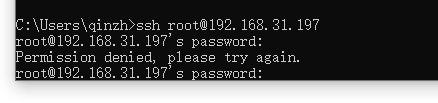
image.png

这是什么意思? 密码到底是什么?为什么第一步都进行不下去那么多人没遇到吗?

本帖子中包含更多资源

您需要 登录 才可以下载或查看,没有账号?立即注册

x
就是你飞牛管理员的用户名和密码,你确定管理员用户名是root吗?  详情 回复
2026-2-16 16:03

1

主题

11

回帖

0

牛值

江湖小虾

飞牛百度网盘玩家

2026-2-16 16:03:39 显示全部楼层
qinzhihuan 发表于 2026-2-16 14:54
这是什么意思? 密码到底是什么?为什么第一步都进行不下去那么多人没遇到吗?
...

就是你飞牛管理员的用户名和密码,你确定管理员用户名是root吗?

1

主题

21

回帖

0

牛值

江湖小虾

2026-2-18 10:34:29 显示全部楼层

重新安装1.1.20,直接外网都Ping不通了。但内网可以Ping电脑 ,Ping不通路由。不知道是什么问题。新版本没测试就放出来了吗?

0

主题

4

回帖

0

牛值

江湖小虾

2026-2-20 13:24:13 显示全部楼层

没有下载地址!!!!飞书内查看???也是飞牛经常获取不到 ip 地址,无论飞牛内设置固定地址还是路由器 DHCP 分配。开始还以为是我路由器固件问题,自己分别编译了 LEDE 237大佬 固件都出现这个问题才意识到是飞牛的问题,都想到要换网线了,结果看论坛是飞牛的问题,结果看贴都没下载地址,也是无语了!!!

草台班子 这是严重的bug啊  详情 回复
2026-2-22 16:20

0

主题

2

回帖

0

牛值

江湖小虾

2026-2-20 20:59:03 显示全部楼层
你好,请问下包在哪里下载

1

主题

5

回帖

0

牛值

江湖小虾

2026-2-22 16:15:33 显示全部楼层

不是 修复包呢?刚升级了太坑了吧

1

主题

5

回帖

0

牛值

江湖小虾

2026-2-22 16:20:59 显示全部楼层
we_7973974025 发表于 2026-2-20 13:24
没有下载地址!!!!飞书内查看???也是飞牛经常获取不到 ip 地址,无论飞牛内设置固定地址还是路由器 D ...

草台班子 这是严重的bug啊
非常严重的Bug了,不能一直靠重启玩NAS吧  详情 回复
2026-3-8 19:52

2

主题

5

回帖

0

牛值

江湖小虾

2026-2-23 02:44:34 显示全部楼层

下载链接的干活发来

1

主题

18

回帖

0

牛值

江湖小虾

2026-2-23 05:41:55 显示全部楼层

已经可以下载了

4

主题

61

回帖

0

牛值

初出茅庐

2026-2-23 13:34:15 显示全部楼层
也不知道更新推送了吗,我这已经好几天没连上飞牛了,只能等回了家,敲命令重启了
ipv4掉了没事啊,就局域网内连不上,用fnid也连不上吗?  详情 回复
2026-2-23 20:59

2

主题

9

回帖

0

牛值

江湖小虾

2026-2-23 20:59:16 显示全部楼层
dsqewl 发表于 2026-2-23 13:34
也不知道更新推送了吗,我这已经好几天没连上飞牛了,只能等回了家,敲命令重启了
...

ipv4掉了没事啊,就局域网内连不上,用fnid也连不上吗?
连不上呗,物理强制重启的  详情 回复
2026-2-25 18:08
也连接不上啊兄弟,这个怎么弄  详情 回复
2026-2-24 14:26

0

主题

6

回帖

0

牛值

江湖小虾

2026-2-23 21:42:19 显示全部楼层

6 更新20以前只是掉有线 更了以后更棒了 无线网卡也掉了

1

主题

11

回帖

0

牛值

江湖小虾

飞牛百度网盘玩家

2026-2-24 08:50:54 显示全部楼层

修复后故障未排除,网卡型号RTL8125BG。

0

主题

4

回帖

0

牛值

江湖小虾

2026-2-24 14:09:32 显示全部楼层

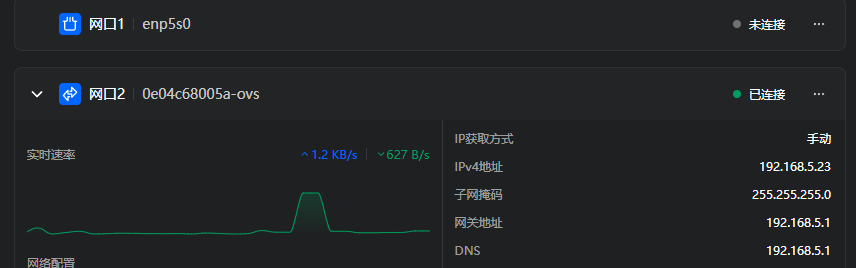
我是双网口,一个连不上,换插另一个网口就可以连上了,换回来就又不行,打完上面的补丁也不行。目前状态是,打完上面补丁,然后在飞牛把 IP设置成手动设置,最最重要是关闭网络设置虚拟机那个 ovs 。开关机飞牛和路由几次都可以正常连上了。

我现在pci网口识别不到,只能用拓展坞**着  详情 回复
2026-2-24 14:28

5

主题

16

回帖

0

牛值

江湖小虾

2026-2-24 14:26:46 显示全部楼层
Xiaowang.🍃 发表于 2026-2-23 20:59
ipv4掉了没事啊,就局域网内连不上,用fnid也连不上吗?

也连接不上啊兄弟,这个怎么弄

0

主题

4

回帖

0

牛值

江湖小虾

2026-2-24 14:28:42 显示全部楼层
we_7973974025 发表于 2026-2-24 14:09
我是双网口,一个连不上,换插另一个网口就可以连上了,换回来就又不行,打完上面的补丁也不行。目前状态是 ...

我现在pci网口识别不到,只能用拓展坞**着
你拓展坞连上就自动识别能用吗,我现在nas直接失联,但是虚拟机没问题,nas还没显卡,没招了  详情 回复
2026-2-24 14:33

5

主题

16

回帖

0

牛值

江湖小虾

2026-2-24 14:31:14 显示全部楼层

我现在系统无法访问,路由器查不到IP这个怎么办,有兄弟有招吗

设置了手动IP就是会这样,重启也是没有IP,自动获取的重启可以有IP,试下重置主板或者再加一张网卡。  详情 回复
2026-2-24 14:47

5

主题

16

回帖

0

牛值

江湖小虾

2026-2-24 14:33:16 显示全部楼层
y7255 发表于 2026-2-24 14:28
我现在pci网口识别不到,只能用拓展坞**着

你拓展坞连上就自动识别能用吗,我现在nas直接失联,但是虚拟机没问题,nas还没显卡,没招了
用拓展坞可以,  详情 回复
2026-2-24 15:06

1

主题

11

回帖

0

牛值

江湖小虾

飞牛百度网盘玩家

2026-2-24 14:47:31 显示全部楼层
靓仔_pvjNb 发表于 2026-2-24 14:31
我现在系统无法访问,路由器查不到IP这个怎么办,有兄弟有招吗

设置了手动IP就是会这样,重启也是没有IP,自动获取的重启可以有IP,试下重置主板或者再加一张网卡。
感谢感谢,正好家里还有一张网卡,我装上去试试,非常感谢  详情 回复
2026-2-24 14:49

5

主题

16

回帖

0

牛值

江湖小虾

2026-2-24 14:49:29 显示全部楼层
wangcong 发表于 2026-2-24 14:47
设置了手动IP就是会这样,重启也是没有IP,自动获取的重启可以有IP,试下重置主板或者再加一张网卡。 ...

感谢感谢,正好家里还有一张网卡,我装上去试试,非常感谢

0

主题

4

回帖

0

牛值

江湖小虾

2026-2-24 15:06:22 显示全部楼层
靓仔_pvjNb 发表于 2026-2-24 14:33
你拓展坞连上就自动识别能用吗,我现在nas直接失联,但是虚拟机没问题,nas还没显卡,没招了 ...

用拓展坞可以,
我现在网卡设置好后,能进去nas,但是按照指示修复完成后,网线插原网口,路由器能看到但是ip后台还是进不去,但是好像关闭ovs就正常  详情 回复
2026-2-25 13:04

0

主题

4

回帖

0

牛值

江湖小虾

2026-2-24 15:25:14 显示全部楼层

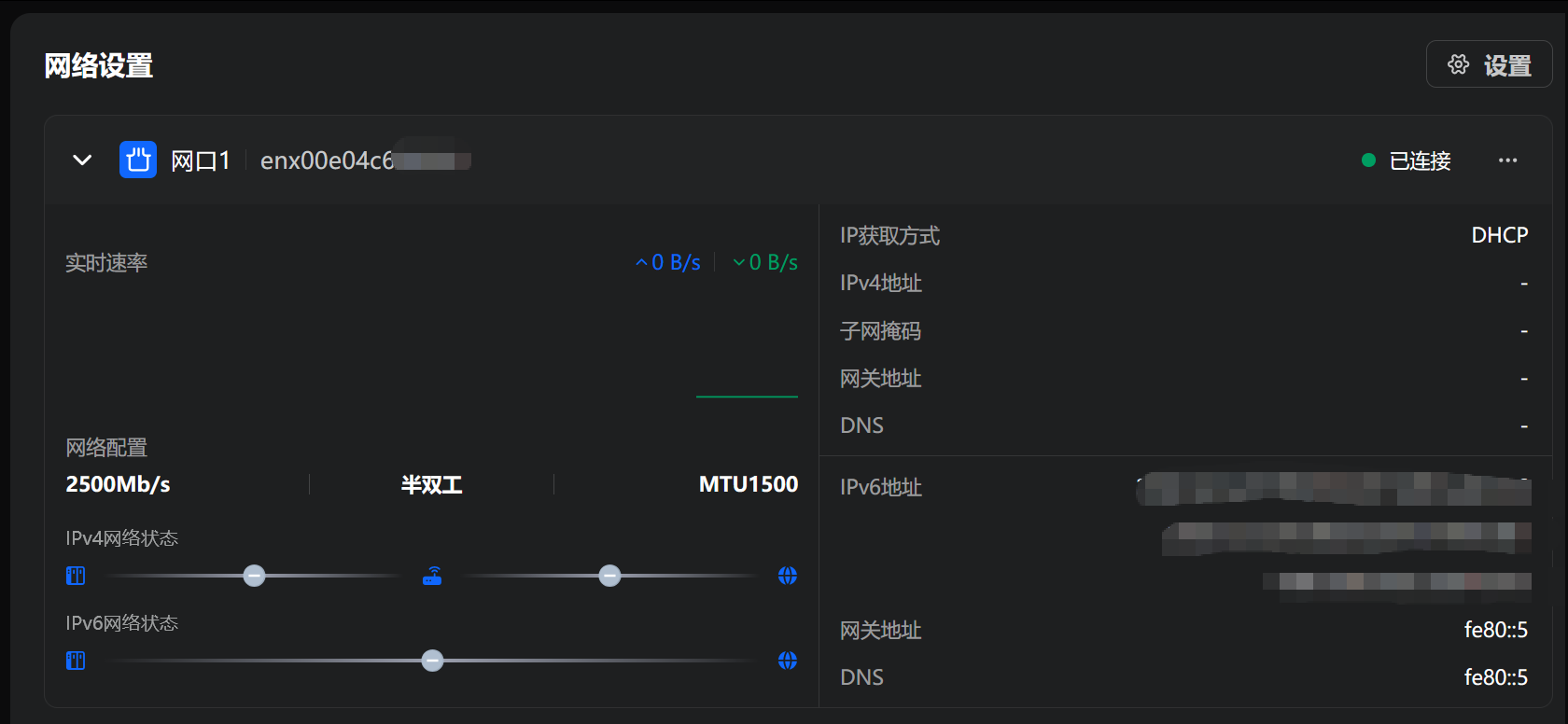
还是没用,当时升级完以后,pci网口就不起作用了(灯都不亮,重装过一次,好了一会,重启后就没用了)
,现在只有拓展坞发挥作用,请问怎么解决,

屏幕截图2026-02-24152500.png

本帖子中包含更多资源

您需要 登录 才可以下载或查看,没有账号?立即注册

x
问问deepseek好使  详情 回复
2026-2-24 22:47

0

主题

2

回帖

0

牛值

江湖小虾

2026-2-24 21:55:24 显示全部楼层

修复后也出现失联了,获取不到ip地址,接显示器命令行关闭ovs后重启才好(虚拟机不能用了,好像一直有这个问题没解决?),网卡intel I266-V

0

主题

2

回帖

0

牛值

江湖小虾

2026-2-24 22:47:02 显示全部楼层
y7255 发表于 2026-2-24 15:25
还是没用,当时升级完以后,pci网口就不起作用了(灯都不亮,重装过一次,好了一会,重启后就没用了)
,现 ...

问问deepseek好使
我chatgpt都问,还是没有用  详情 回复
2026-2-25 00:42

0

主题

4

回帖

0

牛值

江湖小虾

2026-2-25 00:42:08 显示全部楼层

我chatgpt都问,还是没有用

4

主题

6

回帖

0

牛值

江湖小虾

2026-2-25 10:32:50 显示全部楼层

兄弟们,目前有方案了吗,现在1.2.0安装不上,安装之前的版本又出现断联问题,路由器倒是识别到机器连接了,但是局域网后台地址又上不去呀!求救!!!!

关了虚拟机网络试试  详情 回复
2026-2-26 16:35

5

主题

16

回帖

0

牛值

江湖小虾

2026-2-25 13:04:14 显示全部楼层
y7255 发表于 2026-2-24 15:06
用拓展坞可以,

我现在网卡设置好后,能进去nas,但是按照指示修复完成后,网线插原网口,路由器能看到但是ip后台还是进不去,但是好像关闭ovs就正常

4

主题

61

回帖

0

牛值

初出茅庐

2026-2-25 18:08:01 显示全部楼层
Xiaowang.🍃 发表于 2026-2-23 20:59
ipv4掉了没事啊,就局域网内连不上,用fnid也连不上吗?

连不上呗,物理强制重启的

1

主题

3

回帖

0

牛值

江湖小虾

2026-2-26 10:45:05 显示全部楼层

目前是1.1.20版本了,机器经常断网,要么是重启nas,要么是重启路由器

能好半天,之后又连不上。。。。。大家是同样情况吗?

5

主题

16

回帖

0

牛值

江湖小虾

2026-2-26 16:35:20 显示全部楼层
LPSY。 发表于 2026-2-25 10:32
兄弟们,目前有方案了吗,现在1.2.0安装不上,安装之前的版本又出现断联问题,路由器倒是识别到机器连接了 ...

关了虚拟机网络试试

15

主题

66

回帖

0

牛值

初出茅庐

2026-2-26 20:47:18 显示全部楼层

升级1.1.23 后,ipv4地址消失,v6时有时无。。。。

不要啊,我现在就靠ipv6连接了,ipv6也时有时无,那搞毛啊  详情 回复
2026-2-27 15:11

1

主题

1

回帖

0

牛值

江湖小虾

2026-2-27 10:21:18 显示全部楼层

最近隔一两天就断网,屏幕上也不显示ip地址,必须重启才能重新联网,是这个bug导致的吗?

0

主题

2

回帖

0

牛值

江湖小虾

2026-2-27 11:12:16 显示全部楼层

升级到1.1.23后,升级完以后当时是可以连上的,然后手**重启了一下路由器,就彻底歇菜了

J4125 + I226-V,现在完全连不上了,虚拟机的网络是正常的

升级到1.1.23后,/usr/trim/bin/network_service的日期是2月12日的15时左右,而network_service_hotfix-20260112.tar.bz2中的network_service的日期是2月12日的18时左右,搞不懂,这OTA管理也太混乱了  详情 回复
2026-2-27 11:19

0

主题

2

回帖

0

牛值

江湖小虾

2026-2-27 11:19:23 显示全部楼层
Elitah 发表于 2026-2-27 11:12
升级到1.1.23后,升级完以后当时是可以连上的,然后手**重启了一下路由器,就彻底歇菜了
J4125 + I226-V, ...

升级到1.1.23后,/usr/trim/bin/network_service的日期是2月12日的15时左右,而network_service_hotfix-20260112.tar.bz2中的network_service的日期是2月12日的18时左右,搞不懂,这OTA管理也太混乱了

1

主题

5

回帖

0

牛值

江湖小虾

2026-2-27 11:24:36 显示全部楼层

1.1.20 ipv4获取到30分钟后没了,,,,升级到1.1.23后,ipv4获取到1天后没了,,,,只能插个无线网卡在用,,修复不完全等于完全没修复,,,
图片.png

本帖子中包含更多资源

您需要 登录 才可以下载或查看,没有账号?立即注册

x

0

主题

3

回帖

0

牛值

江湖小虾

2026-2-27 15:11:41 显示全部楼层
qianlongzt 发表于 2026-2-26 20:47
升级1.1.23 后,ipv4地址消失,v6时有时无。。。。

不要啊,我现在就靠ipv6连接了,ipv6也时有时无,那搞毛啊
可以终端登录上去。设置ip地址,然后web上去设置静态ip  详情 回复
2026-3-3 21:18
我也是,完全无法登录.  详情 回复
2026-3-2 10:39
跟我一样啊  详情 回复
2026-2-27 16:32

1

主题

3

回帖

0

牛值

江湖小虾

2026-2-27 16:32:32 显示全部楼层
wh9705 发表于 2026-2-27 15:11
不要啊,我现在就靠ipv6连接了,ipv6也时有时无,那搞毛啊

跟我一样啊

1

主题

3

回帖

0

牛值

江湖小虾

2026-2-28 15:40:24 显示全部楼层

升级了1.1.23还是有问题,公网连接不能用,如何处理

无法获取到ip,局域网都访问不了。  详情 回复
2026-3-6 21:26

0

主题

1

回帖

0

牛值

江湖小虾

2026-2-28 16:14:12 显示全部楼层

昨天升级到最新版本,也出现在这断联问题,虚拟机网络正常。。。 怎么修复啊,升级前都好使,手残点了升级!!!!!!!

我也是,虚拟机正常,就是网络无法修复。  详情 回复
2026-3-2 10:39
12下一页
您需要登录后才可以回帖 登录 | 立即注册

本版积分规则